Description
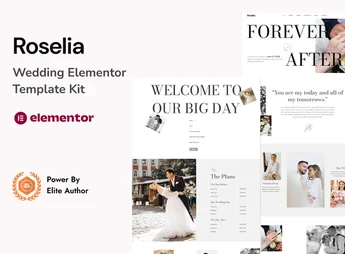
Roselia is an elegant and sophisticated Wedding Elementor Template Kit, designed for couples, event planners and photographers who want to create a memorable wedding site with ease. With a romantic and modern design, this kit offers all the necessary tools to share your love story, event details, photo gallery and RSVP form in a professional and charming way.
Main Features
- Elegant and Romantic Design: Visual style created specifically to capture the essence of wedding celebrations.
- More than 15 Ready-Made Templates: Includes essential pages such as Home, About Us, Our Story, Gallery, Groomsmen, RSVP and Blog.
- 100% Responsive and Mobile-Friendly: Perfect view on any device, whether desktop, tablet or smartphone.
- Drag-and-Drop Customization: Easily edit colors, fonts, and layouts with Elementor, without needing code.
- Integrated RSVP Form: A functional and styled RSVP form to simplify guest organization.
- Optimized for Fast Loading: Ensures a smooth and pleasant browsing experience for all your guests.
Benefits of Roselia
- Save Time and Money: Create a professional-looking wedding site in just a few hours, without needing to hire a web developer.
- Centralized Communication: Keep all your guests informed in one place with details about the ceremony, reception, gift registry, and accommodations.
- Easy to Use, Even for Beginners: Built on Elementor, it allows anyone, even without technical experience, to customize their site intuitively.
- Create a Lasting Digital Memory: The site becomes a beautiful digital record of your journey, one that friends and family can revisit long after the big day.
Who Is It Recommended For?
- Couples who want to create a personalized wedding site.
- Wedding planners who offer site creation as an additional service.
- Photographers and videomakers specializing in weddings who want to create a site for their clients or portfolio.
With Roselia, you transform your wedding organization into an unforgettable digital experience, sharing your happiness with elegance and practicality.
Frequently asked questions
Is Roselia – Wedding Elementor Template Kit GPL?
Yes. Roselia – Wedding Elementor Template Kit is distributed under the GPL (GNU General Public License). You may legally use, modify and redistribute it on as many sites as you want.
Can I use Roselia – Wedding Elementor Template Kit on more than one site?
Yes. You can use Roselia – Wedding Elementor Template Kit on as many sites as you want.
How much does Roselia – Wedding Elementor Template Kit cost at Ultrapack?
Roselia – Wedding Elementor Template Kit costs US$2.99 as a single purchase, and it is also included in the subscription plans starting at US$17/mo (Desenvolvedor I).
Does Roselia – Wedding Elementor Template Kit include updates?
When a new version of Roselia – Wedding Elementor Template Kit becomes available in the catalog, you can download the file during the access period of your purchase or subscription. To update, follow the installation or import procedure described in the documentation for the item and its platform.
Is Roselia – Wedding Elementor Template Kit checked before it is made available for download?
Files for Roselia – Wedding Elementor Template Kit are scanned before publication by UltraHub using ClamAV and YARA rules to detect known threats. This check does not guarantee the absence of risks. Check the item requirements, make a backup, and follow the installation or import instructions for its platform.
How to install
Updates: manual. When a new version comes out, download it on this same page and import it again with Template Kit Import. Template Kits are not updated from the WordPress Themes or Plugins screen.
A template kit is neither a theme nor a plugin. It is imported, and it needs Elementor installed on the site.
- Install and activate the Template Kit Import plugin, which is also here in the catalog.
- Download the file
elements-roselia-wedding-elementor-template-kit.zip. - In the WordPress dashboard, go to Template Kits > Import Kit and upload the file
elements-roselia-wedding-elementor-template-kit.zip. - Pick the templates you want to import and confirm.
- The imported templates end up under Templates > Saved Templates, ready to open in Elementor.
- Some kits use Elementor Pro features. Without it the templates still import, but some blocks have no effect.
Stuck on a step? Open a ticket telling us which one you stopped at.