

Description
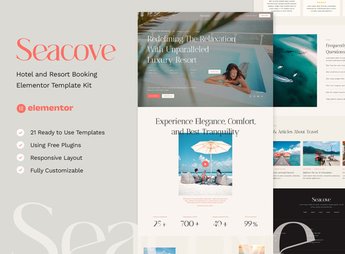
Seacove builds a hotel, inn, or resort website with Elementor, with a booking page, a rooms and suites section with a large photo, and a block dedicated to spa and leisure services. The kit imports the rooms, rates, and booking form pages directly into Elementor, which helps whoever manages an inn, hotel, or resort put the website live without building each section from scratch or hiring a separate designer.
Seacove Main Features
- Ready-made booking form
Brings a block for searching by date and room availability. - Rooms and suites showcase
Displays each accommodation category with a large photo and a list of amenities. - Spa services block
Presents massage, sauna, and other wellness services from the hotel. - Rates section
Shows the price range by room type and length of stay. - Compatible with Envato Elements
Imports through the Envato Elements plugin directly inside the Elementor editor.
Seacove Benefits
- Fast, ready-made hotel website
Reduces setup time because the main pages already come ready. - Direct booking on the website
Makes it easier for the customer to check availability without having to call or use another channel. - Complete presentation of the property
Shows room, service, and rate on the same website, without relying on a PDF. - No-code editing
Lets you change text, photo, and color directly in the Elementor visual editor.
Who Is Seacove Recommended For?
- Anyone who manages a hotel, inn, or resort.
- Anyone who offers spa packages and day use within the property.
- Anyone who already takes bookings by phone and wants their own form on the website.
- Anyone who manages a travel agency with partner accommodations.
How to Download Seacove
Seacove is available for download here on Ultrapack. After downloading the file, import it through Elementor under Elementor > Tools > Import Kit, selecting the .zip package and adjusting photos and rates before publishing the website with the property’s information.
Hospitality depends on showing rooms and booking without friction, and building each page from scratch delays the website launch. With the sections already structured, there’s more time left to take care of photos and text, the two points that weigh the most in the decision of someone choosing where to stay.
Frequently asked questions
Is Seacove – Hotel and Resort Booking Elementor Template Kit GPL?
Yes. Seacove – Hotel and Resort Booking Elementor Template Kit is distributed under the GPL (GNU General Public License). You may legally use, modify and redistribute it on as many sites as you want.
Can I use Seacove – Hotel and Resort Booking Elementor Template Kit on more than one site?
Yes. You can use Seacove – Hotel and Resort Booking Elementor Template Kit on as many sites as you want.
How much does Seacove – Hotel and Resort Booking Elementor Template Kit cost at Ultrapack?
Seacove – Hotel and Resort Booking Elementor Template Kit costs US$2.99 as a single purchase, and it is also included in the subscription plans starting at US$17/mo (Desenvolvedor I).
Does Seacove – Hotel and Resort Booking Elementor Template Kit include updates?
When a new version of Seacove – Hotel and Resort Booking Elementor Template Kit becomes available in the catalog, you can download the file during the access period of your purchase or subscription. To update, follow the installation or import procedure described in the documentation for the item and its platform.
Is Seacove – Hotel and Resort Booking Elementor Template Kit checked before it is made available for download?
Files for Seacove – Hotel and Resort Booking Elementor Template Kit are scanned before publication by UltraHub using ClamAV and YARA rules to detect known threats. This check does not guarantee the absence of risks. Check the item requirements, make a backup, and follow the installation or import instructions for its platform.
How to install
Updates: manual. When a new version comes out, download it on this same page and import it again with Template Kit Import. Template Kits are not updated from the WordPress Themes or Plugins screen.
A template kit is neither a theme nor a plugin. It is imported, and it needs Elementor installed on the site.
- Install and activate the Template Kit Import plugin, which is also here in the catalog.
- Download the file
elements-seacove-hotel-and-resort-booking-elementor-templ.zip. - In the WordPress dashboard, go to Template Kits > Import Kit and upload the file
elements-seacove-hotel-and-resort-booking-elementor-templ.zip. - Pick the templates you want to import and confirm.
- The imported templates end up under Templates > Saved Templates, ready to open in Elementor.
- Some kits use Elementor Pro features. Without it the templates still import, but some blocks have no effect.
Stuck on a step? Open a ticket telling us which one you stopped at.


