Description
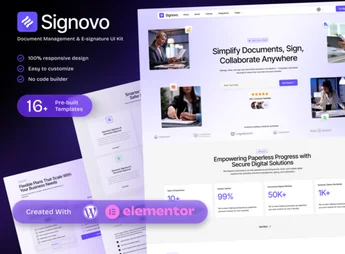
Signovo is a template kit created to simplify the implementation of document management and digital signature platforms. With an intuitive and modern design, it is perfect for companies that seek to optimize their document management and authentication processes.
Key Features
- Intuitive Design:
User-friendly interface that facilitates navigation and use of the site. - SEO Optimized:
Maximizes the site’s visibility in search engines. - Responsive:
Adapts to any screen size, ensuring an optimized experience for all users. - Elementor Compatibility:
Allows site customization with ease through the Elementor plugin. - Wide Variety of Templates:
Provides a range of ready-to-use layouts. - Digital Signature Support:
Seamless integration with digital signature systems.
Benefits of the Signovo – Document Management & E-signature SaaS Platform Elementor Template Kit
- Agility: Simplifies the process of creating a document management platform.
- Cost Savings: Avoids hiring developers to build a site from scratch.
- Time Optimization: With ready-made templates, the site implementation time is reduced.
- Ease of Use: Using the Elementor plugin allows anyone to customize the site.
Who It’s Recommended For?
- Companies offering digital signature services.
- Businesses looking for a document management solution.
- Professionals who need a SaaS digital signature platform.
If your company seeks to optimize documentation and authentication processes, Signovo is the right choice. With its intuitive and modern design, and a variety of templates, it allows efficient site creation in a quick and simplified manner.
Frequently asked questions
Is Signovo – Document Management & E-signature SaaS Platform Elementor Template Kit GPL?
Yes. Signovo – Document Management & E-signature SaaS Platform Elementor Template Kit is distributed under the GPL (GNU General Public License). You may legally use, modify and redistribute it on as many sites as you want.
Can I use Signovo – Document Management & E-signature SaaS Platform Elementor Template Kit on more than one site?
Yes. You can use Signovo – Document Management & E-signature SaaS Platform Elementor Template Kit on as many sites as you want.
How much does Signovo – Document Management & E-signature SaaS Platform Elementor Template Kit cost at Ultrapack?
Signovo – Document Management & E-signature SaaS Platform Elementor Template Kit costs US$2.99 as a single purchase, and it is also included in the subscription plans starting at US$17/mo (Desenvolvedor I).
Does Signovo – Document Management & E-signature SaaS Platform Elementor Template Kit include updates?
When a new version of Signovo – Document Management & E-signature SaaS Platform Elementor Template Kit becomes available in the catalog, you can download the file during the access period of your purchase or subscription. To update, follow the installation or import procedure described in the documentation for the item and its platform.
Is Signovo – Document Management & E-signature SaaS Platform Elementor Template Kit checked before it is made available for download?
Files for Signovo – Document Management & E-signature SaaS Platform Elementor Template Kit are scanned before publication by UltraHub using ClamAV and YARA rules to detect known threats. This check does not guarantee the absence of risks. Check the item requirements, make a backup, and follow the installation or import instructions for its platform.
How to install
Updates: manual. When a new version comes out, download it on this same page and import it again with Template Kit Import. Template Kits are not updated from the WordPress Themes or Plugins screen.
A template kit is neither a theme nor a plugin. It is imported, and it needs Elementor installed on the site.
- Install and activate the Template Kit Import plugin, which is also here in the catalog.
- Download the file
elements-signovo-document-management-e-signature-saas-p.zip. - In the WordPress dashboard, go to Template Kits > Import Kit and upload the file
elements-signovo-document-management-e-signature-saas-p.zip. - Pick the templates you want to import and confirm.
- The imported templates end up under Templates > Saved Templates, ready to open in Elementor.
- Some kits use Elementor Pro features. Without it the templates still import, but some blocks have no effect.
Stuck on a step? Open a ticket telling us which one you stopped at.