Description
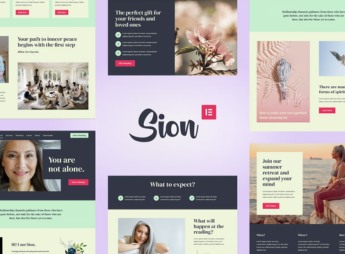
Sion builds, within Elementor, a website for a therapist or medium, with a services page, appointment scheduling and a testimonials section already designed. It serves those who provide tarot readings, holistic therapy or spiritual guidance and need an online presence that conveys trust, with room to explain each type of session, show testimonials from clients already served and receive scheduling directly through the site, without having to exchange messages across several different channels.
Sion’s Main Features
- Services page
Describes each type of consultation or session with text and icon. - Testimonials section
Displays reviews from clients already served in carousel format. - Scheduling block
Brings a dedicated area to book a consultation or online session. - Elementor Pro widgets
Builds each section with native elements from the builder itself. - Mystical color palette
Uses colors and icons that evoke the spiritual universe.
Benefits of Sion
- Online presence with credibility
Replaces a loose social media profile with your own website. - More direct bookings
Reduces back-and-forth messaging to schedule a consultation time. - Trust through testimonials
Shows other clients’ experience right from the first screens. - Editing without a developer
Lets you swap text, photo and color directly in the visual editor.
Who Is Sion For?
- Tarot readers, mediums or therapists who work by individual consultation.
- Spiritual guides looking for a more serious online presence.
- Holistic therapists who today only promote themselves through Instagram.
- Consultants building websites for professionals in the esoteric field.
How to Download Sion
Sion is available for download here on Ultrapack. After importing the kit under Elementor > Tools > Import Kit, the services, testimonials and scheduling pages come in ready, so you just need to replace the text, photos and hours with your own consultation’s.
A website like this takes the weight off explaining every service only during the initial conversation, because the person already arrives at the consultation knowing what to expect. It also helps separate the consultation work from the personal profile, something that matters a lot for those who see recurring clients.
Frequently asked questions
Is Sion – Psychic Medium Elementor Template Kit GPL?
Yes. Sion – Psychic Medium Elementor Template Kit is distributed under the GPL (GNU General Public License). You may legally use, modify and redistribute it on as many sites as you want.
Can I use Sion – Psychic Medium Elementor Template Kit on more than one site?
Yes. You can use Sion – Psychic Medium Elementor Template Kit on as many sites as you want.
How much does Sion – Psychic Medium Elementor Template Kit cost at Ultrapack?
Sion – Psychic Medium Elementor Template Kit costs US$2.99 as a single purchase, and it is also included in the subscription plans starting at US$17/mo (Desenvolvedor I).
Does Sion – Psychic Medium Elementor Template Kit include updates?
When a new version of Sion – Psychic Medium Elementor Template Kit becomes available in the catalog, you can download the file during the access period of your purchase or subscription. To update, follow the installation or import procedure described in the documentation for the item and its platform.
Is Sion – Psychic Medium Elementor Template Kit checked before it is made available for download?
Files for Sion – Psychic Medium Elementor Template Kit are scanned before publication by UltraHub using ClamAV and YARA rules to detect known threats. This check does not guarantee the absence of risks. Check the item requirements, make a backup, and follow the installation or import instructions for its platform.
How to install
Updates: manual. When a new version comes out, download it on this same page and import it again with Template Kit Import. Template Kits are not updated from the WordPress Themes or Plugins screen.
A template kit is neither a theme nor a plugin. It is imported, and it needs Elementor installed on the site.
- Install and activate the Template Kit Import plugin, which is also here in the catalog.
- Download the file
elements-sion-psychic-medium-elementor-template-kit.zip. - In the WordPress dashboard, go to Template Kits > Import Kit and upload the file
elements-sion-psychic-medium-elementor-template-kit.zip. - Pick the templates you want to import and confirm.
- The imported templates end up under Templates > Saved Templates, ready to open in Elementor.
- Some kits use Elementor Pro features. Without it the templates still import, but some blocks have no effect.
Stuck on a step? Open a ticket telling us which one you stopped at.