Description
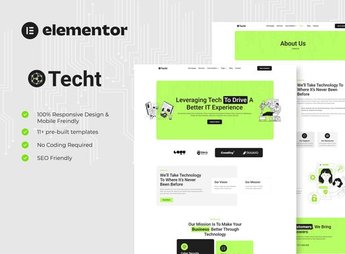
Techt builds a technology company’s or IT services company’s institutional website inside Elementor, with sections for a service catalog, cases of clients served, technical support plans with different service tiers, and a commercial contact form. It serves whoever provides technical support, systems development, or technology consulting and needs to explain each service clearly, without depending on a commercial proposal sent by email.
Main Features of Techt
- Service catalog
Lists each IT service with description, scope, and target audience. - Client cases
Shows delivered projects with the problem solved and the result obtained. - Support plans
Compares service tiers with response time and contact channel. - Commercial form
Receives quote requests with a field to describe the technical need. - Team page
Presents specialists by technical area, with role and relevant certifications.
Benefits of Techt
- Clear technical explanation
Details the scope and deliverables of each service before the first meeting. - Proof of results
Shows real cases with problem, solution applied, and result achieved. - Guided plan selection
Compares support tiers side by side before hiring. - Direct commercial contact
Places the quote form near the service catalog.
Who Is Techt For?
- Whoever provides technical support or systems development for other companies.
- Technology consultants who sell services by contract or closed project.
- Outsourced IT teams that offer tiered support plans.
- Whoever serves clients who compare technology vendors before hiring.
How to Download Techt
Techt is available for download here on Ultrapack. After downloading the file, use Elementor > Tools > Import Kit to load the pages, colors, and fonts at once. The package already comes organized by section, ready to receive the services and support plans.
Whoever already works with Elementor Pro gets a ready-made base to swap services, cases, and plans without redesigning the site with every new contract closed. The catalog is ready to explain each service even before the first commercial meeting.
Frequently asked questions
Is Techt – IT Solutions & Services Company Elementor Template Kit GPL?
Yes. Techt – IT Solutions & Services Company Elementor Template Kit is distributed under the GPL (GNU General Public License). You may legally use, modify and redistribute it on as many sites as you want.
Can I use Techt – IT Solutions & Services Company Elementor Template Kit on more than one site?
Yes. You can use Techt – IT Solutions & Services Company Elementor Template Kit on as many sites as you want.
How much does Techt – IT Solutions & Services Company Elementor Template Kit cost at Ultrapack?
Techt – IT Solutions & Services Company Elementor Template Kit costs US$2.99 as a single purchase, and it is also included in the subscription plans starting at US$17/mo (Desenvolvedor I).
Does Techt – IT Solutions & Services Company Elementor Template Kit include updates?
When a new version of Techt – IT Solutions & Services Company Elementor Template Kit becomes available in the catalog, you can download the file during the access period of your purchase or subscription. To update, follow the installation or import procedure described in the documentation for the item and its platform.
Is Techt – IT Solutions & Services Company Elementor Template Kit checked before it is made available for download?
Files for Techt – IT Solutions & Services Company Elementor Template Kit are scanned before publication by UltraHub using ClamAV and YARA rules to detect known threats. This check does not guarantee the absence of risks. Check the item requirements, make a backup, and follow the installation or import instructions for its platform.
How to install
Updates: manual. When a new version comes out, download it on this same page and import it again with Template Kit Import. Template Kits are not updated from the WordPress Themes or Plugins screen.
A template kit is neither a theme nor a plugin. It is imported, and it needs Elementor installed on the site.
- Install and activate the Template Kit Import plugin, which is also here in the catalog.
- Download the file
elements-techt-it-solutions-services-company-elementor.zip. - In the WordPress dashboard, go to Template Kits > Import Kit and upload the file
elements-techt-it-solutions-services-company-elementor.zip. - Pick the templates you want to import and confirm.
- The imported templates end up under Templates > Saved Templates, ready to open in Elementor.
- Some kits use Elementor Pro features. Without it the templates still import, but some blocks have no effect.
Stuck on a step? Open a ticket telling us which one you stopped at.