

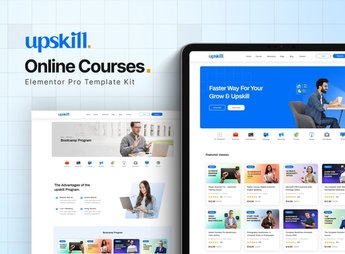
Description
Upskill uses ready-made Elementor blocks to assemble the pages of an online school or course platform: curriculum grid, instructor profiles, student testimonials and an enrollment page already structured for publishing. It’s for anyone who sells recorded courses, live mentorships, runs a distance-learning academy or coordinates a training center and needs to present the course content in a way that convinces the student to enroll.
Key Features of Upskill
- Curriculum grid by module
Organizes the lessons into modules with icons and a description of each stage. - Instructor profiles
Shows each instructor’s photo, specialty and biography in separate cards. - Student testimonials section
Displays reviews and results from students who have already completed the course. - Plans and pricing page
Compares enrollment packages side by side, highlighting the best-selling one. - Frequently asked questions block
Gathers common questions about course hours, certificate and payment method.
Benefits of Upskill
- Faster enrollment
Shortens the distance between the course presentation and the enrollment button. - Credibility for the institution
Reinforces the school’s authority with detailed instructor profiles. - Fewer support questions
Anticipates common student questions with the FAQ section already built in. - A ready-made site without coding
Eliminates the need to hire a designer to build the course page.
Who Is Upskill For?
- Anyone who sells recorded video courses or one-on-one mentorships.
- Anyone who manages a distance-learning academy.
- Anyone who coordinates a professional training center.
- Anyone who delivers corporate training and needs a dedicated page.
How to Download Upskill
Upskill is available for download here on Ultrapack. After downloading the file, go to Elementor > Tools > Import Kit and select the package to load the course pages onto your site.
Anyone selling online courses tends to lose students at the decision stage, when the page doesn’t make clear what’s included in the enrollment. With the curriculum grid, testimonials and plan comparison already organized, it becomes simpler to guide the visitor to the enrollment button without depending on a separately hired design.
Frequently asked questions
Is Upskill – Online Course Elementor Pro Template Kit GPL?
Yes. Upskill – Online Course Elementor Pro Template Kit is distributed under the GPL (GNU General Public License). You may legally use, modify and redistribute it on as many sites as you want.
Can I use Upskill – Online Course Elementor Pro Template Kit on more than one site?
Yes. You can use Upskill – Online Course Elementor Pro Template Kit on as many sites as you want.
How much does Upskill – Online Course Elementor Pro Template Kit cost at Ultrapack?
Upskill – Online Course Elementor Pro Template Kit costs US$2.99 as a single purchase, and it is also included in the subscription plans starting at US$17/mo (Desenvolvedor I).
Does Upskill – Online Course Elementor Pro Template Kit include updates?
When a new version of Upskill – Online Course Elementor Pro Template Kit becomes available in the catalog, you can download the file during the access period of your purchase or subscription. To update, follow the installation or import procedure described in the documentation for the item and its platform.
Is Upskill – Online Course Elementor Pro Template Kit checked before it is made available for download?
Files for Upskill – Online Course Elementor Pro Template Kit are scanned before publication by UltraHub using ClamAV and YARA rules to detect known threats. This check does not guarantee the absence of risks. Check the item requirements, make a backup, and follow the installation or import instructions for its platform.
How to install
Updates: manual. When a new version comes out, download it on this same page and import it again with Template Kit Import. Template Kits are not updated from the WordPress Themes or Plugins screen.
A template kit is neither a theme nor a plugin. It is imported, and it needs Elementor installed on the site.
- Install and activate the Template Kit Import plugin, which is also here in the catalog.
- Download the file
elements-upskill-online-course-elementor-pro-template-kit.zip. - In the WordPress dashboard, go to Template Kits > Import Kit and upload the file
elements-upskill-online-course-elementor-pro-template-kit.zip. - Pick the templates you want to import and confirm.
- The imported templates end up under Templates > Saved Templates, ready to open in Elementor.
- Some kits use Elementor Pro features. Without it the templates still import, but some blocks have no effect.
Stuck on a step? Open a ticket telling us which one you stopped at.


