Description
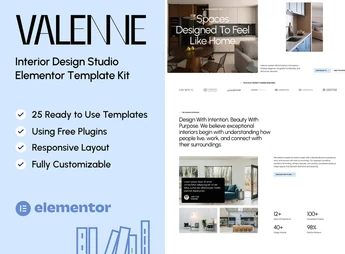
Valenne brings together 19 ready-made pages and 25 importable templates in Elementor, covering home, about, services, projects, scheduling, careers, pricing, blog, and a 404 page, plus header, footer, and contact forms, newsletter, and scheduling. The kit builds the entire website for an interior design studio using only the free Elementor, with ElementsKit Lite, MetForm, and Gum Elementor Addon as supporting plugins.
Valenne Main Features
- 19 ready-made pages to import
Home, About, Services, Projects, Scheduling, FAQ, Careers, Testimonials, Contact, Team, and Pricing. - Internal detail pages
Specific templates for service detail, project detail, career detail, and team member detail. - Header and footer in template form
Editable global blocks in Elementor, applicable to all pages of the site. - Four forms with MetForm
Newsletter, contact, scheduling, and job application forms already structured and ready to connect. - Only free Elementor
All templates work without Elementor Pro, supported by ElementsKit Lite and Gum Elementor Addon.
Valenne Benefits
- Publish the site in just a few hours
Importing the templates removes the step of designing each section from scratch. - Fewer paid plugins in the budget
Without the need for Elementor Pro, the project maintenance cost goes down. - Organized project portfolio
Listing and detail pages are already prepared to showcase environments and completed works. - Client acquisition through the website itself
Scheduling and contact forms shorten the path to the first quote.
Who Is Valenne For?
- Interior design studios and decorators that need to showcase completed projects with featured photos.
- Architecture offices and renovation and remodeling companies that receive quote requests through the website.
- Anyone creating Elementor websites for the furniture, staging, and design segment who wants to start from a ready-made layout.
How to Download Valenne
The Valenne is available for download here on Ultrapack. After downloading the .zip file, install the indicated plugins and import the templates in Elementor > Templates > Import Templates, selecting the kit files. The imported pages will appear in the Elementor library, ready for editing.
It’s worth noting that the images shown in the demo belong to the supplier’s collection: you’ll need to license them separately or replace them with photos from your own projects. With a responsive layout tested in Chrome, Firefox, Safari, and Opera, Valenne covers everything from the institutional presentation to the blog and the jobs page, serving creative studios that want a consistent website without hiring custom design.
Frequently asked questions
Is Valenne — Interior Design Studio Elementor Template Kit GPL?
Yes. Valenne — Interior Design Studio Elementor Template Kit is distributed under the GPL (GNU General Public License). You may legally use, modify and redistribute it on as many sites as you want.
Can I use Valenne — Interior Design Studio Elementor Template Kit on more than one site?
Yes. You can use Valenne — Interior Design Studio Elementor Template Kit on as many sites as you want.
How much does Valenne — Interior Design Studio Elementor Template Kit cost at Ultrapack?
Valenne — Interior Design Studio Elementor Template Kit costs US$2.99 as a single purchase, and it is also included in the subscription plans starting at US$17/mo (Desenvolvedor I).
Does Valenne — Interior Design Studio Elementor Template Kit include updates?
When a new version of Valenne — Interior Design Studio Elementor Template Kit becomes available in the catalog, you can download the file during the access period of your purchase or subscription. To update, follow the installation or import procedure described in the documentation for the item and its platform.
Is Valenne — Interior Design Studio Elementor Template Kit checked before it is made available for download?
Files for Valenne — Interior Design Studio Elementor Template Kit are scanned before publication by UltraHub using ClamAV and YARA rules to detect known threats. This check does not guarantee the absence of risks. Check the item requirements, make a backup, and follow the installation or import instructions for its platform.
How to install
Updates: manual. When a new version comes out, download it on this same page and import it again with Template Kit Import. Template Kits are not updated from the WordPress Themes or Plugins screen.
A template kit is neither a theme nor a plugin. It is imported, and it needs Elementor installed on the site.
- Install and activate the Template Kit Import plugin, which is also here in the catalog.
- Download the file
valenne-interior-design-studio-elementor-template-kit.zip. - In the WordPress dashboard, go to Template Kits > Import Kit and upload the file
valenne-interior-design-studio-elementor-template-kit.zip. - Pick the templates you want to import and confirm.
- The imported templates end up under Templates > Saved Templates, ready to open in Elementor.
- Some kits use Elementor Pro features. Without it the templates still import, but some blocks have no effect.
Stuck on a step? Open a ticket telling us which one you stopped at.