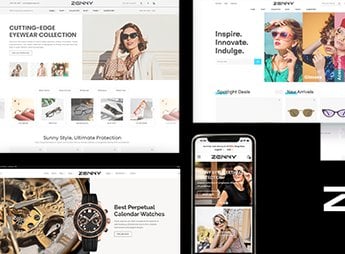
Description
Mella allows creating minimalist Magento 2 stores for the fashion segment, gathering more than 9 ready-to-use homepage demos, a page builder with sliders and responsive design optimized for SEO. The theme is aimed at clothing, accessory, cosmetics, furniture, watch, and digital product retailers, with a customizable admin panel, compatibility with Bootstrap 4.x, PHP 8.2, and GDPR compliance from version 3.1.0.
Main Features
- More than 9 homepage demos
Ready-to-import variations covering niches such as fashion, furniture, electronics and cosmetics. - Page builder with sliders
Allows building internal sections and main banners without editing templates manually. - Customizable admin panel
Controls colors, layout, typography and blocks via the Magento 2 backend. - Wide compatibility with Magento 2
Works on versions 2.4.1 to 2.4.7 and runs on servers with PHP 8.2. - Responsive layout with flexible grid
Bootstrap 4.x based structure adapts the showcase to phones, tablets and desktops up to 4+ columns.
Benefits of Mella
- Reduced time-to-market
Importing ready demos accelerates store launch in a few steps. - Minimalist fashion aesthetic
Clean visuals highlight product photos and reinforce brand identity in the fashion segment. - GDPR compliance
Privacy features reduce compliance work for stores selling in Europe. - Optimized performance and SEO
Faster pages favor ranking and improve conversion rates in online retail.
Who is it for?
- Fashion retailers (clothing, accessories, footwear and bags) looking for a clean, professional look.
- Cosmetics, furniture, watch, and electronics e-commerce with a large image catalog.
- Agencies and developers delivering on-demand Magento 2 projects for various retail niches.
Mella positions itself as a corporate theme for Magento 2 stores looking for a minimalist look without sacrificing native backend flexibility. The combination of importable demos, visual builder and compatibility with recent Magento releases delivers a solid starting point for fashion, decor and digital retail projects in general.
Frequently asked questions
Is Mella – Minimalist eCommerce Magento 2 Fashion Theme GPL?
Yes. Mella – Minimalist eCommerce Magento 2 Fashion Theme is distributed under the GPL (GNU General Public License). You may legally use, modify and redistribute it on as many sites as you want.
Can I use Mella – Minimalist eCommerce Magento 2 Fashion Theme on more than one site?
Yes. You can use Mella – Minimalist eCommerce Magento 2 Fashion Theme on as many sites as you want.
How much does Mella – Minimalist eCommerce Magento 2 Fashion Theme cost at Ultrapack?
Mella – Minimalist eCommerce Magento 2 Fashion Theme costs US$2.99 as a single purchase, and it is also included in the subscription plans starting at US$17/mo (Desenvolvedor I).
Does Mella – Minimalist eCommerce Magento 2 Fashion Theme include updates?
When a new version of Mella – Minimalist eCommerce Magento 2 Fashion Theme becomes available in the catalog, you can download the file during the access period of your purchase or subscription. To update, follow the installation or import procedure described in the documentation for the item and its platform.
Is Mella – Minimalist eCommerce Magento 2 Fashion Theme checked before it is made available for download?
Files for Mella – Minimalist eCommerce Magento 2 Fashion Theme are scanned before publication by UltraHub using ClamAV and YARA rules to detect known threats. This check does not guarantee the absence of risks. Check the item requirements, make a backup, and follow the installation or import instructions for its platform.
How to install
Updates: manual. When a new version comes out, download it on this same page and follow the replacement or import process for the platform shown. This item is not updated through WordPress.
Extras gathers what is neither a WordPress theme nor a plugin: templates, scripts, project files and supporting material.
- Download the file
elements-mella-ecommerce-magento-2-fashion-theme.zipand extract it on your computer. - Open the author documentation that came in the package. It tells you where each file goes.
- When there is a
Como Instalar.txtfile in the main folder of the package, read it first.
Stuck on a step? Open a ticket telling us which one you stopped at.