Description
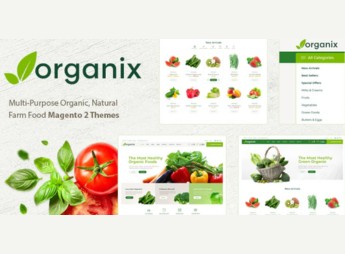
Organix allows creating Magento 2 stores focused on supermarkets, grocery stores, and markets for organic products, with a minimalist layout that highlights photography of fruits, vegetables, and natural items. Built on Magento 2, the theme structures fresh food categories, product pages with weight variations and optimized checkout, serving retailers who sell organic, vegetable, and healthy products online.
Main Features
- Magento 2 compatibility
Structure built on the current version of Magento, with support for the platform’s native features. - Minimalist design for organics
Clean aesthetic with light typography and ample white space, aimed at the natural foods niche. - Segmented catalog by categories
Digital shelf organization in sections such as fruits, vegetables, greens, and packaged organic products. - Detailed product pages
Internal screens that highlight high-resolution photography, description, variations, and food origin indicators. - Responsive layout
Automatic adaptation for smartphones and tablets, maintaining smooth navigation on smaller screens.
Organix Benefits
- Consistent visual identity with the niche
Subdued and natural visuals convey trust to consumers of healthy and organic products. - Checkout conversion focus
Sleek flow that reduces cart abandonment in recurring online grocery purchases. - Faster store launch
Ready structure saves hours of visual setup and accelerates market entry. - Well-curated mobile experience
Fast mobile shopping facilitates quick weekly market orders and local deliveries.
Who Is It For?
- Neighborhood supermarkets and markets that sell online via Magento.
- Organic, natural, and vegan product stores with a produce catalog.
- Entrepreneurs in fruit, vegetable, and weekly organic basket delivery.
- Cooperatives and rural producers who sell directly to the end consumer.
Organix is a solid choice for those operating in the healthy foods segment and needing a Magento 2 store with a fresh market look. The combination of minimalist aesthetics, clear catalog organization, and well-resolved mobile navigation helps convert visitors into repeat buyers of perishable products and everyday dietary items.
Frequently asked questions
Is Organix – Minimalist eCommerce Magento 2 Theme GPL?
Yes. Organix – Minimalist eCommerce Magento 2 Theme is distributed under the GPL (GNU General Public License). You may legally use, modify and redistribute it on as many sites as you want.
Can I use Organix – Minimalist eCommerce Magento 2 Theme on more than one site?
Yes. You can use Organix – Minimalist eCommerce Magento 2 Theme on multiple sites. The number of sites connected to Ultrapack Auto Updater is limited by your plan.
How much does Organix – Minimalist eCommerce Magento 2 Theme cost at Ultrapack?
Organix – Minimalist eCommerce Magento 2 Theme costs US$2.99 as a single purchase, and it is also included in the subscription plans starting at US$17/mo (Desenvolvedor I).
Does Organix – Minimalist eCommerce Magento 2 Theme include updates?
When a new version of Organix – Minimalist eCommerce Magento 2 Theme becomes available in the catalog, you can download the file during the access period of your purchase or subscription. To update, follow the installation or import procedure described in the documentation for the item and its platform.
Is Organix – Minimalist eCommerce Magento 2 Theme checked before it is made available for download?
Files for Organix – Minimalist eCommerce Magento 2 Theme are scanned before publication by UltraHub using ClamAV and YARA rules to detect known threats. This check does not guarantee the absence of risks. Check the item requirements, make a backup, and follow the installation or import instructions for its platform.
How to install
Updates: manual. When a new version comes out, download it on this same page and follow the replacement or import process for the platform shown. This item is not updated through WordPress.
Extras gathers what is neither a WordPress theme nor a plugin: templates, scripts, project files and supporting material.
- Download the file
elements-organix-minimalist-ecommerce-magento-2-theme.zipand extract it on your computer. - Open the author documentation that came in the package. It tells you where each file goes.
- When there is a
Como Instalar.txtfile in the main folder of the package, read it first.
Stuck on a step? Open a ticket telling us which one you stopped at.