

Description
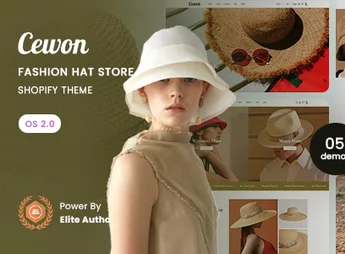
Cewon is a Shopify 2.0 premium theme, designed specifically for hat and fashion accessory stores. With an elegant design and visual focus, it offers the perfect platform for brands that want to showcase their products with style and sophistication. Ideal for entrepreneurs seeking to create an immersive online shopping experience, Cewon blends modern aesthetics with powerful e-commerce features.
Main Features
- Full compatibility with Shopify OS 2.0
Customize all pages of your store, including home, product, and collections, with dynamic drag-and-drop sections. - Fully responsive and Mobile-First design
Guarantees a flawless navigation experience and visually impeccable across all devices, from desktops to smartphones. - Advanced Mega Menu
Create complex and visually appealing navigation menus to organize your product collections effectively and intuitively. - Integrated Lookbook Feature
Showcase your hats in styled collections and high-resolution galleries to inspire customers and boost sales. - Advanced Collection Filters
Allow customers to filter products by color, size, material, and price, making it easier to discover the perfect item. - Optimized for Performance and SEO
Clean, optimized code to guarantee fast loading and better search engine rankings such as Google.
Benefits of Cewon
- Higher Conversion Rates
A professional design and intuitive navigation encourage visitors to explore more products and complete purchases. - Superior Shopping Experience
Simplify the customer journey with visual features and filters that help find the desired product quickly. - Store Management Autonomy
Change layouts, add banners, and promote collections easily, without needing programming knowledge. - Building a Strong Brand
Create a unique and memorable visual identity that sets your store apart from the competition and retains customers.
Who Is it Recommended For?
- Stores specializing in hats, caps, berets, and other head accessories.
- Fashion brands and boutiques that want an elegant online presence focused on a niche market.
- E-commerce entrepreneurs seeking a premium theme, easy to use, and focused on conversion.
With Cewon, you have the ultimate tool to turn your passion for hats into a successful online store. Elevate your brand with flawless design, robust features, and an unforgettable user experience, building the showroom of your dreams quickly and professionally.
Frequently asked questions
Is Cewon – Fashion Hat Store Shopify 2.0 Theme GPL?
Yes. Cewon – Fashion Hat Store Shopify 2.0 Theme is distributed under the GPL (GNU General Public License). You may legally use, modify and redistribute it on as many sites as you want.
Can I use Cewon – Fashion Hat Store Shopify 2.0 Theme on more than one site?
Yes. You can use Cewon – Fashion Hat Store Shopify 2.0 Theme on as many sites as you want.
How much does Cewon – Fashion Hat Store Shopify 2.0 Theme cost at Ultrapack?
Cewon – Fashion Hat Store Shopify 2.0 Theme costs US$2.99 as a single purchase, and it is also included in the subscription plans starting at US$17/mo (Desenvolvedor I).
Does Cewon – Fashion Hat Store Shopify 2.0 Theme include updates?
When a new version of Cewon – Fashion Hat Store Shopify 2.0 Theme becomes available in the catalog, you can download the file during the access period of your purchase or subscription. To update, follow the installation or import procedure described in the documentation for the item and its platform.
Is Cewon – Fashion Hat Store Shopify 2.0 Theme checked before it is made available for download?
Files for Cewon – Fashion Hat Store Shopify 2.0 Theme are scanned before publication by UltraHub using ClamAV and YARA rules to detect known threats. This check does not guarantee the absence of risks. Check the item requirements, make a backup, and follow the installation or import instructions for its platform.
How to install
Updates: manual. When a new version comes out, download it on this same page and upload the new file from the Shopify admin. This item is not installed through WordPress.
A Shopify theme is not installed on WordPress. It is uploaded in your store dashboard.
- Download the file
elements-cewon-fashion-hat-store-shopify-2-0-theme.zipand extract it on your computer. - Inside the package, look for the theme ZIP, which is the file Shopify accepts. It is usually in a folder named after the theme, and it has the
assets,layout,sectionsandtemplatesfolders inside. - In the Shopify dashboard, go to Online Store > Themes.
- Under Theme library, click Add theme > Upload zip file and upload the theme ZIP.
- Use Preview to check it, and Publish when you want it live.
- Shopify rejects packages that are too large. If the upload fails because of size, take the documentation and demo files out of the folder before zipping it.
Stuck on a step? Open a ticket telling us which one you stopped at.


