

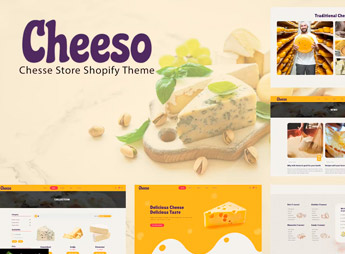
Description
Cheeso sets up a complete Shopify store to sell artisanal cheeses, dairy products, and organic foods, with product showcase by category, ingredient origin section, and natural seal banners on the homepage. It’s ideal for those who produce farm cheese, organic dairy, or gourmet grocery items and want to open an online store with a rustic identity and farm visual, without needing to hire a programmer to assemble the layout.
Key Features of Cheeso
- Showcase by category
Organizes cheeses, dairy products, and derivatives into separate collections on the store’s homepage. - Origin section
Shows where each product comes from, with a photo of the farm or producer. - Natural product seals
Displays organic, artisanal, or preservative-free seals next to the price. - Product filter
Allows customers to filter by cheese type, weight, or curing method. - Recipe banner
Brings recipe banners and combination suggestions to encourage purchase.
Benefits of Cheeso
- Rustic and artisanal look
Conveys the feeling of a homemade and quality product just with the store’s design. - Store ready to sell
Comes with homepage, product, and cart already configured for quick publishing. - Compatible with Shopify apps
Works with shipping, review, and abandoned cart recovery apps. - Customer trust gain
Helps the buyer understand the origin of the cheese before finalizing the order.
Who is Cheeso for?
- Those who produce artisanal cheese or small-scale dairy products.
- Those who resell organic products and gourmet grocery items.
- Those who already sell at markets and want to open an online store.
- Those who assemble colonial product baskets for delivery.
How to Download Cheeso
Cheeso is available for download here on Ultrapack. The theme file is sent to Virtual Store > Themes > Add theme, in the Shopify panel, and is ready for immediate customization. Then just adjust colors, logo, and homepage texts.
Those who sell farm products often lose sales due to a lack of a store that inspires confidence in the origin of the food. Cheeso solves this with a layout designed for perishable and artisanal products, giving the brand the same visual seriousness as a larger gourmet store, without requiring technical knowledge to put it online.
Frequently asked questions
Is Cheeso | Organic Cheese Products Shopify Store GPL?
Yes. Cheeso | Organic Cheese Products Shopify Store is distributed under the GPL (GNU General Public License). You may legally use, modify and redistribute it on as many sites as you want.
Can I use Cheeso | Organic Cheese Products Shopify Store on more than one site?
Yes. You can use Cheeso | Organic Cheese Products Shopify Store on as many sites as you want.
How much does Cheeso | Organic Cheese Products Shopify Store cost at Ultrapack?
Cheeso | Organic Cheese Products Shopify Store costs US$2.99 as a single purchase, and it is also included in the subscription plans starting at US$17/mo (Desenvolvedor I).
Does Cheeso | Organic Cheese Products Shopify Store include updates?
When a new version of Cheeso | Organic Cheese Products Shopify Store becomes available in the catalog, you can download the file during the access period of your purchase or subscription. To update, follow the installation or import procedure described in the documentation for the item and its platform.
Is Cheeso | Organic Cheese Products Shopify Store checked before it is made available for download?
Files for Cheeso | Organic Cheese Products Shopify Store are scanned before publication by UltraHub using ClamAV and YARA rules to detect known threats. This check does not guarantee the absence of risks. Check the item requirements, make a backup, and follow the installation or import instructions for its platform.
How to install
Updates: manual. When a new version comes out, download it on this same page and upload the new file from the Shopify admin. This item is not installed through WordPress.
A Shopify theme is not installed on WordPress. It is uploaded in your store dashboard.
- Download the file
elements-cheeso-organic-cheese-products-shopify-store.zipand extract it on your computer. - Inside the package, look for the theme ZIP, which is the file Shopify accepts. It is usually in a folder named after the theme, and it has the
assets,layout,sectionsandtemplatesfolders inside. - In the Shopify dashboard, go to Online Store > Themes.
- Under Theme library, click Add theme > Upload zip file and upload the theme ZIP.
- Use Preview to check it, and Publish when you want it live.
- Shopify rejects packages that are too large. If the upload fails because of size, take the documentation and demo files out of the folder before zipping it.
Stuck on a step? Open a ticket telling us which one you stopped at.



