

Description
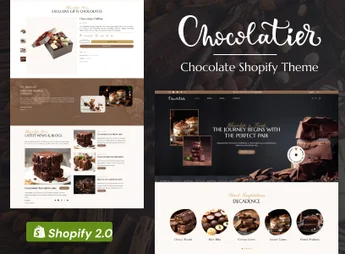
Chocolatier is a premium Shopify theme designed for chocolate shops, bakeries, and artisanal candy shops that want a sophisticated and appetizing online presence. Its elegant and immersive design, with a focus on high-quality visuals, is tailored to highlight the beauty and uniqueness of your products, converting visitors into loyal customers and providing a shopping experience as delightful as your creations.
Key Features
- Elegant and Responsive Design: Immaculate appearance across desktops, tablets, and smartphones, centered on the user experience.
- Drag & Drop Sections (v2.0): Easily customize the layout of all pages with Shopify’s intuitive sections editor.
- Rich and Warm Color Palette: Predefined colors that evoke feelings of luxury and the taste of chocolate, fully customizable.
- Optimized Product Galleries: Display your chocolates and sweets with high-resolution image galleries, zoom, and attractive layouts.
- Integrated Blog for Stories and Recipes: Share your brand’s story, production processes, or recipes to engage your audience.
- Speed and SEO Optimization: Clean and optimized code to ensure fast loading and better search engine positioning.
Benefits of Chocolatier
- Boost Conversions: Professional design and intuitive navigation guide customers through the purchase journey, encouraging the completion of orders and increasing sales.
- Build a Premium Brand: Communicate professionalism and luxury, differentiating your shop from competitors and justifying the value of your artisanal products.
- Save Time and Money: Create a stunning online store without the need to hire a designer or developer, thanks to easy-to-use customization options.
- Build Loyalty: Use the integrated blog to build a community around your brand, offering valuable content that keeps customers coming back.
Who is It For?
- Artisanal and gourmet chocolate shops.
- Bakeries, patisseries, and candy boutiques.
- Fine food brands seeking an elegant online showcase.
With the Chocolatier theme, your passion for chocolate gains a digital showcase as irresistible as your products.
Frequently asked questions
Is Chocolatier | chocolate Shop Shopify Theme GPL?
Yes. Chocolatier | chocolate Shop Shopify Theme is distributed under the GPL (GNU General Public License). You may legally use, modify and redistribute it on as many sites as you want.
Can I use Chocolatier | chocolate Shop Shopify Theme on more than one site?
Yes. You can use Chocolatier | chocolate Shop Shopify Theme on as many sites as you want.
How much does Chocolatier | chocolate Shop Shopify Theme cost at Ultrapack?
Chocolatier | chocolate Shop Shopify Theme costs US$2.99 as a single purchase, and it is also included in the subscription plans starting at US$17/mo (Desenvolvedor I).
Does Chocolatier | chocolate Shop Shopify Theme include updates?
When a new version of Chocolatier | chocolate Shop Shopify Theme becomes available in the catalog, you can download the file during the access period of your purchase or subscription. To update, follow the installation or import procedure described in the documentation for the item and its platform.
Is Chocolatier | chocolate Shop Shopify Theme checked before it is made available for download?
Files for Chocolatier | chocolate Shop Shopify Theme are scanned before publication by UltraHub using ClamAV and YARA rules to detect known threats. This check does not guarantee the absence of risks. Check the item requirements, make a backup, and follow the installation or import instructions for its platform.
How to install
Updates: manual. When a new version comes out, download it on this same page and upload the new file from the Shopify admin. This item is not installed through WordPress.
A Shopify theme is not installed on WordPress. It is uploaded in your store dashboard.
- Download the file
elements-chocolatier-chocolate-shop-shopify-theme.zipand extract it on your computer. - Inside the package, look for the theme ZIP, which is the file Shopify accepts. It is usually in a folder named after the theme, and it has the
assets,layout,sectionsandtemplatesfolders inside. - In the Shopify dashboard, go to Online Store > Themes.
- Under Theme library, click Add theme > Upload zip file and upload the theme ZIP.
- Use Preview to check it, and Publish when you want it live.
- Shopify rejects packages that are too large. If the upload fails because of size, take the documentation and demo files out of the folder before zipping it.
Stuck on a step? Open a ticket telling us which one you stopped at.



