

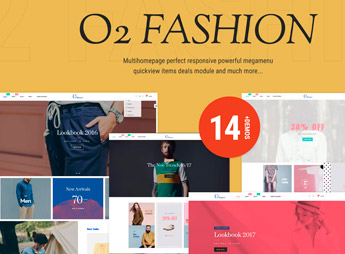
Description
The Fashion Store Section Drag & Drop builds an online clothing, footwear, and accessories store within Shopify, with showcase, collection, and banner sections that rearrange by drag and drop, without needing to edit code. It’s for those who sell fashion, footwear, and accessories online and want to build or reorganize the home page, collection pages, and banners without relying on a developer for each layout adjustment.
Main Features of Fashion Store Section Drag & Drop
- Drag and Drop Sections
Reorganizes home and collection blocks without code. - Configurable Showcase
Displays featured products with adjustable layout in each section. - Category Filter
Separates clothing, footwear, and accessories into their own store sections. - Checkout Integrated with Shopify
Connects directly with the platform’s native cart, shipping, and payment. - Minimalist Layout
Maintains a clean visual, focusing on product photos.
Benefits of Fashion Store Section Drag & Drop
- Developer-Free Autonomy
Allows you to change the store layout without editing code. - More Conversions in the Showcase
Highlights new releases and collections for those looking for novelty. - Ready-to-Publish Store
Reduces the time it takes to set up a fashion store from scratch. - Mobile Purchase
Maintains smooth navigation on any screen size.
Who is Fashion Store Section Drag & Drop Suitable For?
- Fashion and accessories stores that need to adjust the layout frequently.
- Footwear brands that launch collections and seasonally reorganize the showcase.
- Clothing resellers who test different layouts without hiring a developer.
How to Download Fashion Store Section Drag & Drop
The Fashion Store Section Drag & Drop is available for download here on Ultrapack. After importing the file, the theme is installed in Storefront > Themes > Add theme, which automatically applies the sections and menu. Simply drag the blocks to assemble the home page and publish the catalog.
Fashion stores often change their showcase frequently, whether it’s for a new collection, promotion, or season, and there isn’t always time or budget to call a developer for each adjustment. Being able to reorganize the sections directly in the Shopify editor puts this maintenance in control of those who manage the store on a daily basis.
Frequently asked questions
Is Fashion Store Section Drag & Drop GPL?
Yes. Fashion Store Section Drag & Drop is distributed under the GPL (GNU General Public License). You may legally use, modify and redistribute it on as many sites as you want.
Can I use Fashion Store Section Drag & Drop on more than one site?
Yes. You can use Fashion Store Section Drag & Drop on as many sites as you want.
How much does Fashion Store Section Drag & Drop cost at Ultrapack?
Fashion Store Section Drag & Drop costs US$2.99 as a single purchase, and it is also included in the subscription plans starting at US$17/mo (Desenvolvedor I).
Does Fashion Store Section Drag & Drop include updates?
When a new version of Fashion Store Section Drag & Drop becomes available in the catalog, you can download the file during the access period of your purchase or subscription. To update, follow the installation or import procedure described in the documentation for the item and its platform.
Is Fashion Store Section Drag & Drop checked before it is made available for download?
Files for Fashion Store Section Drag & Drop are scanned before publication by UltraHub using ClamAV and YARA rules to detect known threats. This check does not guarantee the absence of risks. Check the item requirements, make a backup, and follow the installation or import instructions for its platform.
How to install
Updates: manual. When a new version comes out, download it on this same page and upload the new file from the Shopify admin. This item is not installed through WordPress.
A Shopify theme is not installed on WordPress. It is uploaded in your store dashboard.
- Download the file
elements-fashion-store-section-drag-drop.zipand extract it on your computer. - Inside the package, look for the theme ZIP, which is the file Shopify accepts. It is usually in a folder named after the theme, and it has the
assets,layout,sectionsandtemplatesfolders inside. - In the Shopify dashboard, go to Online Store > Themes.
- Under Theme library, click Add theme > Upload zip file and upload the theme ZIP.
- Use Preview to check it, and Publish when you want it live.
- Shopify rejects packages that are too large. If the upload fails because of size, take the documentation and demo files out of the folder before zipping it.
Stuck on a step? Open a ticket telling us which one you stopped at.


