

Description
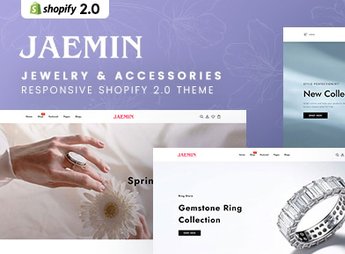
Jaemin sets up a Shopify store focused on jewelry and accessories, with a clean and modern layout, parallax effect on the home banners, and a product grid that highlights the photo of each piece. **The theme uses white space and subtle typography to enhance the shine and finish of the pieces**, which helps those who sell jewelry, fine jewelry, or accessories to convey sophistication without cluttering the store’s visual appeal.
Jaemin’s Main Features
- Banners with parallax effect
Creates visual depth on the home page when the customer scrolls. - Clean product grid
Displays each piece in a spacious area, without elements that distract from the product. - Product image zoom
Enlarges the photo on hover, showing detail of finish and shine. - Subtle typography
Uses thin and spaced fonts to keep the visual focus on the product. - Responsive layout
Automatically reorganizes banners, grid, and menu for mobile and tablet.
Jaemin’s Benefits
- Sophisticated look without effort
Comes with a visual identity ready for the jewelry and accessories segment. - Product in the spotlight
Reduces visual elements on the page so that the piece gets more attention. - Simple navigation
Facilitates finding the right piece even with a small catalog of items. - Store ready to publish
Reduces setup time because banners and grid are already assembled.
Who is Jaemin Recommended For?
- Those who sell jewelry, costume jewelry, or semi-jewelry online.
- Those who resell fashion accessories with a focus on unique pieces.
- Those who want a small catalog with a sophisticated look.
- Those who already sell on a marketplace and want a more elegant own store.
How to Download Jaemin
The Jaemin is available for download here on Ultrapack. After downloading the file, install via Shopify in Online Store > Themes > Add theme, sending the .zip package and adjusting photos and banners before publishing the store with the brand’s complete catalog.
Jewelry pieces depend on good photos and clean space to sell, which a generic fashion layout doesn’t always deliver. The parallax and subtle typography of Jaemin give this visual breathing room, helping the customer to perceive detail of finish before deciding on the purchase.
Frequently asked questions
Is Jaemin – Jewelry & Accessories Responsive Shopify 2.0 Theme GPL?
Yes. Jaemin – Jewelry & Accessories Responsive Shopify 2.0 Theme is distributed under the GPL (GNU General Public License). You may legally use, modify and redistribute it on as many sites as you want.
Can I use Jaemin – Jewelry & Accessories Responsive Shopify 2.0 Theme on more than one site?
Yes. You can use Jaemin – Jewelry & Accessories Responsive Shopify 2.0 Theme on as many sites as you want.
How much does Jaemin – Jewelry & Accessories Responsive Shopify 2.0 Theme cost at Ultrapack?
Jaemin – Jewelry & Accessories Responsive Shopify 2.0 Theme costs US$2.99 as a single purchase, and it is also included in the subscription plans starting at US$17/mo (Desenvolvedor I).
Does Jaemin – Jewelry & Accessories Responsive Shopify 2.0 Theme include updates?
When a new version of Jaemin – Jewelry & Accessories Responsive Shopify 2.0 Theme becomes available in the catalog, you can download the file during the access period of your purchase or subscription. To update, follow the installation or import procedure described in the documentation for the item and its platform.
Is Jaemin – Jewelry & Accessories Responsive Shopify 2.0 Theme checked before it is made available for download?
Files for Jaemin – Jewelry & Accessories Responsive Shopify 2.0 Theme are scanned before publication by UltraHub using ClamAV and YARA rules to detect known threats. This check does not guarantee the absence of risks. Check the item requirements, make a backup, and follow the installation or import instructions for its platform.
How to install
Updates: manual. When a new version comes out, download it on this same page and upload the new file from the Shopify admin. This item is not installed through WordPress.
A Shopify theme is not installed on WordPress. It is uploaded in your store dashboard.
- Download the file
elements-jaemin-jewelry-accessories-shopify-2-0-theme.zipand extract it on your computer. - Inside the package, look for the theme ZIP, which is the file Shopify accepts. It is usually in a folder named after the theme, and it has the
assets,layout,sectionsandtemplatesfolders inside. - In the Shopify dashboard, go to Online Store > Themes.
- Under Theme library, click Add theme > Upload zip file and upload the theme ZIP.
- Use Preview to check it, and Publish when you want it live.
- Shopify rejects packages that are too large. If the upload fails because of size, take the documentation and demo files out of the folder before zipping it.
Stuck on a step? Open a ticket telling us which one you stopped at.


