Description
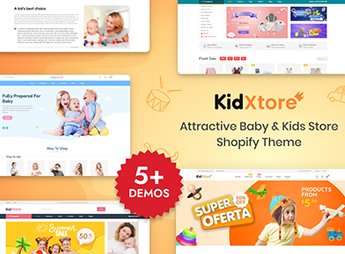
KidXtore organizes a Shopify store for those who sell baby clothes, nursery items, and general children’s products, with categories separated by age range and product type. The theme serves for those who manage a baby supplies and baby articles store and need to organize clothing, footwear, and accessories in a single storefront, with a product page that informs size and material without requiring the customer to ask before completing the purchase.
Key Features of KidXtore
- Category by item type
Separates children’s clothing, footwear, and accessories into their own sections. - Filter by age range
Allows customers to search for items by the child’s or baby’s age. - Suggested nursery list
Gathers essential baby items into a ready-made gift section. - Size and material sheet
Shows measurements and fabric composition for each product. - Featured section on the home
Showcases new arrivals, promotions, or seasonal collections on the home page.
Benefits of KidXtore
- Easier gift purchase
The nursery list helps those looking for a ready-to-give item. - Fewer exchanges due to size
The size sheet reduces returns of clothing or footwear that doesn’t fit. - Faster search by age
The age range filter avoids scrolling through the entire catalog looking for an item. - Unique storefront for the baby
Clothing, footwear, and accessories coexist in an organized store.
Who is KidXtore for?
- Those who sell clothing and nursery items for babies.
- Those who manage a children’s fashion store with various age ranges.
- Those who assemble gift sets for baby showers.
- Those who sell children’s footwear and accessories along with clothing.
How to Download KidXtore
The KidXtore is available for download here on Ultrapack. After downloading the file, install it through the path Online Store > Themes > Add theme in the Shopify panel. Then, register clothing, footwear, and accessories with size before publishing the store.
Baby stores often bring together very different types of products in the same storefront, from clothing to footwear, and without a clear category, the customer gets lost before finding what they are looking for. KidXtore separates this catalog by type and age, which gives those who assemble a nursery or buy a gift a direct path to the right item.
Frequently asked questions
Is KidXtore – Baby Shop and Kids Store Shopify 2.0 Theme GPL?
Yes. KidXtore – Baby Shop and Kids Store Shopify 2.0 Theme is distributed under the GPL (GNU General Public License). You may legally use, modify and redistribute it on as many sites as you want.
Can I use KidXtore – Baby Shop and Kids Store Shopify 2.0 Theme on more than one site?
Yes. You can use KidXtore – Baby Shop and Kids Store Shopify 2.0 Theme on as many sites as you want.
How much does KidXtore – Baby Shop and Kids Store Shopify 2.0 Theme cost at Ultrapack?
KidXtore – Baby Shop and Kids Store Shopify 2.0 Theme costs US$2.99 as a single purchase, and it is also included in the subscription plans starting at US$17/mo (Desenvolvedor I).
Does KidXtore – Baby Shop and Kids Store Shopify 2.0 Theme include updates?
When a new version of KidXtore – Baby Shop and Kids Store Shopify 2.0 Theme becomes available in the catalog, you can download the file during the access period of your purchase or subscription. To update, follow the installation or import procedure described in the documentation for the item and its platform.
Is KidXtore – Baby Shop and Kids Store Shopify 2.0 Theme checked before it is made available for download?
Files for KidXtore – Baby Shop and Kids Store Shopify 2.0 Theme are scanned before publication by UltraHub using ClamAV and YARA rules to detect known threats. This check does not guarantee the absence of risks. Check the item requirements, make a backup, and follow the installation or import instructions for its platform.
What changed in this version
Version 1.2.2
- Fix Variant picker style dropdown
- Fix BS - Slidershow, BS - Grid Product, BS - Happy Clients: lost when reloading DOM
- Fix Product related: lost when reloading DOM and find by tags not work
Version 1.2.1 Aug 26, 2023
- Update theme name
Version 1.2.1 Aug 25, 2023
- Fixed bug: vertical thumbs position on product detail page
Release notes published by the developer.
How to install
Updates: manual. When a new version comes out, download it on this same page and upload the new file from the Shopify admin. This item is not installed through WordPress.
A Shopify theme is not installed on WordPress. It is uploaded in your store dashboard.
- Download the file
elements-kidxtore-baby-kids-store-shopify-2-0-theme.zipand extract it on your computer. - Inside the package, look for the theme ZIP, which is the file Shopify accepts. It is usually in a folder named after the theme, and it has the
assets,layout,sectionsandtemplatesfolders inside. - In the Shopify dashboard, go to Online Store > Themes.
- Under Theme library, click Add theme > Upload zip file and upload the theme ZIP.
- Use Preview to check it, and Publish when you want it live.
- Shopify rejects packages that are too large. If the upload fails because of size, take the documentation and demo files out of the folder before zipping it.
Stuck on a step? Open a ticket telling us which one you stopped at.