

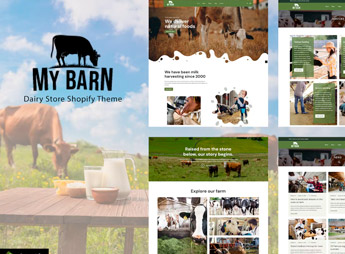
Description
Mybarn sets up a complete Shopify store for those who sell organic food, milk, and farm products, with homepage showcase sections, product grid by category, seasonal highlight banner, and text blocks to tell the story of the production’s origin. The theme caters to those who sell fresh, packaged, or subscription products directly to consumers and need to show provenance, organic seal, and availability without having to edit code.
Mybarn’s Main Features
- Showcase for rural products
Homepage sections organize categories like dairy, produce, and packaged items by origin. - Filter by category
The product grid allows filtering by food type, weight, or organic seal. - Seasonal highlight banner
A banner block on the homepage changes the offer according to the month’s harvest. - Responsive Shopify 2.0 layout
The theme runs on Shopify’s OS 2.0 structure, with editable sections in the customizer. - Detailed product page
The product sheet includes tabs for ingredients, storage method, and nutritional information.
Benefits of Mybarn
- Trust in origin
Text and image blocks reinforce rural provenance and increase buyer confidence. - Less configuration work
Ready-made sections reduce store setup time without having to hire a programmer. - Clear category navigation
The menu and filters help shoppers quickly find the right item. - Visual aligned with the niche
Colors and typography follow a rustic aesthetic that combines with natural products.
Who is Mybarn for?
- Those who sell dairy and derivatives directly from the farm.
- Those who have organic produce with subscription delivery.
- Those who resell artisanal products from small rural producers.
- Those who set up an online market with a natural origin appeal.
How to Download Mybarn
Mybarn is available for download here on Ultrapack. Installation is done in Virtual Store > Themes > Add theme, sending the compressed file directly in the Shopify panel. Then just publish the theme and adjust the sections through the visual customizer.
Those who already sell at fairs or deliver locally get a digital showcase that reinforces the same artisanal identity, without losing the feeling of fresh and traceable product. The section-based structure facilitates testing new page arrangements without depending on a developer for each seasonal adjustment.
Frequently asked questions
Is Mybarn – Organic Food, Milk Store Shopify Theme GPL?
Yes. Mybarn – Organic Food, Milk Store Shopify Theme is distributed under the GPL (GNU General Public License). You may legally use, modify and redistribute it on as many sites as you want.
Can I use Mybarn – Organic Food, Milk Store Shopify Theme on more than one site?
Yes. You can use Mybarn – Organic Food, Milk Store Shopify Theme on as many sites as you want.
How much does Mybarn – Organic Food, Milk Store Shopify Theme cost at Ultrapack?
Mybarn – Organic Food, Milk Store Shopify Theme costs US$2.99 as a single purchase, and it is also included in the subscription plans starting at US$17/mo (Desenvolvedor I).
Does Mybarn – Organic Food, Milk Store Shopify Theme include updates?
When a new version of Mybarn – Organic Food, Milk Store Shopify Theme becomes available in the catalog, you can download the file during the access period of your purchase or subscription. To update, follow the installation or import procedure described in the documentation for the item and its platform.
Is Mybarn – Organic Food, Milk Store Shopify Theme checked before it is made available for download?
Files for Mybarn – Organic Food, Milk Store Shopify Theme are scanned before publication by UltraHub using ClamAV and YARA rules to detect known threats. This check does not guarantee the absence of risks. Check the item requirements, make a backup, and follow the installation or import instructions for its platform.
How to install
Updates: manual. When a new version comes out, download it on this same page and upload the new file from the Shopify admin. This item is not installed through WordPress.
A Shopify theme is not installed on WordPress. It is uploaded in your store dashboard.
- Download the file
elements-mybarn-organic-food-milk-store-shopify-theme.zipand extract it on your computer. - Inside the package, look for the theme ZIP, which is the file Shopify accepts. It is usually in a folder named after the theme, and it has the
assets,layout,sectionsandtemplatesfolders inside. - In the Shopify dashboard, go to Online Store > Themes.
- Under Theme library, click Add theme > Upload zip file and upload the theme ZIP.
- Use Preview to check it, and Publish when you want it live.
- Shopify rejects packages that are too large. If the upload fails because of size, take the documentation and demo files out of the folder before zipping it.
Stuck on a step? Open a ticket telling us which one you stopped at.



