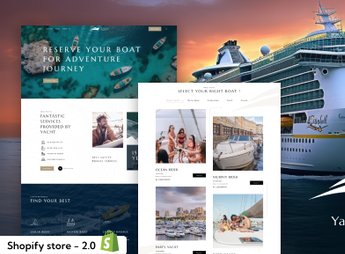
Description
Neera builds a complete Shopify site for anyone who rents boats, yachts, or sea excursions, with a fleet page, tour packages, and booking sections already organized in the platform’s 2.0 theme standard. The theme presents each vessel as an item with photos, description, and a booking option, plus destination blocks, a suggested itinerary, and a customer testimonial, all adjustable via drag-and-drop in Shopify’s visual editor.
Key Features of Neera
- Page per vessel
Creates a dedicated page for each boat or yacht, with photos and description. - Tour packages
Organizes itineraries and tour durations as different booking options. - Fleet photo gallery
Displays several images of each vessel in a gallery within the page. - Customer testimonials
Shows reviews from people who have already taken the tour right on the homepage. - Tourist destination banners
Highlights a tour route or region with a large image at the top of the homepage.
Benefits of Neera
- Clearer booking
Helps the visitor understand options and pricing before completing the booking. - Fleet presented in detail
Conveys more trust by showing each vessel with photos and its own profile. - Visible social proof
Uses previous customer testimonials to reduce hesitation for people who have never rented before. - No-developer adjustments
Lets you change photos, text, and color directly in Shopify’s visual editor.
Who Is Neera For?
- Anyone who rents boats, yachts, or speedboats for tours.
- Anyone who organizes maritime sightseeing tours or diving tours.
- Anyone who manages a marina and wants to promote the fleet available for rental.
- Anyone who sells travel packages that include a boat or yacht segment.
How to Download Neera
Neera is available for download here on Ultrapack. After downloading the file, install it from the Shopify dashboard under Online Store > Themes > Add theme and publish it after adding the fleet and tour packages.
A boat tour is usually sold on the trust placed in the vessel and the itinerary, so it’s worth investing time in good fleet photos and real testimonials from people who have already traveled. The page-per-vessel structure keeps this content organized right from installation.
Frequently asked questions
Is Neera – Yacht Boat & Travel Rental Services Shopify Theme GPL?
Yes. Neera – Yacht Boat & Travel Rental Services Shopify Theme is distributed under the GPL (GNU General Public License). You may legally use, modify and redistribute it on as many sites as you want.
Can I use Neera – Yacht Boat & Travel Rental Services Shopify Theme on more than one site?
Yes. You can use Neera – Yacht Boat & Travel Rental Services Shopify Theme on as many sites as you want.
How much does Neera – Yacht Boat & Travel Rental Services Shopify Theme cost at Ultrapack?
Neera – Yacht Boat & Travel Rental Services Shopify Theme costs US$2.99 as a single purchase, and it is also included in the subscription plans starting at US$17/mo (Desenvolvedor I).
Does Neera – Yacht Boat & Travel Rental Services Shopify Theme include updates?
When a new version of Neera – Yacht Boat & Travel Rental Services Shopify Theme becomes available in the catalog, you can download the file during the access period of your purchase or subscription. To update, follow the installation or import procedure described in the documentation for the item and its platform.
Is Neera – Yacht Boat & Travel Rental Services Shopify Theme checked before it is made available for download?
Files for Neera – Yacht Boat & Travel Rental Services Shopify Theme are scanned before publication by UltraHub using ClamAV and YARA rules to detect known threats. This check does not guarantee the absence of risks. Check the item requirements, make a backup, and follow the installation or import instructions for its platform.
How to install
Updates: manual. When a new version comes out, download it on this same page and upload the new file from the Shopify admin. This item is not installed through WordPress.
A Shopify theme is not installed on WordPress. It is uploaded in your store dashboard.
- Download the file
elements-neera-yacht-boat-travel-rental-shopify-theme.zipand extract it on your computer. - Inside the package, look for the theme ZIP, which is the file Shopify accepts. It is usually in a folder named after the theme, and it has the
assets,layout,sectionsandtemplatesfolders inside. - In the Shopify dashboard, go to Online Store > Themes.
- Under Theme library, click Add theme > Upload zip file and upload the theme ZIP.
- Use Preview to check it, and Publish when you want it live.
- Shopify rejects packages that are too large. If the upload fails because of size, take the documentation and demo files out of the folder before zipping it.
Stuck on a step? Open a ticket telling us which one you stopped at.