

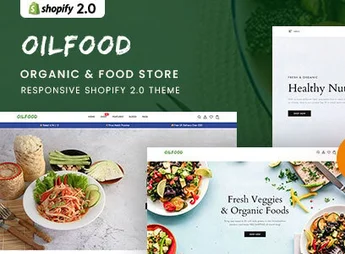
Description
Olifood is an elegant and modern Shopify 2.0 theme specifically designed for organic food stores, grocery stores, local producers, and natural products markets. Its clean and image-focused design helps convey freshness and trust, creating an inviting and intuitive online shopping experience that showcases the quality of your products and encourages visitors to become customers.
Main Features
- Shopify Online Store 2.0: Total flexibility with dynamic sections on all pages, allowing drag and drop elements to easily customize your site.
- Full-Width Responsive Design: Ensures a perfect appearance and smooth navigation on desktops, tablets, and smartphones, reaching customers on any device.
- Multiple Home Page Layouts: Includes numerous pre-built demos with unique designs to help you quickly start selling your products.
- Advanced Mega Menu: Create rich and organized navigation, enabling customers to easily find product categories and special offers.
- E-commerce Functionalities: Equipped with essential features such as Quick View, Wish List, Product Filters, and Ajax ShoppingCart.
- SEO and Performance Optimized: Clean code and optimized for search engines, as well as fast loading to improve ranking and user experience.
Benefits of Olifood
- Build Customer Confidence: A professional and transparent layout, focused on product quality, builds credibility and encourages the first purchase.
- Enhance Shopping Experience: Intuitive navigation tools and advanced filters help customers find exactly what they are looking for, reducing cart abandonment.
- Complete Customization Without Coding: Thanks to Shopify 2.0 architecture, you can customize every detail of your store without technical knowledge.
- Highlight Your Products: The visually appealing design, with a focus on large images and galleries, allows your organic foods and products to stand out.
Who It’s For
- Organic food stores, vegan and natural products stores.
- Local producers, farms, and farmer’s markets.
- Grocery stores, bakeries, butchers, and gourmet online emporiums.
With Olifood, you transform your online store into a visually appetizing and functional digital showcase, ready to win and retain quality food enthusiasts as customers.
Frequently asked questions
Is Olifood – Organic & Food Store Shopify 2.0 Theme GPL?
Yes. Olifood – Organic & Food Store Shopify 2.0 Theme is distributed under the GPL (GNU General Public License). You may legally use, modify and redistribute it on as many sites as you want.
Can I use Olifood – Organic & Food Store Shopify 2.0 Theme on more than one site?
Yes. You can use Olifood – Organic & Food Store Shopify 2.0 Theme on as many sites as you want.
How much does Olifood – Organic & Food Store Shopify 2.0 Theme cost at Ultrapack?
Olifood – Organic & Food Store Shopify 2.0 Theme costs US$2.99 as a single purchase, and it is also included in the subscription plans starting at US$17/mo (Desenvolvedor I).
Does Olifood – Organic & Food Store Shopify 2.0 Theme include updates?
When a new version of Olifood – Organic & Food Store Shopify 2.0 Theme becomes available in the catalog, you can download the file during the access period of your purchase or subscription. To update, follow the installation or import procedure described in the documentation for the item and its platform.
Is Olifood – Organic & Food Store Shopify 2.0 Theme checked before it is made available for download?
Files for Olifood – Organic & Food Store Shopify 2.0 Theme are scanned before publication by UltraHub using ClamAV and YARA rules to detect known threats. This check does not guarantee the absence of risks. Check the item requirements, make a backup, and follow the installation or import instructions for its platform.
How to install
Updates: manual. When a new version comes out, download it on this same page and upload the new file from the Shopify admin. This item is not installed through WordPress.
A Shopify theme is not installed on WordPress. It is uploaded in your store dashboard.
- Download the file
elements-olifood-organic-food-store-shopify-2-0-theme.zipand extract it on your computer. - Inside the package, look for the theme ZIP, which is the file Shopify accepts. It is usually in a folder named after the theme, and it has the
assets,layout,sectionsandtemplatesfolders inside. - In the Shopify dashboard, go to Online Store > Themes.
- Under Theme library, click Add theme > Upload zip file and upload the theme ZIP.
- Use Preview to check it, and Publish when you want it live.
- Shopify rejects packages that are too large. If the upload fails because of size, take the documentation and demo files out of the folder before zipping it.
Stuck on a step? Open a ticket telling us which one you stopped at.


