

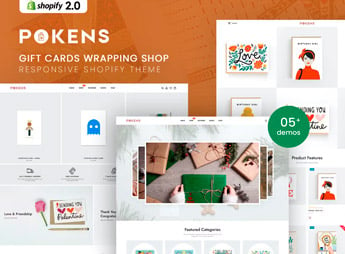
Description
Pokens provides the structure for a Shopify store specializing in gift cards and wrapping paper, with product pages that let shoppers choose the amount, packaging design, and personalized message in one place, without having to visit more than one page to put together a complete gift order. It serves gift card sellers catering to special occasions, stationery stores offering gift wrapping, and stores that combine both into kits ready to ship directly to the recipient.
Key Features of Pokens
- Variable gift card amounts
Lets shoppers choose the exact card amount before checking out. - Choice of packaging design
Displays paper and bow options so customers can create their own package. - Personalized message with the order
Provides a text field for shoppers to write a gift message. - Ready-to-ship kits
Combines a card, wrapping, and message into a single product ready to ship. - Catalog organized by occasion
Organizes products by birthdays, weddings, Mother’s Day, and special occasions.
Benefits of Pokens
- A gift ready in one click
Eliminates the need to buy a card and wrapping from different places. - Higher average order value
Encourages sales of complete kits instead of inexpensive individual items. - Easier impulse purchases
Reduces the time between the gift idea and checkout. - Standing out during seasonal occasions
Helps stores stand out during periods of high demand for ready-made gifts.
Who Is Pokens For?
- Gift card sellers catering to special occasions.
- Stationery stores specializing in gift wrapping.
- Party supply stores that assemble ready-made kits.
- Resellers of third-party products packaged as gifts.
How to Download Pokens
Pokens is available for download here at Ultrapack. In your store dashboard, go to Online Store > Themes > Add theme and upload the file to install the layout. Then, add the card amounts, wrapping options, and combined kits.
Gift cards and wrapping are often sold on separate pages or in different stores, which slows down shoppers rushing to find a last-minute gift. Pokens brings both together in a single purchase, reducing steps and helping close more sales during peak occasions such as Mother’s Day and Christmas.
Frequently asked questions
Is Pokens – Gift Cards Wrapping Shop Shopify Theme GPL?
Yes. Pokens – Gift Cards Wrapping Shop Shopify Theme is distributed under the GPL (GNU General Public License). You may legally use, modify and redistribute it on as many sites as you want.
Can I use Pokens – Gift Cards Wrapping Shop Shopify Theme on more than one site?
Yes. You can use Pokens – Gift Cards Wrapping Shop Shopify Theme on as many sites as you want.
How much does Pokens – Gift Cards Wrapping Shop Shopify Theme cost at Ultrapack?
Pokens – Gift Cards Wrapping Shop Shopify Theme costs US$2.99 as a single purchase, and it is also included in the subscription plans starting at US$17/mo (Desenvolvedor I).
Does Pokens – Gift Cards Wrapping Shop Shopify Theme include updates?
When a new version of Pokens – Gift Cards Wrapping Shop Shopify Theme becomes available in the catalog, you can download the file during the access period of your purchase or subscription. To update, follow the installation or import procedure described in the documentation for the item and its platform.
Is Pokens – Gift Cards Wrapping Shop Shopify Theme checked before it is made available for download?
Files for Pokens – Gift Cards Wrapping Shop Shopify Theme are scanned before publication by UltraHub using ClamAV and YARA rules to detect known threats. This check does not guarantee the absence of risks. Check the item requirements, make a backup, and follow the installation or import instructions for its platform.
How to install
Updates: manual. When a new version comes out, download it on this same page and upload the new file from the Shopify admin. This item is not installed through WordPress.
A Shopify theme is not installed on WordPress. It is uploaded in your store dashboard.
- Download the file
elements-pokens-gift-cards-wrapping-shop-shopify-theme.zipand extract it on your computer. - Inside the package, look for the theme ZIP, which is the file Shopify accepts. It is usually in a folder named after the theme, and it has the
assets,layout,sectionsandtemplatesfolders inside. - In the Shopify dashboard, go to Online Store > Themes.
- Under Theme library, click Add theme > Upload zip file and upload the theme ZIP.
- Use Preview to check it, and Publish when you want it live.
- Shopify rejects packages that are too large. If the upload fails because of size, take the documentation and demo files out of the folder before zipping it.
Stuck on a step? Open a ticket telling us which one you stopped at.


