 UAU Ready
Description
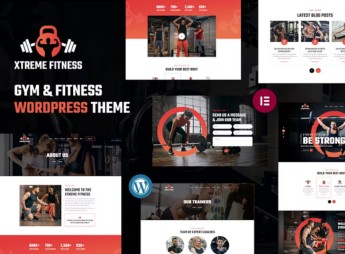
The Workout allows building WordPress sites for gyms, crossfit studios, and personal trainers, with a layout focused on showcasing programs, trainer profiles, and weekly class schedules. Built with Elementor, the theme imports ready demos tailored to the fitness world and includes WooCommerce integration for selling plans, supplements, and sports event tickets directly through the gym’s site.
Main Features
- Elementor Visual Builder
Edits pages with drag-and-drop, without needing code. - Ready-Importable Demos
Installs full layouts geared toward gyms, studios, and sports clubs. - WooCommerce Integration
Enables selling plans, supplements, and fitness gear directly through the site. - Trainer Profiles
Creates individual pages for personal trainers with bios and programs. - Class Schedules and Times
Organizes program tables with days, shifts, and responsible instructors.
Benefits of The Workout
- Fast Site Setup
Puts the gym online in just a few days by importing a demo and tweaking content. - Sporty Visual Identity
Conveys energy and motion without hiring a fitness-specialized designer. - New Member Acquisition
Guides visitors toward enrollment, trial class scheduling, and contact. - Extra Revenue per Store
Sells products, plans, and memberships without switching to another platform.
Who Is It Recommended For?
- Gyms, crossfit boxes, and weight-training studios needing professional digital presence.
- Personal trainers, sports coaches, and instructors selling online or in-person workouts.
- Wellness centers, sports clubs, and supplement brands combining service and e-commerce.
Targeted to the fitness niche, The Workout brings together a library of sports demos, Elementor builder, and WooCommerce compatibility in a single installation, covering everything from neighborhood gyms to multi-unit chains. The structure prioritizes enrollment calls, program display, and plan sales, shortening the journey from website visit to paying member.
Frequently asked questions
Is The Workout – Trainer Fitness WordPress Theme GPL-licensed?
Yes. The Workout – Trainer Fitness WordPress Theme is distributed under the GPL (GNU General Public License). You may legally use, modify and redistribute it on as many sites as you want.
Can I use The Workout – Trainer Fitness WordPress Theme on multiple sites?
Yes. You can install The Workout – Trainer Fitness WordPress Theme on as many sites as you want. Only automatic updates through Ultrapack Auto Updater have a limit: from 3 to 80 sites, depending on the plan.
How much does The Workout – Trainer Fitness WordPress Theme cost at Ultrapack?
The Workout – Trainer Fitness WordPress Theme costs US$2.99 as a single purchase, and it is also included in the subscription plans starting at US$12/mo (VIP I).
Does The Workout – Trainer Fitness WordPress Theme include updates?
Yes. The current version of The Workout – Trainer Fitness WordPress Theme is 1.2.1, published at Ultrapack on Mar 9, 2026. Subscribers update straight from the WordPress dashboard with UAU (Ultrapack Auto Updater).
Is The Workout – Trainer Fitness WordPress Theme scanned before publication?
Yes. Every version of The Workout – Trainer Fitness WordPress Theme goes through a malware scan (ClamAV and YARA rules, at UltraHub) before it is published.
How to install
Automatic updates: this item is updated by the Ultrapack Auto Updater. With it installed, the new version shows up in your dashboard like any other WordPress update (how to set it up).
The file on this page is the developer’s full package, with documentation, demos and plugins. Do not upload that file to WordPress. The theme comes ready inside it, as a ZIP of its own, and that is the one you upload.
- Download the file
elements-the-workout-trainer-fitness-wordpress-theme.zipand extract it on your computer. - Look inside the extracted files for the file
the-workout.zip. - In the WordPress dashboard, go to Appearance > Themes > Add New > Upload Theme.
- Select that file and click Install Now.
- Click Activate.
- There is nothing to zip. The ZIP inside the package is already in the format WordPress accepts.
- Uploading the whole package is the most common mistake when installing a theme: WordPress answers that no valid theme was found, and nothing is installed.
- The rest of the package belongs to the author: documentation, demo files and, in some themes, the plugins it asks for during setup.
- The package also includes the plugin the theme uses, in
revslider.zip. Upload this file in Plugins > Add New > Upload Plugin after activating the theme.
Stuck on a step? Open a ticket telling us which one you stopped at.