

 UAU Ready
Description
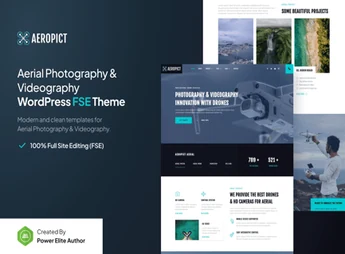
Aeropict structures aerial photography and videography portfolios using WordPress Full Site Editing, combining Gutenverse blocks, one-click demo import, and editable header, footer, and inner-page templates without code. Designed for drone pilots, videographers, and production companies that need to publish galleries and reels of aerial footage, the theme also covers archive and single-post pages that can be customized directly in the block editor.
Aeropict Key Features
- Complete editing through Full Site Editing
Allows you to edit the header, footer, and page templates directly in the block editor, without code. - Advanced Gutenverse blocks
Adds design elements for galleries, videos, and aerial portfolio grids. - One-click demo import
Installs ready-made portfolio, blog, and inner-page templates all at once. - Inner template library
Includes ready-to-customize templates for single posts, archives, and 404 pages. - Yoast SEO compatibility
Structures page metadata and content for indexing by search engines.
Aeropict Benefits
- Publishing without relying on a developer
Edits layout and content directly through the native WordPress block editor. - Ready-to-use portfolio in less time
Reduces setup work by importing complete demos at once. - Consistent presentation of aerial footage
Keeps galleries and videos organized in standardized templates. - Website prepared for organic search
Makes it easier for portfolio and blog pages to rank.
Who Is Aeropict For?
- People who fly drones and want to publish aerial photo and video galleries.
- Videographers and production companies that document events, real estate, or landscapes viewed from the air.
- Creative agencies that present aerial production projects to clients.
How to Download Aeropict
Aeropict is available for download here on Ultrapack. After downloading the .zip file, install it in Appearance > Themes > Add New > Upload Theme and activate the theme in the WordPress dashboard. Once activated, the templates and blocks are available directly in the block editor for importing demos.
Aerial photography and video require a website that keeps pace with project delivery, and Aeropict supports this workflow with portfolio templates, post archives, and inner pages already structured in the WordPress block editor. Without relying on separate page builder plugins, agencies and drone pilots can publish footage, update galleries, and keep the blog active using only the native Full Site Editing features.
Frequently asked questions
Is Aeropict – Drone Aerial Photography & Videography Gutenverse FSE WordPress Block Theme GPL-licensed?
Yes. Aeropict – Drone Aerial Photography & Videography Gutenverse FSE WordPress Block Theme is distributed under the GPL (GNU General Public License). You may legally use, modify and redistribute it on as many sites as you want.
Can I use Aeropict – Drone Aerial Photography & Videography Gutenverse FSE WordPress Block Theme on multiple sites?
Yes. You can install Aeropict – Drone Aerial Photography & Videography Gutenverse FSE WordPress Block Theme on as many sites as you want. Only automatic updates through Ultrapack Auto Updater have a limit: from 3 to 80 sites, depending on the plan.
How much does Aeropict – Drone Aerial Photography & Videography Gutenverse FSE WordPress Block Theme cost at Ultrapack?
Aeropict – Drone Aerial Photography & Videography Gutenverse FSE WordPress Block Theme costs US$2.99 as a single purchase, and it is also included in the subscription plans starting at US$12/mo (VIP I).
Does Aeropict – Drone Aerial Photography & Videography Gutenverse FSE WordPress Block Theme include updates?
Yes. The current version of Aeropict – Drone Aerial Photography & Videography Gutenverse FSE WordPress Block Theme is 1.0.3, published at Ultrapack on Aug 7, 2026. Subscribers update straight from the WordPress dashboard with UAU (Ultrapack Auto Updater).
Is Aeropict – Drone Aerial Photography & Videography Gutenverse FSE WordPress Block Theme scanned before publication?
Yes. Every version of Aeropict – Drone Aerial Photography & Videography Gutenverse FSE WordPress Block Theme goes through a malware scan (ClamAV and YARA rules, at UltraHub) before it is published.
How to install
Automatic updates: this item is updated by the Ultrapack Auto Updater. With it installed, the new version shows up in your dashboard like any other WordPress update (how to set it up).
The file on this page is already the theme, ready to upload to WordPress.
- Download the file
elements-aeropict-drone-aerial-photography-videography.zip. - In the WordPress dashboard, go to Appearance > Themes > Add New > Upload Theme.
- Select the file
elements-aeropict-drone-aerial-photography-videography.zipand click Install Now. - Click Activate.
- If WordPress answers that no valid theme was found, the file is the developer’s full package and the theme is in a folder inside it. Extract the file on your computer, look for the folder that has
style.cssandscreenshot.png(in this item, the folderaeropict), zip that folder only and upload it again.
Stuck on a step? Open a ticket telling us which one you stopped at.


