 UAU Ready
Description
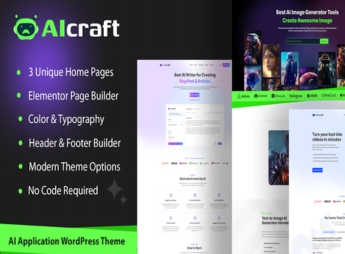
When a company needs to launch an AI application website, AIcraft structures WordPress pages with chatbot interfaces, prompt-based content generators and results galleries, all integrated with APIs such as ChatGPT and with ready-made demos for customization. Designed for tech startups, digital agencies and independent developers, the theme eliminates the need to program complex interfaces from scratch, speeding up the launch of new tools without relying on a developer.
Main Features of AIcraft
- Ready-made demos for AI applications
Start the site with pre-built landing page layouts and AI tool panel dashboards. - Chatbot API integration
Connect the site to AI services for automatic responses via shortcode or widget. - Content generation blocks
Offer prompt fields, parameter selection and result display on editable pages. - Smart forms
Collect user data and route it for processing via API with integrated validation. - Dynamic result rendering
Show AI responses in real time without reloading the page, using AJAX.
Benefits of AIcraft
- Rapid deployment of AI tools
Launch AI application sites without building from scratch. - User engagement
Provide real-time interaction with chatbots and content generators. - No-code customization
Modify prompts, parameters and layout using the theme’s visual builder. - Scalability
Add new AI services easily with modular architecture.
Who is AIcraft for?
- Tech startups looking to launch AI applications quickly.
- Digital agencies building sites for clients in the AI sector.
- Independent developers creating content generation tools with WordPress.
How to download AIcraft
AIcraft is available for download here on Ultrapack. After downloading the .zip file, install it in Appearance > Themes > Add New > Upload Theme, select the .zip and activate. The file is complete and ready for immediate installation.
With AIcraft, you build AI application sites by integrating chatbots, text generators and smart forms without backend coding. The theme is ideal for startups and agencies that want to offer AI-based services on WordPress, combining ready demos and full visual customization. A practical solution to turn WordPress into an AI content generation platform.
Frequently asked questions
Is AIcraft – AI Application & Generator WordPress Theme GPL-licensed?
Yes. AIcraft – AI Application & Generator WordPress Theme is distributed under the GPL (GNU General Public License). You may legally use, modify and redistribute it on as many sites as you want.
Can I use AIcraft – AI Application & Generator WordPress Theme on multiple sites?
Yes. You can install AIcraft – AI Application & Generator WordPress Theme on as many sites as you want. Only automatic updates through Ultrapack Auto Updater have a limit: from 3 to 80 sites, depending on the plan.
How much does AIcraft – AI Application & Generator WordPress Theme cost at Ultrapack?
AIcraft – AI Application & Generator WordPress Theme costs US$2.99 as a single purchase, and it is also included in the subscription plans starting at US$12/mo (VIP I).
Does AIcraft – AI Application & Generator WordPress Theme include updates?
Yes. The current version of AIcraft – AI Application & Generator WordPress Theme is 1.0.3, published at Ultrapack on Jul 1, 2026. Subscribers update straight from the WordPress dashboard with UAU (Ultrapack Auto Updater).
Is AIcraft – AI Application & Generator WordPress Theme scanned before publication?
Yes. Every version of AIcraft – AI Application & Generator WordPress Theme goes through a malware scan (ClamAV and YARA rules, at UltraHub) before it is published.
How to install
Automatic updates: this item is updated by the Ultrapack Auto Updater. With it installed, the new version shows up in your dashboard like any other WordPress update (how to set it up).
The file on this page is the full package the author publishes on the marketplace: the theme, the documentation and sometimes the plugins it uses. Do not upload that file through the dashboard, because WordPress cannot find the theme inside it. What gets installed is the theme folder, which is in there.
- Download the file
elements-aicraft-ai-application-generator-wordpress-theme.zipand extract it on your computer. - If the extracted package contains another ZIP file named after the theme, extract that ZIP as well before looking for the theme folder.
- Look for the folder that has the
style.cssfile and thescreenshot.pngimage. That is the theme folder. - Zip that folder only. Do not use RAR.
- In the WordPress dashboard, go to Appearance > Themes > Add New > Upload Theme and upload the ZIP file you just created.
- Click Activate.
- Uploading the whole package is the most common mistake when installing a theme. WordPress answers that no valid theme was found, and nothing is installed.
- If after extracting you already find
style.cssandscreenshot.pngin the main folder, that folder is the theme folder. - The rest of the package belongs to the author: documentation, demo files and, in some themes, the plugins it asks for during setup.
Stuck on a step? Open a ticket telling us which one you stopped at.