

 UAU Ready
Description
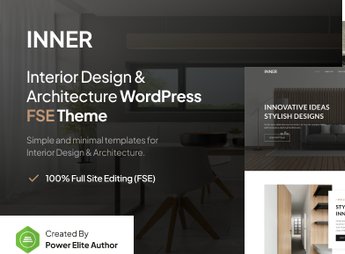
Inner is a theme aimed at architects, interior designers, and landscaping studios, with native WordPress Full Site Editing and advanced blocks provided by the Gutenverse plugin. Built on React, it allows editing header, footer, homepage, posts, archives, and 404 pages directly in the block editor, eliminating the need for third-party visual builders to create portfolios and institutional websites for the sector.
Main Features
- Native Full Site Editing
Edit header, footer, templates, and archives using the WordPress block editor, without external plugins. - Integrated Gutenverse blocks
Adds advanced design blocks built on React for fluid and interactive layouts. - One-click demo import
Installs ready-made templates focused on interiors, architecture, real estate, and furniture in just a few steps. - Page template library
Includes editable models for single post, archive, 404 page, and front page of the site. - Asynchronous and synchronous template parts
Allows reusing synchronized sections across pages or varying content independently.
Benefits of Inner
- Portfolio-focused presentation
Visual structure designed to highlight photography of projects, environments, and completed works. - Code-free editing
Freelancers update the site without relying on a developer to change layout or typography. - Loading performance
Block-based code results in lightweight, responsive pages on any device. - SEO compatibility
Clean structure works well with Yoast SEO, increasing organic visibility of newly published projects.
Who Is It For?
- Architects and architecture offices needing to showcase residential and commercial project portfolios.
- Interior designers and decoration professionals presenting finished environments.
- Landscaping studios, construction companies, and furniture businesses seeking an institutional digital presence.
Focused on visual segments such as architecture, decoration, and landscaping, Inner combines Full Site Editing, Gutenverse blocks, and an importable demo library in a single installation. The proposal serves professionals who need a solid visual identity to present projects without relying on heavy builders, keeping the editing workflow within the WordPress dashboard itself.
Frequently asked questions
Is Inner – Interior Design & Architecture WordPress Theme GPL-licensed?
Yes. Inner – Interior Design & Architecture WordPress Theme is distributed under the GPL (GNU General Public License). You may legally use, modify and redistribute it on as many sites as you want.
Can I use Inner – Interior Design & Architecture WordPress Theme on multiple sites?
Yes. You can install Inner – Interior Design & Architecture WordPress Theme on as many sites as you want. Only automatic updates through Ultrapack Auto Updater have a limit: from 3 to 80 sites, depending on the plan.
How much does Inner – Interior Design & Architecture WordPress Theme cost at Ultrapack?
Inner – Interior Design & Architecture WordPress Theme costs US$2.99 as a single purchase, and it is also included in the subscription plans starting at US$12/mo (VIP I).
Does Inner – Interior Design & Architecture WordPress Theme include updates?
Yes. The current version of Inner – Interior Design & Architecture WordPress Theme is 1.0.4, published at Ultrapack on Sep 26, 2026. Subscribers update straight from the WordPress dashboard with UAU (Ultrapack Auto Updater).
Is Inner – Interior Design & Architecture WordPress Theme scanned before publication?
Yes. Every version of Inner – Interior Design & Architecture WordPress Theme goes through a malware scan (ClamAV and YARA rules, at UltraHub) before it is published.
How to install
Automatic updates: this item is updated by the Ultrapack Auto Updater. With it installed, the new version shows up in your dashboard like any other WordPress update (how to set it up).
The file on this page is the developer’s full package, with documentation, demos and plugins. Do not upload that file to WordPress. The theme comes ready inside it, as a ZIP of its own, and that is the one you upload.
- Download the file
elements-inner-interior-design-architecture-wp-theme.zipand extract it on your computer. - Look inside the extracted files for the file
inner-bundle/inner.zip. - In the WordPress dashboard, go to Appearance > Themes > Add New > Upload Theme.
- Select that file and click Install Now.
- Click Activate.
- There is nothing to zip. The ZIP inside the package is already in the format WordPress accepts.
- Uploading the whole package is the most common mistake when installing a theme: WordPress answers that no valid theme was found, and nothing is installed.
- The rest of the package belongs to the author: documentation, demo files and, in some themes, the plugins it asks for during setup.
Stuck on a step? Open a ticket telling us which one you stopped at.


