

Description
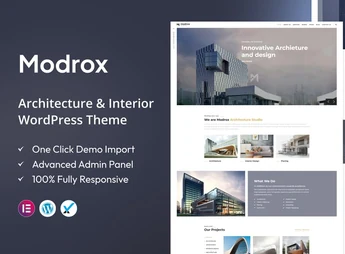
Modrox is a theme designed for architecture offices, interior design studios, and construction companies, with project pages, portfolio galleries, and testimonial sections ready to edit in Elementor. The layout organizes projects in visual showcases with parallax effects and keeps faithful readability on Retina screens, serving those who need to present works, floor plans, and spaces with emphasis on the images.
Key Features of Modrox
- Compatibility with Elementor
Lets you edit sections, columns, and blocks by drag-and-drop, without touching code. - Project and detail pages
Listing structure for works and internal pages dedicated to each individual project. - Portfolio gallery
Organizes photos of spaces, facades, and interiors into navigable visual grids. - Parallax effects
Applies layered scrolling in highlight sections to add depth to images. - Responsive and Retina-ready layout
Adapts content to phones and tablets and displays crisp images on high-density screens.
Benefits of Modrox
- Faster portfolio online
Project pages are already set up, leaving only the task of replacing text and photos of the works. - Editing autonomy
Layout adjustments happen in the visual editor, without needing a developer for every change. - Valued image presentation
Spacious galleries and Retina sharpness highlight finishes, materials, and space details. - Credibility with testimonials
Testimonial sections bring together client feedback alongside delivered projects.
Who Is Modrox Intended For?
- Anyone who designs residential, commercial, and renovation projects and needs to showcase the works in an online portfolio.
- Interior design studios that want to publish photographed spaces with spacious galleries.
- Construction companies and project firms looking for an institutional website with detailed project pages.
- You who already work with Elementor and want a theme ready for the architecture niche.
How to Download Modrox
The Modrox is available for download here on Ultrapack. After downloading the .zip file, install it in Appearance > Themes > Add New > Upload theme, select the file, and activate it. After activation, the layout options and theme sections start appearing in the panel and the page editor.
Focused on the architecture and interiors niche, Modrox brings together what this type of website needs: a project showcase, internal pages per work, a gallery of spaces, and a blog for technical content. Editing with Elementor keeps section control in the hands of whoever publishes, shortening the cycle between photographing a work and putting it online.
Frequently asked questions
Is Modrox – Architecture and Interior WordPress Theme GPL-licensed?
Yes. Modrox – Architecture and Interior WordPress Theme is distributed under the GPL (GNU General Public License). You may legally use, modify and redistribute it on as many sites as you want.
Can I use Modrox – Architecture and Interior WordPress Theme on multiple sites?
Yes. You can install Modrox – Architecture and Interior WordPress Theme on as many sites as you want. Only automatic updates through Ultrapack Auto Updater have a limit: from 3 to 80 sites, depending on the plan.
How much does Modrox – Architecture and Interior WordPress Theme cost at Ultrapack?
Modrox – Architecture and Interior WordPress Theme costs US$2.99 as a single purchase, and it is also included in the subscription plans starting at US$12/mo (VIP I).
Does Modrox – Architecture and Interior WordPress Theme include updates?
Yes. The current version of Modrox – Architecture and Interior WordPress Theme is 2.7, published at Ultrapack on Aug 25, 2026. Subscribers update straight from the WordPress dashboard with UAU (Ultrapack Auto Updater).
Is Modrox – Architecture and Interior WordPress Theme scanned before publication?
Yes. Every version of Modrox – Architecture and Interior WordPress Theme goes through a malware scan (ClamAV and YARA rules, at UltraHub) before it is published.
What changed in this version
Version 2.7 2023-09-05
- 1) Included Elementor Page builder
Version 2.6 2023-01-08
- 1) All Plugins are up to date.
Version 2.5 2022-10-28
- 1) Compatible with PHP 8.0 or Higher versions.
- 2) All Plugins are up to date.
Version 2.4 2022-03-11
- 1) kingcomposer not installing issue fixed.
Version 2.3 2021-12-09
- 1) All plugins are up to date.
Release notes published by the developer.
How to install
Updates: manual. When a new version comes out, download it on this same page and upload it over the old one; WordPress asks whether you want to replace the current version.
The file on this page is the developer’s full package, with documentation, demos and plugins. Do not upload that file to WordPress. The theme comes ready inside it, as a ZIP of its own, and that is the one you upload.
- Download the file
elements-modrox-architecture-and-interior-wordpress-theme.zipand extract it on your computer. - Look inside the extracted files for the file
modrox-wp-full/modrox.zip. - In the WordPress dashboard, go to Appearance > Themes > Add New > Upload Theme.
- Select that file and click Install Now.
- Click Activate.
- There is nothing to zip. The ZIP inside the package is already in the format WordPress accepts.
- Uploading the whole package is the most common mistake when installing a theme: WordPress answers that no valid theme was found, and nothing is installed.
- The rest of the package belongs to the author: documentation, demo files and, in some themes, the plugins it asks for during setup.
- The package also includes the plugin the theme uses, in
revslider.zip. Upload this file in Plugins > Add New > Upload Plugin after activating the theme.
Stuck on a step? Open a ticket telling us which one you stopped at.


