

 UAU Ready
Description
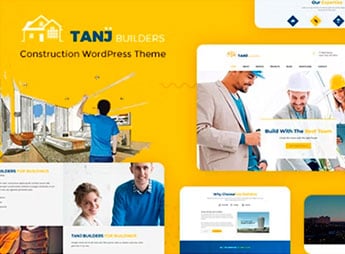
With the Tanj, you create professional websites for the civil construction and renovation sector, with ready-made layouts for construction companies, architects, and service providers. The theme transforms WordPress into a visual platform to showcase projects, services, and portfolios, eliminating the need for code editing during page construction.
Key Features of the Tanj
- Construction-focused layouts
Predefined structures to display projects, quotes, and client testimonials. - Full visual customization
Adjust colors, typography, and headers directly in the WordPress dashboard without additional plugins. - Integrated project gallery
Organize images of completed projects in responsive grids with lightbox effect. - Featured services section
Dedicated area to list specialties such as electrical, plumbing, and carpentry. - Ready contact form
Optimized fields for quote requests and scheduling technical visits.
Benefits of the Tanj
- Professional presentation
Make a good impression with a site that reflects the quality of your services. - Time-saving creation
Avoid starting from scratch; ready-made demos accelerate site launch. - Ease for the client
Allow visitors to request quotes and view your portfolio with just a few clicks. - Niche adaptation
The theme adapts to different profiles, from small repairs to large developers.
Who Tanj is Designed For?
- Construction companies that want to showcase ongoing projects and delivered works.
- Architects and engineers who need a digital portfolio with an image gallery.
- Service providers such as electricians, plumbers, and carpenters who want to promote their specialties.
How to Download the Tanj
Tanj is available for download here on Ultrapack. After downloading the .zip file, install it in Appearance > Themes > Add New > Upload Theme, select the .zip and activate. The theme appears immediately in the dashboard, ready to be configured with the included demos.
Combining a robust visual presentation and features tailored to the construction audience, Tanj enables industry professionals to build their sites without relying on developers. The result is an institutional page that showcases projects, facilitates client contact, and conveys confidence, all based on a WordPress foundation optimized for the niche.
Frequently asked questions
Is Tanj – Construction WordPress Theme GPL-licensed?
Yes. Tanj – Construction WordPress Theme is distributed under the GPL (GNU General Public License). You may legally use, modify and redistribute it on as many sites as you want.
Can I use Tanj – Construction WordPress Theme on multiple sites?
Yes. You can install Tanj – Construction WordPress Theme on as many sites as you want. Only automatic updates through Ultrapack Auto Updater have a limit: from 3 to 80 sites, depending on the plan.
How much does Tanj – Construction WordPress Theme cost at Ultrapack?
Tanj – Construction WordPress Theme costs US$2.99 as a single purchase, and it is also included in the subscription plans starting at US$12/mo (VIP I).
Does Tanj – Construction WordPress Theme include updates?
Yes. The current version of Tanj – Construction WordPress Theme is 3.5, published at Ultrapack on Aug 17, 2026. Subscribers update straight from the WordPress dashboard with UAU (Ultrapack Auto Updater).
Is Tanj – Construction WordPress Theme scanned before publication?
Yes. Every version of Tanj – Construction WordPress Theme goes through a malware scan (ClamAV and YARA rules, at UltraHub) before it is published.
What changed in this version
Version 3.5 2026.02.25
- Security: Fixed reflected XSS in section ID attribute.
- Updated: Outdated copies of some WooCommerce template files
- Fixed: Notice error
Version 3.4 2025.09.16
- Added: Security Improvements
Version 3.3 2025.08.02
- Premium plugins source updated
Version 3.2 2025.02.14
- Premium plugins source updated
- Compatible with the latest version of premium plugins listed
Version 3.1 2024.11.26
- Compatible: Latest WordPress Version
- Fixed : Warnings and deprecated errors
Release notes published by the developer.
How to install
Automatic updates: this item is updated by the Ultrapack Auto Updater. With it installed, the new version shows up in your dashboard like any other WordPress update (how to set it up).
The file on this page is the developer’s full package, with documentation, demos and plugins. Do not upload that file to WordPress. The theme comes ready inside it, as a ZIP of its own, and that is the one you upload.
- Download the file
elements-tanj-architecture-construction-wordpress-theme.zipand extract it on your computer. - Look inside the extracted files for the file
tanj-3.5.zip. - In the WordPress dashboard, go to Appearance > Themes > Add New > Upload Theme.
- Select that file and click Install Now.
- Click Activate.
- There is nothing to zip. The ZIP inside the package is already in the format WordPress accepts.
- Uploading the whole package is the most common mistake when installing a theme: WordPress answers that no valid theme was found, and nothing is installed.
- The rest of the package belongs to the author: documentation, demo files and, in some themes, the plugins it asks for during setup.
- The file
premium-plugins.zipis not an installable plugin: it's a package. Extract this file and upload each plugin inside it to Plugins > Add New > Upload Plugin.
Stuck on a step? Open a ticket telling us which one you stopped at.



