

 UAU Ready
Description
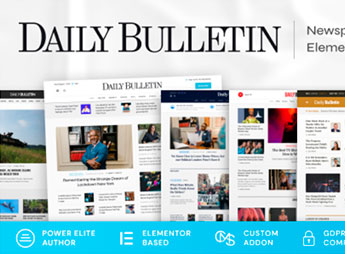
The Daily Bulletin allows the creation of news and digital magazine websites for publishers, newspapers, and content portals, combining pre-built layouts with featured sections, article grid, editorial area, and support for galleries and videos, all configurable via the WordPress customizer. Ideal for those who need to publish daily editorial content frequently, the theme foregoes code editing, offers ready demos and adjustable typography, as well as widgets for newsletters and social networks, with clean navigation, responsive design, and optimized loading.
Key Features of the Daily Bulletin
- Layouts for News and Magazines
Pre-defined structure with headline, editorial, and category sections. - Featured and Article Grid
Display of featured articles and a posts grid for intuitive navigation. - Customization via Customizer
Adjust colors, typography, and layout in real-time without editing code. - Support for Galleries and Videos
Embed images, galleries, and videos directly in articles and pages. - Social Media Widgets
Add social media feeds, newsletter, and other widgets in the sidebar.
Benefits of the Daily Bulletin
- Rapid Content Publishing
Build and publish articles quickly with pre-formatted layouts and ready demos. - Enhanced Reading Experience
Responsive design and adjustable typography ensure visual comfort on any device. - Visual Professionalism
Present news with visual emphasis and clear hierarchy, conveying credibility. - Reader Engagement
Social media and newsletter widgets facilitate audience retention and growth.
Who is the Daily Bulletin for?
- Editors and journalists who publish daily content in news outlets or digital magazines.
- Professional bloggers who want a magazine structure with categories and featured articles.
- Content portals that need a robust platform to manage multiple authors and editorial sections.
How to Download the Daily Bulletin
The Daily Bulletin is available for download here on Ultrapack. After downloading the .zip file, install it in Appearance > Themes > Add New > Upload Theme, select the file and activate. The theme is complete and ready for immediate installation with demos included.
With a focus on news and magazine sites, the Daily Bulletin offers a combination of ready editorial layouts and visual customization that speeds content publishing. Its demo and integrated widget system reduces set-up time, allowing editors and bloggers to maintain a professional portal with minimal technical intervention. It is a direct solution for those who need a WordPress theme specialized in daily and categorized content.
Frequently asked questions
Is Daily Bulletin – Magazine & Newspaper WordPress Theme GPL-licensed?
Yes. Daily Bulletin – Magazine & Newspaper WordPress Theme is distributed under the GPL (GNU General Public License). You may legally use, modify and redistribute it on as many sites as you want.
Can I use Daily Bulletin – Magazine & Newspaper WordPress Theme on multiple sites?
Yes. You can install Daily Bulletin – Magazine & Newspaper WordPress Theme on as many sites as you want. Only automatic updates through Ultrapack Auto Updater have a limit: from 3 to 80 sites, depending on the plan.
How much does Daily Bulletin – Magazine & Newspaper WordPress Theme cost at Ultrapack?
Daily Bulletin – Magazine & Newspaper WordPress Theme costs US$2.99 as a single purchase, and it is also included in the subscription plans starting at US$12/mo (VIP I).
Does Daily Bulletin – Magazine & Newspaper WordPress Theme include updates?
Yes. The current version of Daily Bulletin – Magazine & Newspaper WordPress Theme is 1.1.1, published at Ultrapack on Mar 26, 2025. Subscribers update straight from the WordPress dashboard with UAU (Ultrapack Auto Updater).
Is Daily Bulletin – Magazine & Newspaper WordPress Theme scanned before publication?
Yes. Every version of Daily Bulletin – Magazine & Newspaper WordPress Theme goes through a malware scan (ClamAV and YARA rules, at UltraHub) before it is published.
What are the requirements for the theme Daily Bulletin – Magazine & Newspaper WordPress Theme?
Requires PHP 7.4 or higher. Tested up to WordPress 6.6.
What changed in this version
Version 1.1.1 2025-03-04
- Tweak: Importer optimization.
- Bug Fix: Fixed animation in page preloader.
Version 1.1.0 2025-01-22
- Tweak: Improve importer.
- Tweak: Improve security.
- Bug Fix: Fixed translations in theme.
Version 1.0.16 2024-12-26
- Tweak: Improved demo content import process.
- Bug Fix: Fixed responsive for latest events.
- Bug Fix: Fixed elementor editor for user roles.
- Bug Fix: Fixed Forminator post types registration.
Version 1.0.15 2024-10-22
- Tweak: Added logger for theme.
- Tweak: Optimized installer.
- Tweak: Optimized scripts running.
- Tweak: Replaced unsafe methods.
- Tweak: Added message for plugins page in installer.
- Bug Fix: Fixed plugins redirection on installation.
Version 1.0.14 2024-10-09
- Tweak: Added caching in API requests for optimization.
- Tweak: Fixed updating default colors in customize event calendar settings when theme uses rgba color format.
- Tweak: Add possibility to loading installation log.
- Bux Fix: Fixed woocommerce products import.
- Bug Fix: Fixed duplication on import.
Release notes published by the developer.
How to install
Automatic updates: this item is updated by the Ultrapack Auto Updater. With it installed, the new version shows up in your dashboard like any other WordPress update (how to set it up).
The file on this page is the developer’s full package, with documentation, demos and plugins. Do not upload that file to WordPress. The theme comes ready inside it, as a ZIP of its own, and that is the one you upload.
- Download the file
elements-daily-bulletin-magazine-newspaper-theme.zipand extract it on your computer. - Look inside the extracted files for the file
daily-bulletin.zip. - In the WordPress dashboard, go to Appearance > Themes > Add New > Upload Theme.
- Select that file and click Install Now.
- Click Activate.
Requirements: Requires PHP 7.4 or higher. Tested up to WordPress 6.6.
- There is nothing to zip. The ZIP inside the package is already in the format WordPress accepts.
- Uploading the whole package is the most common mistake when installing a theme: WordPress answers that no valid theme was found, and nothing is installed.
- The rest of the package belongs to the author: documentation, demo files and, in some themes, the plugins it asks for during setup.
- The package also includes the plugin the theme uses, in
revslider.zip. Upload this file in Plugins > Add New > Upload Plugin after activating the theme.
Stuck on a step? Open a ticket telling us which one you stopped at.


