UAU Ready
Description
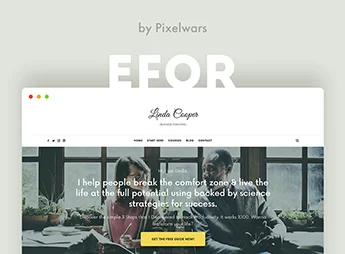
Editor allows the creation of personal blogs and magazines with an integrated image gallery for bloggers, travelers, and lifestyle enthusiasts who want a visually appealing website. Featuring a responsive layout, drag-and-drop customization panel, and support for importable demos, the theme eliminates manual code adjustments and speeds up the creation of sites ready for publication.
Main Features of Editor
- Optimized responsive layout
Automatically adapts to smartphones, tablets, and desktops while maintaining readability. - Integrated image gallery
Organizes photos in grids and slideshows with caption and lightbox support. - Drag-and-drop customization panel
Changes colors, typography, and header visually without editing code. - Multiple post styles
Supports standard, gallery, video, and quote formats to vary content. - Customizable widgets
Adds sidebars with social networks, categories, and recent posts.
Benefits of Editor
- Modern and clean design
Attracts readers and highlights visual content with elegant typography and balanced spacing. - Time saving
Ready demos and visual customization remove the need for a developer. - Intuitive organization
Menus and widgets help categorize articles and galleries clearly. - Mobile-first experience
Ensures smooth navigation and adapted images on any device.
Who Is Editor Recommended For?
- Travel bloggers who want to showcase diaries with destination photos and interactive maps.
- Lifestyle content creators who need an elegant layout for daily articles and galleries.
- Amateur or professional photographers who want a site with integrated portfolio and blog.
How to Download Editor
Editor is available for download here at Ultrapack. After downloading the .zip file, install it by going to Appearance > Themes > Add New > Upload Theme, select the .zip, and activate it. The file is complete and ready for immediate installation.
Combining design focused on visual content and customization flexibility through ready demos and drag-and-drop panel, Editor is a solid choice for bloggers who want a personal or magazine site without sacrificing visual identity. Whether narrating trips, showcasing photography galleries, or sharing daily inspirations, the theme offers the ideal structure to engage readers with well-organized images and texts.
Frequently asked questions
Is Editor – A WordPress Theme for Bloggers GPL-licensed?
Yes. Editor – A WordPress Theme for Bloggers is distributed under the GPL (GNU General Public License). You may legally use, modify and redistribute it on as many sites as you want.
Can I use Editor – A WordPress Theme for Bloggers on multiple sites?
Yes. You can install Editor – A WordPress Theme for Bloggers on as many sites as you want. Only automatic updates through Ultrapack Auto Updater have a limit: from 3 to 80 sites, depending on the plan.
How much does Editor – A WordPress Theme for Bloggers cost at Ultrapack?
Editor – A WordPress Theme for Bloggers costs US$2.99 as a single purchase, and it is also included in the subscription plans starting at US$12/mo (VIP I).
Does Editor – A WordPress Theme for Bloggers include updates?
Yes. The current version of Editor – A WordPress Theme for Bloggers is 1.6.1, published at Ultrapack on Aug 13, 2023. Subscribers update straight from the WordPress dashboard with UAU (Ultrapack Auto Updater).
Is Editor – A WordPress Theme for Bloggers scanned before publication?
Yes. Every version of Editor – A WordPress Theme for Bloggers goes through a malware scan (ClamAV and YARA rules, at UltraHub) before it is published.
How to install
Automatic updates: this item is updated by the Ultrapack Auto Updater. With it installed, the new version shows up in your dashboard like any other WordPress update (how to set it up).
The file on this page is the developer’s full package, with documentation, demos and plugins. Do not upload that file to WordPress. The theme comes ready inside it, as a ZIP of its own, and that is the one you upload.
- Download the file
elements-editor-blog-a-wordpress-blog-theme-for-bloggers.zipand extract it on your computer. - Look inside the extracted files for the file
editor-package-v1.6.1/Theme/1 - Parent Theme/Editor v1.6.1/editor-wp.zip. - In the WordPress dashboard, go to Appearance > Themes > Add New > Upload Theme.
- Select that file and click Install Now.
- Click Activate.
- There is nothing to zip. The ZIP inside the package is already in the format WordPress accepts.
- Uploading the whole package is the most common mistake when installing a theme: WordPress answers that no valid theme was found, and nothing is installed.
- The rest of the package belongs to the author: documentation, demo files and, in some themes, the plugins it asks for during setup.
Stuck on a step? Open a ticket telling us which one you stopped at.