 UAU Ready
Description
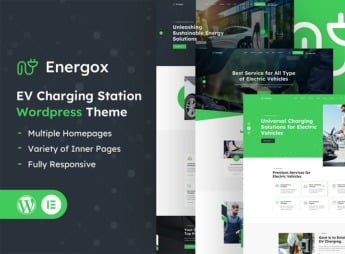
With Energox, you build professional websites for electric vehicle charging stations, mobility operators, and energy companies, combining interactive location maps and ready service pages. The theme is geared toward those who want to showcase charging points, operating hours, and sustainable differentiators without editing code.
Main Features of Energox
- Interactive stations map
Integrates maps to display the exact location of charging points and access routes. - Predefined service pages
Includes layouts to describe charger types, speeds, and availability. - Complete visual customization
Allows you to adjust colors, typography, and layout via a visual builder without technical knowledge. - Integrated contact form
Captures client questions and requests directly on the site with field validation. - Responsive and optimized design
Ensures smooth navigation on mobile phones, tablets, and desktops with fast loading.
Benefits of Energox
- Professional online presence
Establishes credibility for charging stations with a modern, informative site. - Easy location
Drivers quickly find the nearest station with maps and directions. - Streamlined information management
Updates schedules, pricing, and charger status without developer help. - Attracting sustainable customers
Communicates the company’s ecological commitment and attracts environmentally conscious audience.
Who Is Energox Recommended For?
- Charging station operators who want to promote their charging points.
- Energy and electric mobility companies seeking an institutional digital presence.
- Entrepreneurs in the electric vehicle sector needing a site to attract drivers.
How to Download Energox
Energox is available for download here on Ultrapack. After downloading the .zip file, install it via Appearance > Themes > Add New > Upload Theme, select the .zip, and activate. The theme will be ready for immediate customization in the WordPress dashboard.
Energox provides a solid foundation for those operating in the electric charging market, combining location maps and ready service pages in a single WordPress theme. With it, you reduce development time and deliver a site that communicates trust, practicality, and innovation to drivers and partners in the sustainable sector.
Frequently asked questions
Is Energox – EV Charging Station WordPress Theme GPL-licensed?
Yes. Energox – EV Charging Station WordPress Theme is distributed under the GPL (GNU General Public License). You may legally use, modify and redistribute it on as many sites as you want.
Can I use Energox – EV Charging Station WordPress Theme on multiple sites?
Yes. You can install Energox – EV Charging Station WordPress Theme on as many sites as you want. Only automatic updates through Ultrapack Auto Updater have a limit: from 3 to 80 sites, depending on the plan.
How much does Energox – EV Charging Station WordPress Theme cost at Ultrapack?
Energox – EV Charging Station WordPress Theme costs US$2.99 as a single purchase, and it is also included in the subscription plans starting at US$12/mo (VIP I).
Does Energox – EV Charging Station WordPress Theme include updates?
Yes. The current version of Energox – EV Charging Station WordPress Theme is 1.3, published at Ultrapack on Sep 17, 2026. Subscribers update straight from the WordPress dashboard with UAU (Ultrapack Auto Updater).
Is Energox – EV Charging Station WordPress Theme scanned before publication?
Yes. Every version of Energox – EV Charging Station WordPress Theme goes through a malware scan (ClamAV and YARA rules, at UltraHub) before it is published.
How to install
Automatic updates: this item is updated by the Ultrapack Auto Updater. With it installed, the new version shows up in your dashboard like any other WordPress update (how to set it up).
The file on this page is already the theme, ready to upload to WordPress.
- Download the file
elements-energox-ev-charging-station-wordpress-theme.zip. - In the WordPress dashboard, go to Appearance > Themes > Add New > Upload Theme.
- Select the file
elements-energox-ev-charging-station-wordpress-theme.zipand click Install Now. - Click Activate.
- If WordPress answers that no valid theme was found, the file is the developer’s full package and the theme is in a folder inside it. Extract the file on your computer, look for the folder that has
style.cssandscreenshot.png, zip that folder only and upload it again.
Stuck on a step? Open a ticket telling us which one you stopped at.