

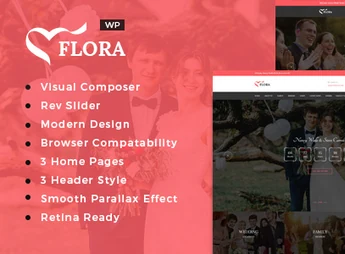
Description
Flora builds wedding, engagement and commemorative event websites using the Visual Composer visual builder, with a fullscreen slider via Slider Revolution and demo content ready for import in one click. The theme is fully responsive, optimized for retina screens and compatible with Contact Form 7, Gravity Forms, and WPML, catering to wedding photographers, officiants, and couples who plan invitation and online RSVP pages.
Key Features of Flora
- Visual Composer visual builder
Builds pages by dragging and dropping without needing to edit code. - Integrated Slider Revolution
Creates full-screen sliders with transitions and animated background images. - Form Compatibility
Integrates with Contact Form 7 and Gravity Forms for contact and confirmations. - WPML Support
Allows the site to be translated to accommodate guests of different languages. - One-Click Installation
Imports demo content and quickly reproduces ready layouts.
Benefits of Flora
- Quick Site Publication
Reduces setup time by importing demos and activating ready layouts. - Reach International Guests
Provides content in multiple languages via WPML. - Contact and RSVP Centralization
Consolidates confirmation of attendance forms onto a single page. - Sharpness on Any Screen
Maintains crisp photos and slides on retina monitors and mobile devices.
Who is Flora Recommended For?
- Couples who plan their wedding and want to publish invitation and online RSVP.
- Officiants and wedding planners who showcase a portfolio of organized events.
- Wedding photographers who display photo albums and capture contact of new clients.
How to Download Flora
The Flora is available for download here on Ultrapack. After downloading the .zip file, go to Appearance > Themes > Add New > Upload Theme, select the file and activate the theme; then import demo content to reproduce ready wedding layouts.
Flora serves those who organize wedding and engagement celebrations without relying on development agencies, bringing together a visual builder, fullscreen slider, and contact forms into a single installation. The combination of child theme, customizable CSS, and more than 600 Google fonts covers everything from simple invitations to full ceremonial pages, maintaining visual consistency across any browser or device.
Frequently asked questions
Is Flora – WordPress Wedding Theme GPL-licensed?
Yes. Flora – WordPress Wedding Theme is distributed under the GPL (GNU General Public License). You may legally use, modify and redistribute it on as many sites as you want.
Can I use Flora – WordPress Wedding Theme on multiple sites?
Yes. You can install Flora – WordPress Wedding Theme on as many sites as you want. Only automatic updates through Ultrapack Auto Updater have a limit: from 3 to 80 sites, depending on the plan.
How much does Flora – WordPress Wedding Theme cost at Ultrapack?
Flora – WordPress Wedding Theme costs US$2.99 as a single purchase, and it is also included in the subscription plans starting at US$12/mo (VIP I).
Does Flora – WordPress Wedding Theme include updates?
Yes. The current version of Flora – WordPress Wedding Theme is 1.7, published at Ultrapack on Aug 19, 2026. Subscribers update straight from the WordPress dashboard with UAU (Ultrapack Auto Updater).
Is Flora – WordPress Wedding Theme scanned before publication?
Yes. Every version of Flora – WordPress Wedding Theme goes through a malware scan (ClamAV and YARA rules, at UltraHub) before it is published.
How to install
Updates: manual. When a new version comes out, download it on this same page and upload it over the old one; WordPress asks whether you want to replace the current version.
The file on this page is the developer’s full package, with documentation, demos and plugins. Do not upload that file to WordPress. The theme comes ready inside it, as a ZIP of its own, and that is the one you upload.
- Download the file
elements-flora-wedding-wordpress-theme.zipand extract it on your computer. - Look inside the extracted files for the file
flora-wp-full/flora.zip. - In the WordPress dashboard, go to Appearance > Themes > Add New > Upload Theme.
- Select that file and click Install Now.
- Click Activate.
- There is nothing to zip. The ZIP inside the package is already in the format WordPress accepts.
- Uploading the whole package is the most common mistake when installing a theme: WordPress answers that no valid theme was found, and nothing is installed.
- The rest of the package belongs to the author: documentation, demo files and, in some themes, the plugins it asks for during setup.
Stuck on a step? Open a ticket telling us which one you stopped at.


