 UAU Ready
Description
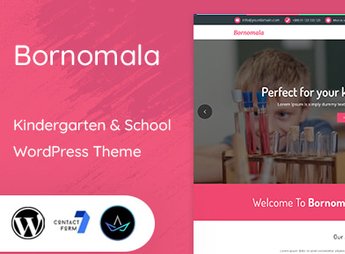
With Bornomala, you build websites for early childhood schools, nurseries, and extracurricular activity programs, featuring a playful layout and navigation designed for parents and caretakers. The theme organizes sections presenting the school, classes, events, and photo galleries without requiring programming expertise.
Key Features of Bornomala
- Child-friendly responsive layout
Responsive design for tablets and smartphones, with rounded borders and colorful icons that attract children and families. - Class and teacher pages
Ready-made structure to display educator profiles, schedules, and description of each class with photos and text. - Integrated event calendar
Listing of celebrations, meetings, and excursions with visual highlights in the footer or on the homepage. - Photo and video gallery
Area to record daily activities, outings, and performances with caption options and category-based organization. - Contact and enrollment fields
Native forms for visit requests, pre-enrollment, and direct messages to the office, without mandatory extra plugins.
Benefits of Bornomala
- Fast site creation
Sample data and preconfigured pages reduce the setup time from weeks to minutes. - Professional school presentation
Clean and colorful layout conveys confidence and warmth, a decisive factor for enrolling new students. - Simplified parent communication
Centralizing events, notices, and photos in one place reduces reliance on messaging groups. - No technical knowledge needed for updates
The WordPress dashboard allows you to change text, images, and schedules directly, without contacting a developer.
Who Is Bornomala Recommended For?
- Early childhood schools that need a playful-looking site but still maintain clear navigation for adults.
- Nurseries and baby nurseries that wish to publish photos of the little ones, menus, and internal notices in an organized manner.
- Extracurricular activity centers (tutoring, arts, sports) that want to promote schedules and teachers on dedicated pages.
How to Download Bornomala
Bornomala is available for download here on Ultrapack. After downloading the .zip file, go to Appearance > Themes > Add New > Upload Theme, select the .zip, and click Install Now. After installation, activate the theme and it will be ready to receive your school’s content.
With a look that blends vibrant colors and friendly typography, Bornomala turns WordPress into a full portal for early learning institutions. Teachers, coordinators, and parents find information on classes, events, and enrollment in a digital environment that strengthens the bond between school and family.
Frequently asked questions
Is Bornomala – Kindergarten & School WordPress Theme GPL-licensed?
Yes. Bornomala – Kindergarten & School WordPress Theme is distributed under the GPL (GNU General Public License). You may legally use, modify and redistribute it on as many sites as you want.
Can I use Bornomala – Kindergarten & School WordPress Theme on multiple sites?
Yes. You can install Bornomala – Kindergarten & School WordPress Theme on as many sites as you want. Only automatic updates through Ultrapack Auto Updater have a limit: from 3 to 80 sites, depending on the plan.
How much does Bornomala – Kindergarten & School WordPress Theme cost at Ultrapack?
Bornomala – Kindergarten & School WordPress Theme costs US$2.99 as a single purchase, and it is also included in the subscription plans starting at US$12/mo (VIP I).
Does Bornomala – Kindergarten & School WordPress Theme include updates?
Yes. The current version of Bornomala – Kindergarten & School WordPress Theme is 2.1, published at Ultrapack on Sep 14, 2026. Subscribers update straight from the WordPress dashboard with UAU (Ultrapack Auto Updater).
Is Bornomala – Kindergarten & School WordPress Theme scanned before publication?
Yes. Every version of Bornomala – Kindergarten & School WordPress Theme goes through a malware scan (ClamAV and YARA rules, at UltraHub) before it is published.
What are the requirements for the theme Bornomala – Kindergarten & School WordPress Theme?
Requires WordPress 6.0 or higher and PHP 7.4 or higher. Tested up to WordPress 7.1.
How to install
Automatic updates: this item is updated by the Ultrapack Auto Updater. With it installed, the new version shows up in your dashboard like any other WordPress update (how to set it up).
The file on this page is the developer’s full package, with documentation, demos and plugins. Do not upload that file to WordPress. The theme comes ready inside it, as a ZIP of its own, and that is the one you upload.
- Download the file
elements-bornomala-kindergarten-school-wordpress-theme.zipand extract it on your computer. - Look inside the extracted files for the file
bornomala.zip. - In the WordPress dashboard, go to Appearance > Themes > Add New > Upload Theme.
- Select that file and click Install Now.
- Click Activate.
Requirements: Requires WordPress 6.0 or higher and PHP 7.4 or higher. Tested up to WordPress 7.1.
- There is nothing to zip. The ZIP inside the package is already in the format WordPress accepts.
- Uploading the whole package is the most common mistake when installing a theme: WordPress answers that no valid theme was found, and nothing is installed.
- The rest of the package belongs to the author: documentation, demo files and, in some themes, the plugins it asks for during setup.
Stuck on a step? Open a ticket telling us which one you stopped at.