

 UAU Ready
Description
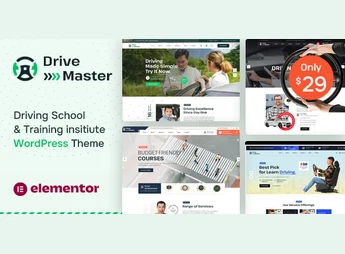
Drive Master allows creating websites for driving schools, driving instructors, and vehicle training centers using the Elementor visual builder, with four ready-to-import demos in one click and a library of over 600 font families from Google Fonts. The theme serves those who need to showcase courses, class schedules, and student testimonials, featuring advanced typography, wide and boxed layouts, as well as WPML compatibility for driving schools that serve multilingual audiences.
Main Features of Drive Master
- Elementor visual editor
Builds course pages, classes, and testimonials by dragging and dropping, without editing code. - One-click demo import
Installs any of the four demos with content, images, and sliders already configured. - Typography with Google Fonts
Opens a panel with over 600 font families to adjust site headings and texts. - Multilingual support via WPML
Integrates with the WPML plugin to publish course pages in more than one language. - Wide and boxed layouts with unlimited sidebars
Switches between full-width and centered box layouts, with a full-screen background slider on the homepage.
Benefits of Drive Master
- Less dependence on a developer
The visual builder removes the need for code to adjust course and class pages. - Site ready in fewer steps
The ready demos reduce the effort of building layouts, images, and texts from scratch. - Reach students in other languages
WPML support expands class promotion to multilingual audiences. - Consistent visual identity
The typography and color panel keeps the same standard across all site pages.
Who is Drive Master For?
- Driving schools that need to publish course catalogs, classes, and class schedules.
- Independent driving instructors who want a dedicated page to attract students.
- Vehicle training centers that serve students in more than one language.
How to Download Drive Master
Drive Master is available for download here on Ultrapack. After downloading the .zip file, install it at Appearance > Themes > Add New > Upload theme, select the file, and activate it. The four demos will then appear on the import panel for quick site setup.
The theme serves driving schools and training centers that need to publish course catalogs, class schedules, and testimonials without relying on a developer, maintaining compatibility with WordPress 5.9 through 7.0 and major browsers (Chrome, Firefox, Safari, Edge). Integration with Contact Form 7 covers lead capture from students interested in scheduling classes, closing the cycle between institutional presentation and conversion.
Frequently asked questions
Is Drive Master – Driving School WordPress Theme GPL-licensed?
Yes. Drive Master – Driving School WordPress Theme is distributed under the GPL (GNU General Public License). You may legally use, modify and redistribute it on as many sites as you want.
Can I use Drive Master – Driving School WordPress Theme on multiple sites?
Yes. You can install Drive Master – Driving School WordPress Theme on as many sites as you want. Only automatic updates through Ultrapack Auto Updater have a limit: from 3 to 80 sites, depending on the plan.
How much does Drive Master – Driving School WordPress Theme cost at Ultrapack?
Drive Master – Driving School WordPress Theme costs US$2.99 as a single purchase, and it is also included in the subscription plans starting at US$12/mo (VIP I).
Does Drive Master – Driving School WordPress Theme include updates?
Yes. The current version of Drive Master – Driving School WordPress Theme is 1.0, published at Ultrapack on Aug 12, 2026. Subscribers update straight from the WordPress dashboard with UAU (Ultrapack Auto Updater).
Is Drive Master – Driving School WordPress Theme scanned before publication?
Yes. Every version of Drive Master – Driving School WordPress Theme goes through a malware scan (ClamAV and YARA rules, at UltraHub) before it is published.
How to install
Automatic updates: this item is updated by the Ultrapack Auto Updater. With it installed, the new version shows up in your dashboard like any other WordPress update (how to set it up).
The file on this page is the developer’s full package, with documentation, demos and plugins. Do not upload that file to WordPress. The theme comes ready inside it, as a ZIP of its own, and that is the one you upload.
- Download the file
elements-drive-master-driving-school-wordpress-theme.zipand extract it on your computer. - Look inside the extracted files for the file
drivemaster-wp-full/drivemaster.zip. - In the WordPress dashboard, go to Appearance > Themes > Add New > Upload Theme.
- Select that file and click Install Now.
- Click Activate.
- There is nothing to zip. The ZIP inside the package is already in the format WordPress accepts.
- Uploading the whole package is the most common mistake when installing a theme: WordPress answers that no valid theme was found, and nothing is installed.
- The rest of the package belongs to the author: documentation, demo files and, in some themes, the plugins it asks for during setup.
Stuck on a step? Open a ticket telling us which one you stopped at.


