 UAU Ready
Description
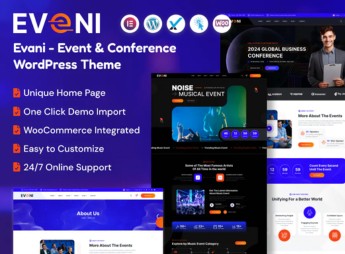
Eveni organizes event and conference sites on WordPress, with pre-built demos for congresses, trade shows, and webinars, a detailed schedule panel, speaker profiles, and a registration system with email confirmation. Targeted at corporate event organizers and festivals, the theme eliminates coding by offering daily schedule pages, a countdown timer, photo gallery, venue map, sponsor section, and Zoom integration, all adjustable via the theme customizer.
Main Features of Eveni
- Dynamic agenda panel
Organizes talks by day, time, and room with grid view. - Speaker profiles
Displays photo, bio, and social links for each event participant. - Integrated registration system
Collects participant data with automatic email confirmation. - Mobile responsive layout
Ensures perfect view of schedule on phones and tablets. - Zoom integration
Connects to the platform for live streaming of webinars and talks.
Benefits of Eveni
- Reduced content rework
Schedule and speakers are adjusted without programming. - Professional experience for the audience
Modern design and intuitive navigation convey credibility. - Scalability for various sizes
Covers everything from local workshops to international conferences. - Lead capture and conversions
Registration flow with confirmation optimizes participant sign-ups.
Who is Eveni for?
- Conference and symposium organizers who need to promote programs and receive online registrations.
- Companies that host recurring webinars and corporate events, needing to centralize information and broadcast live.
- Festival and event promoters looking for a platform to display line-up, manage registrations, and map the venue.
How to Download Eveni
Eveni is available for download here on Ultrapack. After downloading the .zip file, install it in Appearance > Themes > Add New > Upload Theme, select the .zip and activate. The file is complete and ready for instant installation.
Combining a design aimed at the best visitor experience and tools focused on event management, Eveni reduces the dependence on multiple plugins. Whether for an in-person meeting with hundreds of attendees or a global online broadcast, the theme provides the necessary structure to keep the schedule clear and registrations organized, all within a single WordPress theme.
Frequently asked questions
Is Eveni – Event & Conference WordPress Theme GPL-licensed?
Yes. Eveni – Event & Conference WordPress Theme is distributed under the GPL (GNU General Public License). You may legally use, modify and redistribute it on as many sites as you want.
Can I use Eveni – Event & Conference WordPress Theme on multiple sites?
Yes. You can install Eveni – Event & Conference WordPress Theme on as many sites as you want. Only automatic updates through Ultrapack Auto Updater have a limit: from 3 to 80 sites, depending on the plan.
How much does Eveni – Event & Conference WordPress Theme cost at Ultrapack?
Eveni – Event & Conference WordPress Theme costs US$2.99 as a single purchase, and it is also included in the subscription plans starting at US$12/mo (VIP I).
Does Eveni – Event & Conference WordPress Theme include updates?
Yes. The current version of Eveni – Event & Conference WordPress Theme is 1.0.0, published at Ultrapack on Jun 25, 2024. Subscribers update straight from the WordPress dashboard with UAU (Ultrapack Auto Updater).
Is Eveni – Event & Conference WordPress Theme scanned before publication?
Yes. Every version of Eveni – Event & Conference WordPress Theme goes through a malware scan (ClamAV and YARA rules, at UltraHub) before it is published.
How to install
Automatic updates: this item is updated by the Ultrapack Auto Updater. With it installed, the new version shows up in your dashboard like any other WordPress update (how to set it up).
The file on this page is the developer’s full package, with documentation, demos and plugins. Do not upload that file to WordPress. The theme comes ready inside it, as a ZIP of its own, and that is the one you upload.
- Download the file
elements-eveni-event-conference-wordpress-theme.zipand extract it on your computer. - Look inside the extracted files for the file
eveni.zip. - In the WordPress dashboard, go to Appearance > Themes > Add New > Upload Theme.
- Select that file and click Install Now.
- Click Activate.
- There is nothing to zip. The ZIP inside the package is already in the format WordPress accepts.
- Uploading the whole package is the most common mistake when installing a theme: WordPress answers that no valid theme was found, and nothing is installed.
- The rest of the package belongs to the author: documentation, demo files and, in some themes, the plugins it asks for during setup.
Stuck on a step? Open a ticket telling us which one you stopped at.