Description
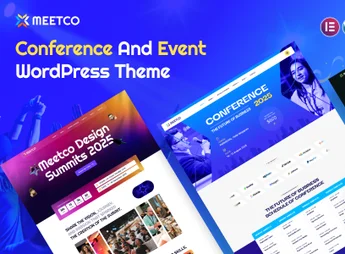
Eventum is a theme designed for organizers of conferences, corporate congresses and meetups, with full event agenda, speaker list, and direct ticket sales on the site. It combines integration with Ticket Tailor and Eventbrite for ticketing management, event venue mapping, photo gallery, and participant testimonial block, within a responsive layout that adapts to mobile, tablet, and desktop.
Main Features of Eventum
- Event agenda
Structure full programming with times, rooms and talks in schedule format. - Speaker list
Creates individual profiles with photo, biography and link to sessions they participate in. - Venue map
Positions the event address on an interactive map for participant orientation. - Integrated ticket sales
Connects with Ticket Tailor and Eventbrite to process ticketing without leaving the site. - Gallery and testimonials
Showcase photos from previous editions and a block of participant testimonials to reinforce social proof.
Benefits of Eventum
- Event site in a matter of days
Ready templates reduce build time before the registration opening date. - Ticketing without a developer
Native integration with ticket platforms eliminates custom code or extra plugins. - Consistent experience across devices
Responsive layout keeps reading and purchase smooth on mobile, tablet and desktop. - Information centralization
Programming, speakers, venue, and tickets live on the same site, preventing dispersion to external links.
Who is Eventum Recommended For?
- Those who organize conferences and corporate congresses with extensive programming and multiple speakers.
- Event production companies, summits and forums that need to sell tickets through their own site.
- Communities, associations and groups that run recurring meetups and want to centralize agenda and registrations.
How to download Eventum
The Eventum is available for download here on Ultrapack. After downloading the .zip file, install it in Appearance > Themes > Add New > Upload Theme, select the file and activate it. Then, set up the agenda, speakers and integration with Ticket Tailor or Eventbrite via the WordPress dashboard.
For event producers who need a full showcase, with detailed programming, speaker profiles and integrated ticketing, Eventum brings everything together in a single installation. Choosing between Ticket Tailor and Eventbrite preserves gateway flexibility, while the responsive layout ensures registrants can purchase tickets from mobile without friction.
Frequently asked questions
Is Eventum – Conference & Event WordPress Theme with Ticket Selling Feature GPL-licensed?
Yes. Eventum – Conference & Event WordPress Theme with Ticket Selling Feature is distributed under the GPL (GNU General Public License). You may legally use, modify and redistribute it on as many sites as you want.
Can I use Eventum – Conference & Event WordPress Theme with Ticket Selling Feature on multiple sites?
Yes. You can install Eventum – Conference & Event WordPress Theme with Ticket Selling Feature on as many sites as you want. Only automatic updates through Ultrapack Auto Updater have a limit: from 3 to 80 sites, depending on the plan.
How much does Eventum – Conference & Event WordPress Theme with Ticket Selling Feature cost at Ultrapack?
Eventum – Conference & Event WordPress Theme with Ticket Selling Feature costs US$2.99 as a single purchase, and it is also included in the subscription plans starting at US$12/mo (VIP I).
Does Eventum – Conference & Event WordPress Theme with Ticket Selling Feature include updates?
Yes. The current version of Eventum – Conference & Event WordPress Theme with Ticket Selling Feature is 2.9, published at Ultrapack on Jun 14, 2018. Subscribers update straight from the WordPress dashboard with UAU (Ultrapack Auto Updater).
Is Eventum – Conference & Event WordPress Theme with Ticket Selling Feature scanned before publication?
Yes. Every version of Eventum – Conference & Event WordPress Theme with Ticket Selling Feature goes through a malware scan (ClamAV and YARA rules, at UltraHub) before it is published.
How to install
Updates: manual. When a new version comes out, download it on this same page and upload it over the old one; WordPress asks whether you want to replace the current version.
The file on this page is the full package the author publishes on the marketplace: the theme, the documentation and sometimes the plugins it uses. Do not upload that file through the dashboard, because WordPress cannot find the theme inside it. What gets installed is the theme folder, which is in there.
- Download the file
themeforest-12943209-eventum-conference-event-wordpress-theme.zipand extract it on your computer. - If the extracted package contains another ZIP file named after the theme, extract that ZIP as well before looking for the theme folder.
- Look for the folder that has the
style.cssfile and thescreenshot.pngimage (in this item, the foldereventum). That is the theme folder. - Zip that folder only. Do not use RAR.
- In the WordPress dashboard, go to Appearance > Themes > Add New > Upload Theme and upload the ZIP file you just created.
- Click Activate.
- Uploading the whole package is the most common mistake when installing a theme. WordPress answers that no valid theme was found, and nothing is installed.
- If after extracting you already find
style.cssandscreenshot.pngin the main folder, that folder is the theme folder. - The rest of the package belongs to the author: documentation, demo files and, in some themes, the plugins it asks for during setup.
- Ignore the folder
old: they are the previous versions that the author left in the package.
Stuck on a step? Open a ticket telling us which one you stopped at.