 UAU Ready
Description
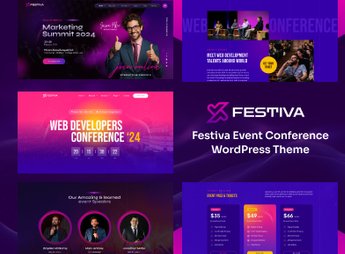
Festiva allows the creation of sites for events and conferences, integrating programming listings, speaker grids, and ticket sales into a single WordPress theme. The theme is aimed at event organizers, festival promoters, and convention producers who need a complete platform to promote, schedule, and manage participants without editing code.
Key Features of Festiva
- Event Listings
Displays lectures, workshops, and attractions in grid or list with filters by date and category. - Interactive Agenda
Allows building a schedule grid with details of each session and speaker. - Ticket Sales
Integrates a purchase form with batch control and ticket types. - AMP Support
Accelerated versions ensure fast loading on mobile devices. - Visual Customization
Color, typography, and layout panel allow tailoring the design to the event’s identity.
Benefits of Festiva
- Rapid Site Creation
Pre-built and importable demos cut configuration time to hours. - Centralized Management
Programming, speakers, and sales are managed from the same WordPress dashboard. - Professional Presence
A clean, responsive layout conveys credibility to sponsors and attendees. - Cost Savings with Developers
The visual builder and native options eliminate third-party dependency.
Who is Festiva Recommended For?
- Organizers of corporate events, shows, and festivals who need a site to promote and sell tickets.
- If you manage academic or technical conferences and want a detailed agenda with speakers.
- Production houses and agencies building sites for conventions and fairs with multiple simultaneous activities.
How to Download Festiva
Festiva is available for download here on Ultrapack. After downloading the .zip file, install by navigating to Appearance > Themes > Add New > Upload Theme, select the file and activate. The theme already contains all event, schedule, and ticket functions ready for immediate use.
Combining programming tools, ticket sales, and speaker displays, Festiva transforms WordPress into a complete hub for organizing events of any size. Whether for a music festival with multiple stages or a corporate conference with parallel tracks, the theme structures the entire flow of information and participant registration without requiring advanced technical knowledge.
Frequently asked questions
Is Festiva – Event & Conference WordPress Theme GPL-licensed?
Yes. Festiva – Event & Conference WordPress Theme is distributed under the GPL (GNU General Public License). You may legally use, modify and redistribute it on as many sites as you want.
Can I use Festiva – Event & Conference WordPress Theme on multiple sites?
Yes. You can install Festiva – Event & Conference WordPress Theme on as many sites as you want. Only automatic updates through Ultrapack Auto Updater have a limit: from 3 to 80 sites, depending on the plan.
How much does Festiva – Event & Conference WordPress Theme cost at Ultrapack?
Festiva – Event & Conference WordPress Theme costs US$2.99 as a single purchase, and it is also included in the subscription plans starting at US$12/mo (VIP I).
Does Festiva – Event & Conference WordPress Theme include updates?
Yes. The current version of Festiva – Event & Conference WordPress Theme is 1.0.0, published at Ultrapack on Dec 6, 2024. Subscribers update straight from the WordPress dashboard with UAU (Ultrapack Auto Updater).
Is Festiva – Event & Conference WordPress Theme scanned before publication?
Yes. Every version of Festiva – Event & Conference WordPress Theme goes through a malware scan (ClamAV and YARA rules, at UltraHub) before it is published.
How to install
Automatic updates: this item is updated by the Ultrapack Auto Updater. With it installed, the new version shows up in your dashboard like any other WordPress update (how to set it up).
The file on this page is the developer’s full package, with documentation, demos and plugins. Do not upload that file to WordPress. The theme comes ready inside it, as a ZIP of its own, and that is the one you upload.
- Download the file
elements-festiva-event-conference-wordpress-theme.zipand extract it on your computer. - Look inside the extracted files for the file
Festiva_FullPackage/Theme Install/festiva.zip. - In the WordPress dashboard, go to Appearance > Themes > Add New > Upload Theme.
- Select that file and click Install Now.
- Click Activate.
- There is nothing to zip. The ZIP inside the package is already in the format WordPress accepts.
- Uploading the whole package is the most common mistake when installing a theme: WordPress answers that no valid theme was found, and nothing is installed.
- The rest of the package belongs to the author: documentation, demo files and, in some themes, the plugins it asks for during setup.
- The package also includes the plugin the theme uses, in
revslider.zip. Upload this file in Plugins > Add New > Upload Plugin after activating the theme.
Stuck on a step? Open a ticket telling us which one you stopped at.