 UAU Ready
Description
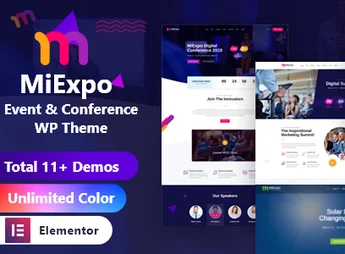
MiExpo is a WordPress theme designed specifically for events, conferences, seminars, trade shows, workshops, and corporate meetings. It includes essential features such as event scheduling, speaker profiles, countdown timers, ticket sales, and previous edition galleries, allowing you to create a professional and comprehensive website to promote and organize any type of event, whether it’s in-person or online.
Main Features
- Multiple Event Demos
Various ready-made layouts for conferences, festivals, meetups, and fairs, importable with a single click to quickly set up your site. - Speaker and Schedule Management
Dedicated modules to register speakers with bios and social media links, and to organize the schedule by days, times, and rooms. - Ticket Sales with WooCommerce
Full integration for selling tickets, setting up promotional batches, and accepting direct payments through the site. - Drag-and-Drop Visual Builder
Page editing by drag-and-drop with exclusive elements from the theme, no coding knowledge required. - Countdowns and Call-to-Actions
Countdown blocks, enrollment banners, and contact forms that increase visitor conversions to participants. - Responsive and Retina-Ready Design
Clear and crisp visuals on desktops, tablets, and smartphones, ensuring a good user experience across all screen resolutions.
Benefits of MiExpo
- Time-saving production
With importable demos and pre-configured sections, the event site goes from zero to live in just a few hours. - More attendees and ticket sales
The combination of countdowns, action buttons, and integrated checkout reduces friction during the purchasing process. - Clear organization of information
The agenda, speakers, sponsors, and venue are structured in dedicated areas, making navigation easier for the public. - Reusability across editions
The same installation can be used for new event editions, requiring only updates to dates, schedule, and photo gallery.
Who is It For?
- Conferences, congresses, and summit organizers
- Event producers, trade shows, and festivals
- Companies and agencies that promote workshops, training, and corporate meetings
With a structure thought out from start to finish for the event universe, MiExpo delivers the balance between visual appeal and practical functionality. It is the natural choice for anyone who needs to promote a schedule, present speakers, sell tickets, and keep the audience informed on a single professional, modern, and easy-to-manage site.
Frequently asked questions
Is MiExpo | Event Conference Elementor WordPress Theme GPL-licensed?
Yes. MiExpo | Event Conference Elementor WordPress Theme is distributed under the GPL (GNU General Public License). You may legally use, modify and redistribute it on as many sites as you want.
Can I use MiExpo | Event Conference Elementor WordPress Theme on multiple sites?
Yes. You can install MiExpo | Event Conference Elementor WordPress Theme on as many sites as you want. Only automatic updates through Ultrapack Auto Updater have a limit: from 3 to 80 sites, depending on the plan.
How much does MiExpo | Event Conference Elementor WordPress Theme cost at Ultrapack?
MiExpo | Event Conference Elementor WordPress Theme costs US$2.99 as a single purchase, and it is also included in the subscription plans starting at US$12/mo (VIP I).
Does MiExpo | Event Conference Elementor WordPress Theme include updates?
Yes. The current version of MiExpo | Event Conference Elementor WordPress Theme is 2.2, published at Ultrapack on Aug 2, 2026. Subscribers update straight from the WordPress dashboard with UAU (Ultrapack Auto Updater).
Is MiExpo | Event Conference Elementor WordPress Theme scanned before publication?
Yes. Every version of MiExpo | Event Conference Elementor WordPress Theme goes through a malware scan (ClamAV and YARA rules, at UltraHub) before it is published.
How to install
Automatic updates: this item is updated by the Ultrapack Auto Updater. With it installed, the new version shows up in your dashboard like any other WordPress update (how to set it up).
The file on this page is the developer’s full package, with documentation, demos and plugins. Do not upload that file to WordPress. The theme comes ready inside it, as a ZIP of its own, and that is the one you upload.
- Download the file
elements-miexpo-event-conference-elementor-wordpress-them.zipand extract it on your computer. - Look inside the extracted files for the file
miexpo.zip. - In the WordPress dashboard, go to Appearance > Themes > Add New > Upload Theme.
- Select that file and click Install Now.
- Click Activate.
- There is nothing to zip. The ZIP inside the package is already in the format WordPress accepts.
- Uploading the whole package is the most common mistake when installing a theme: WordPress answers that no valid theme was found, and nothing is installed.
- The rest of the package belongs to the author: documentation, demo files and, in some themes, the plugins it asks for during setup.
Stuck on a step? Open a ticket telling us which one you stopped at.