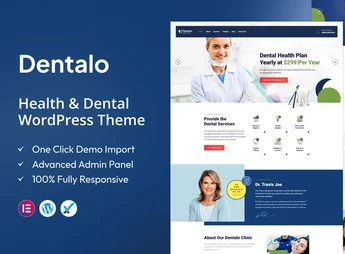
Description
Dentalo is a WordPress theme created for dental clinics, hospitals, and medical offices, with appointment scheduling pages, gallery, team member profiles, and a testimonials area already structured. The layout is responsive and built for retina screens, keeping reading comfortable on mobile phones and tablets for anyone who needs to present specialties, the clinical staff, and contact channels on a single institutional website.
Key Features of the Dentalo
- Appointment scheduling page
Ready-made template to receive patients’ appointment requests through the website. - Clinical team member profiles
Presentation pages for dentists, doctors, and other office professionals. - Image gallery
Displays photos of the facility, procedures, and results in an organized grid. - Testimonials sections
Publishes patient reports in highlighted blocks on internal pages. - Integrated blog
Publishes health articles, guidance, and clinic news in post format.
Benefits of the Dentalo
- Get your clinic website online faster
The pages are already structured for the health niche, with only texts and photos to adjust. - Fewer missed appointments by phone
Scheduling through the website receives requests outside business hours. - More patient trust
Team profiles and testimonials strengthen credibility before the first visit. - Comfortable reading on mobile
The responsive, retina-ready layout keeps text and images crisp on any screen.
Who Is the Dentalo Intended For?
- Dental clinics that want to showcase specialties and receive online appointments.
- Hospitals and health centers that need to present clinical staff and the physical facility.
- Anyone working as a dentist, doctor, or surgeon in their own office and who wants an institutional website with a blog.
How to Download the Dentalo
The Dentalo is available for download here on Ultrapack. After downloading the .zip file, install it in Appearance > Themes > Add New > Upload theme, select the file, and activate it. After activation, the theme layout options and pages start appearing in the WordPress panel.
For those working in the health field, the value of Dentalo is that it already includes the pages every clinic needs: scheduling, team, gallery, and testimonials. Instead of building these sections from scratch, the work comes down to inserting real office information, publishing content on the blog, and keeping the contact channel active for new patients.
Frequently asked questions
Is Dentalo – Medical Health & Dental WordPress Theme GPL-licensed?
Yes. Dentalo – Medical Health & Dental WordPress Theme is distributed under the GPL (GNU General Public License). You may legally use, modify and redistribute it on as many sites as you want.
Can I use Dentalo – Medical Health & Dental WordPress Theme on multiple sites?
Yes. You can install Dentalo – Medical Health & Dental WordPress Theme on as many sites as you want. Only automatic updates through Ultrapack Auto Updater have a limit: from 3 to 80 sites, depending on the plan.
How much does Dentalo – Medical Health & Dental WordPress Theme cost at Ultrapack?
Dentalo – Medical Health & Dental WordPress Theme costs US$2.99 as a single purchase, and it is also included in the subscription plans starting at US$12/mo (VIP I).
Does Dentalo – Medical Health & Dental WordPress Theme include updates?
Yes. The current version of Dentalo – Medical Health & Dental WordPress Theme is 1.4, published at Ultrapack on Aug 25, 2026. Subscribers update straight from the WordPress dashboard with UAU (Ultrapack Auto Updater).
Is Dentalo – Medical Health & Dental WordPress Theme scanned before publication?
Yes. Every version of Dentalo – Medical Health & Dental WordPress Theme goes through a malware scan (ClamAV and YARA rules, at UltraHub) before it is published.
What changed in this version
Version 1.4 2024-05-11
- 1) Debug mode on issues all are fixed.
- 2) All Plugins are up to date.
Version 1.3 2023-11-06
- 1) All Plugins are up to date.
Version 1.2 2023-01-08
- 1) All Plugins are up to date.
Version 1.1 2022-04-09
- 1) One Click Demo import issue has been fixed.
- First release!
Release notes published by the developer.
How to install
Updates: manual. When a new version comes out, download it on this same page and upload it over the old one; WordPress asks whether you want to replace the current version.
The file on this page is the developer’s full package, with documentation, demos and plugins. Do not upload that file to WordPress. The theme comes ready inside it, as a ZIP of its own, and that is the one you upload.
- Download the file
elements-dentalo-medical-health-and-dental-wordpress-theme.zipand extract it on your computer. - Look inside the extracted files for the file
dentalo-wp-full/dentalo.zip. - In the WordPress dashboard, go to Appearance > Themes > Add New > Upload Theme.
- Select that file and click Install Now.
- Click Activate.
- There is nothing to zip. The ZIP inside the package is already in the format WordPress accepts.
- Uploading the whole package is the most common mistake when installing a theme: WordPress answers that no valid theme was found, and nothing is installed.
- The rest of the package belongs to the author: documentation, demo files and, in some themes, the plugins it asks for during setup.
Stuck on a step? Open a ticket telling us which one you stopped at.