 UAU Ready
Description
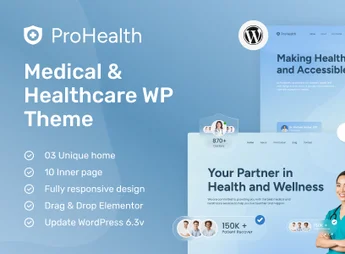
ProHealth is a premium WordPress theme, meticulously crafted to meet the needs of professionals and institutions in the healthcare sector. It provides a robust and reliable platform for doctors, clinics, hospitals, dentists and therapists to create a professional and welcoming online presence. With a clean design and sector-specific features, ProHealth simplifies patient communication and the efficient management of vital information.
Key Features
- Online Appointment Scheduling: Allows patients to book appointments directly through the site, in a simple and intuitive way, with integrated forms.
- Doctor and Team Profiles: Create detailed pages for each professional, showcasing specialties, academic background, experience and availability.
- Elementor Page Builder: Easily customize your site’s layout with the drag-and-drop visual builder, without needing any coding knowledge.
- Fully Responsive Design: Ensures flawless view and user experience across all devices, such as desktops, tablets and smartphones.
- Services and Treatments Listing: Present your procedures and medical specialties in a clear, organized and informative way to patients.
- One-Click Demo Import: Install the complete demo content with a single click to quickly set up your site, saving time.
Benefits of ProHealth
- Boosts Patient Confidence: A professional, clean, user-experience-focused design conveys credibility and security, essential elements in healthcare.
- Optimizes Appointment Management: The integrated scheduling system reduces administrative workload, centralizes consultation requests and improves schedule organization.
- Ease of Use and Customization: Even without technical knowledge, you can fully customize the site to reflect your clinic’s visual identity, thanks to the intuitive page builder.
- Improves Communication: Makes it easier for patients to access important information such as opening hours, location, offered services and team profiles, strengthening relationships.
Who is It Recommended For?
- Medical and Dental Clinics
- Hospitals and Health Centers
- Independent Medical, Therapeutic and Healthcare Professionals
With ProHealth, you build more than a website; you create a comprehensive and reliable digital health portal for your patients.
Frequently asked questions
Is ProHealth – Creative WordPress Theme For Medical and Healthcare GPL-licensed?
Yes. ProHealth – Creative WordPress Theme For Medical and Healthcare is distributed under the GPL (GNU General Public License). You may legally use, modify and redistribute it on as many sites as you want.
Can I use ProHealth – Creative WordPress Theme For Medical and Healthcare on multiple sites?
Yes. You can install ProHealth – Creative WordPress Theme For Medical and Healthcare on as many sites as you want. Only automatic updates through Ultrapack Auto Updater have a limit: from 3 to 80 sites, depending on the plan.
How much does ProHealth – Creative WordPress Theme For Medical and Healthcare cost at Ultrapack?
ProHealth – Creative WordPress Theme For Medical and Healthcare costs US$2.99 as a single purchase, and it is also included in the subscription plans starting at US$12/mo (VIP I).
Does ProHealth – Creative WordPress Theme For Medical and Healthcare include updates?
Yes. The current version of ProHealth – Creative WordPress Theme For Medical and Healthcare is 1.2, published at Ultrapack on Apr 27, 2026. Subscribers update straight from the WordPress dashboard with UAU (Ultrapack Auto Updater).
Is ProHealth – Creative WordPress Theme For Medical and Healthcare scanned before publication?
Yes. Every version of ProHealth – Creative WordPress Theme For Medical and Healthcare goes through a malware scan (ClamAV and YARA rules, at UltraHub) before it is published.
How to install
Automatic updates: this item is updated by the Ultrapack Auto Updater. With it installed, the new version shows up in your dashboard like any other WordPress update (how to set it up).
The file on this page is the developer’s full package, with documentation, demos and plugins. Do not upload that file to WordPress. The theme comes ready inside it, as a ZIP of its own, and that is the one you upload.
- Download the file
elements-prohealth-creative-medical-healthcare-wp-theme.zipand extract it on your computer. - Look inside the extracted files for the file
main-file/Theme File/prohealth.zip. - In the WordPress dashboard, go to Appearance > Themes > Add New > Upload Theme.
- Select that file and click Install Now.
- Click Activate.
- There is nothing to zip. The ZIP inside the package is already in the format WordPress accepts.
- Uploading the whole package is the most common mistake when installing a theme: WordPress answers that no valid theme was found, and nothing is installed.
- The rest of the package belongs to the author: documentation, demo files and, in some themes, the plugins it asks for during setup.
Stuck on a step? Open a ticket telling us which one you stopped at.