

Description
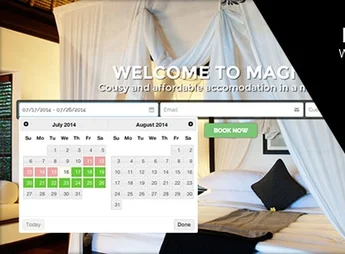
The MAGNOLIA theme is designed for hotels, inns, and travel accommodations, featuring a layout for showcasing rooms and date-check areas for reservations. It helps create sites for hotels, inns, and travel accommodations with institutional pages, space images, stay information, and clear paths for contact or reservation requests.
Main Features of MAGNOLIA
- Hotel layout
Organizes lodging pages, rooms, services, and stay information. - Date search
Includes areas focused on selecting periods and reservation intent. - Accommodation pages
Allows describing rooms, suites, and spaces with images and details. - Institutional structure
Brings together sections for presenting the hotel, location, and the space’s differentiators. - Contact forms
Facilitates sending requests, questions, and reservation orders.
Benefits of MAGNOLIA
- Clearer presence
Helps visitors understand rooms, location, and stay conditions. - More direct booking
Reduces steps between the visitor’s inquiry and commercial contact. - Organized content
Keeps lodging information on easy-to-navigate pages. - Tourism-aligned visuals
Highlights images, environments, and vital details for reservation decisions.
Who is MAGNOLIA recommended for?
- Hotels needing to showcase rooms, services, and location on their own site.
- Inns wishing to receive date inquiries and online reservation requests.
- Travel accommodations wanting to organize photos, information, and contact channels.
How to Download MAGNOLIA
The MAGNOLIA is available for download here on Ultrapack. After downloading the .zip file, install it under Appearance > Themes > Add New > Upload Theme, select the theme package and activate it in the WordPress dashboard.
The MAGNOLIA makes sense for hosting projects needing to transform the site into an organized showcase of rooms, services, location, and reservation channels. The structure encourages objective pages, well-positioned images, and useful information for those comparing stays before contacting or requesting availability.
Frequently asked questions
Is MAGNOLIA – Hotel Booking WordPress Theme GPL-licensed?
Yes. MAGNOLIA – Hotel Booking WordPress Theme is distributed under the GPL (GNU General Public License). You may legally use, modify and redistribute it on as many sites as you want.
Can I use MAGNOLIA – Hotel Booking WordPress Theme on multiple sites?
Yes. You can install MAGNOLIA – Hotel Booking WordPress Theme on as many sites as you want. Only automatic updates through Ultrapack Auto Updater have a limit: from 3 to 80 sites, depending on the plan.
How much does MAGNOLIA – Hotel Booking WordPress Theme cost at Ultrapack?
MAGNOLIA – Hotel Booking WordPress Theme costs US$2.99 as a single purchase, and it is also included in the subscription plans starting at US$12/mo (VIP I).
Does MAGNOLIA – Hotel Booking WordPress Theme include updates?
Yes. The current version of MAGNOLIA – Hotel Booking WordPress Theme is 1.0, published at Ultrapack on Jul 1, 2026. Subscribers update straight from the WordPress dashboard with UAU (Ultrapack Auto Updater).
Is MAGNOLIA – Hotel Booking WordPress Theme scanned before publication?
Yes. Every version of MAGNOLIA – Hotel Booking WordPress Theme goes through a malware scan (ClamAV and YARA rules, at UltraHub) before it is published.
How to install
Updates: manual. When a new version comes out, download it on this same page and upload it over the old one; WordPress asks whether you want to replace the current version.
The file on this page is the developer’s full package, with documentation, demos and plugins. Do not upload that file to WordPress. The theme comes ready inside it, as a ZIP of its own, and that is the one you upload.
- Download the file
elements-magnolia-hotel-booking-wordpress-theme.zipand extract it on your computer. - Look inside the extracted files for the file
magnolia_package/magnolia.zip. - In the WordPress dashboard, go to Appearance > Themes > Add New > Upload Theme.
- Select that file and click Install Now.
- Click Activate.
- There is nothing to zip. The ZIP inside the package is already in the format WordPress accepts.
- Uploading the whole package is the most common mistake when installing a theme: WordPress answers that no valid theme was found, and nothing is installed.
- The rest of the package belongs to the author: documentation, demo files and, in some themes, the plugins it asks for during setup.
Stuck on a step? Open a ticket telling us which one you stopped at.


