Description
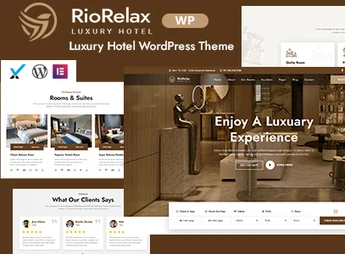
Riorelax is a WordPress theme created for hotels, resorts and lodges, with four variations of homepage and inner pages focused on rooms, suites, galleries and reservation information. Built on Elementor with Bootstrap 5 framework, it allows building the lodging site in the drag-and-drop visual editor and importing ready demos with one click, without needing to touch the template code.
Key Features of Riorelax
- Integrated Elementor Builder
Visual page editing on front-end and back-end via drag and drop. - One-click demo importer
Reproduces the full demo layout on the site immediately after installation. - Four home variations
Alternative home pages accompanied by twelve ready inner pages. - Responsive Bootstrap 5 Base
Grid adapts to phones, tablets and retina screens without manual adjustment. - Built-in visual library
Slick carousel, Magnific popup, WOW animations, Google Fonts and Font Awesome.
Benefits of Riorelax
- Site up quickly
The imported demo serves as a starting point and only needs your content. - Clear hospitality presentation
Rooms, suites and galleries are organized on already structured pages. - Daily editing autonomy
Text, rates and photos change via Elementor without calling a developer. - Preserved updates
Included child theme keeps your customizations after new releases.
Who is Riorelax recommended for?
- Hotels, resorts and lodges that need to display rooms, suites and galleries on their own site.
- Those running hostels or bed and breakfasts who want to receive reservation inquiries via Contact Form 7.
- Those already working with Elementor who want ready hospitality layout to adapt.
How to Download Riorelax
Riorelax is available for download here on Ultrapack. After saving the .zip file, go to Appearance > Themes > Add New > Upload Theme, select the package and activate. Then the panel shows recommended plugins and the option to import the demo, which reproduces the demo layout on your site.
By combining Elementor, Bootstrap 5 and a set of hotel-focused pages, Riorelax covers the visitor’s journey from accommodation showcase to contact form. It is a straightforward choice for those managing lodging who prefer keeping the site updated internally, adjusting photos, room descriptions and blog content as the season changes.
Frequently asked questions
Is Riorelax – Luxury Hotel WordPress Theme GPL-licensed?
Yes. Riorelax – Luxury Hotel WordPress Theme is distributed under the GPL (GNU General Public License). You may legally use, modify and redistribute it on as many sites as you want.
Can I use Riorelax – Luxury Hotel WordPress Theme on multiple sites?
Yes. You can install Riorelax – Luxury Hotel WordPress Theme on as many sites as you want. Only automatic updates through Ultrapack Auto Updater have a limit: from 3 to 80 sites, depending on the plan.
How much does Riorelax – Luxury Hotel WordPress Theme cost at Ultrapack?
Riorelax – Luxury Hotel WordPress Theme costs US$2.99 as a single purchase, and it is also included in the subscription plans starting at US$12/mo (VIP I).
Does Riorelax – Luxury Hotel WordPress Theme include updates?
Yes. The current version of Riorelax – Luxury Hotel WordPress Theme is 1.0.0, published at Ultrapack on Aug 22, 2026. Subscribers update straight from the WordPress dashboard with UAU (Ultrapack Auto Updater).
Is Riorelax – Luxury Hotel WordPress Theme scanned before publication?
Yes. Every version of Riorelax – Luxury Hotel WordPress Theme goes through a malware scan (ClamAV and YARA rules, at UltraHub) before it is published.
How to install
Updates: manual. When a new version comes out, download it on this same page and upload it over the old one; WordPress asks whether you want to replace the current version.
The file on this page is the full package the author publishes on the marketplace: the theme, the documentation and sometimes the plugins it uses. Do not upload that file through the dashboard, because WordPress cannot find the theme inside it. What gets installed is the theme folder, which is in there.
- Download the file
elements-riorelax-luxury-hotel-wordpress-theme.zipand extract it on your computer. - If the extracted package contains another ZIP file named after the theme, extract that ZIP as well before looking for the theme folder.
- Look for the folder that has the
style.cssfile and thescreenshot.pngimage. That is the theme folder. - Zip that folder only. Do not use RAR.
- In the WordPress dashboard, go to Appearance > Themes > Add New > Upload Theme and upload the ZIP file you just created.
- Click Activate.
- Uploading the whole package is the most common mistake when installing a theme. WordPress answers that no valid theme was found, and nothing is installed.
- If after extracting you already find
style.cssandscreenshot.pngin the main folder, that folder is the theme folder. - The rest of the package belongs to the author: documentation, demo files and, in some themes, the plugins it asks for during setup.
Stuck on a step? Open a ticket telling us which one you stopped at.