 UAU Ready
Description
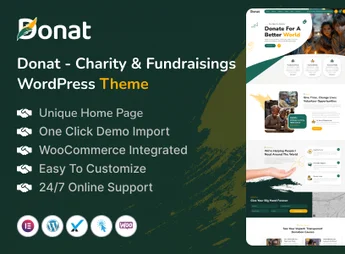
The Donat theme is designed for NGOs, churches, and social projects that aim to raise funds online, as it combines a recurring donation system, a live fundraising counter, and campaign pages optimized for conversion. Built on a visual drag-and-drop builder, it allows importing full charity demos and customizing every visual detail – header, footer, colors, typography, forms – without writing code, while also offering integration with popular email-marketing platforms and payment gateways, accelerating your organization’s digital communication.
Key Features of Donat
- Recurring Donations System
Allows visitors to contribute monthly or one-time, with the option to recur. - Real-Time Fundraising Counter
Displays the progress of fundraising campaigns with visual animations. - Customizable Campaign Pages
Includes ready-made layouts to import and edit via visual builder. - Drag-and-Drop Visual Builder
Allows building pages, headers, and footers without programming. - Volunteer and Events Area
Manages volunteer registration and the organization’s event calendar.
Benefits of Donat
- Simplified Fundraising
Eases the receipt of online donations without technical complications. - Visual Content Management
Non-technical teams can update the website with ease. - Fast Deployment
Ready-made demos accelerate website creation. - Community Engagement
Features such as the counter and volunteer manager boost participation.
Who Should Use Donat?
- NGOs that need a professional website to raise donations and promote causes.
- Churches that want to receive online contributions and manage community events.
- Social projects that seek to engage volunteers and showcase campaign results.
How to Download Donat
Donat is available for download here on Ultrapack. After downloading the .zip file, install it in Appearance > Themes > Add New > Upload Theme, select the .zip and activate. The file is complete and ready for immediate installation.
Combining conversion-focused design, fundraising tools, and easy customization, Donat is the ideal foundation for third-sector organizations that want to professionalize their digital presence without high development costs. Its modular structure, coupled with the visual builder, allows each institution to tailor the site to its visual identity and specific fundraising needs.
Frequently asked questions
Is Donat – Charity & Fundraising WordPress Theme GPL-licensed?
Yes. Donat – Charity & Fundraising WordPress Theme is distributed under the GPL (GNU General Public License). You may legally use, modify and redistribute it on as many sites as you want.
Can I use Donat – Charity & Fundraising WordPress Theme on multiple sites?
Yes. You can install Donat – Charity & Fundraising WordPress Theme on as many sites as you want. Only automatic updates through Ultrapack Auto Updater have a limit: from 3 to 80 sites, depending on the plan.
How much does Donat – Charity & Fundraising WordPress Theme cost at Ultrapack?
Donat – Charity & Fundraising WordPress Theme costs US$2.99 as a single purchase, and it is also included in the subscription plans starting at US$12/mo (VIP I).
Does Donat – Charity & Fundraising WordPress Theme include updates?
Yes. The current version of Donat – Charity & Fundraising WordPress Theme is 1.0.0, published at Ultrapack on Feb 28, 2025. Subscribers update straight from the WordPress dashboard with UAU (Ultrapack Auto Updater).
Is Donat – Charity & Fundraising WordPress Theme scanned before publication?
Yes. Every version of Donat – Charity & Fundraising WordPress Theme goes through a malware scan (ClamAV and YARA rules, at UltraHub) before it is published.
How to install
Automatic updates: this item is updated by the Ultrapack Auto Updater. With it installed, the new version shows up in your dashboard like any other WordPress update (how to set it up).
The file on this page is the developer’s full package, with documentation, demos and plugins. Do not upload that file to WordPress. The theme comes ready inside it, as a ZIP of its own, and that is the one you upload.
- Download the file
elements-donat-charity-fundraising-wordpress-theme.zipand extract it on your computer. - Look inside the extracted files for the file
donat.zip. - In the WordPress dashboard, go to Appearance > Themes > Add New > Upload Theme.
- Select that file and click Install Now.
- Click Activate.
- There is nothing to zip. The ZIP inside the package is already in the format WordPress accepts.
- Uploading the whole package is the most common mistake when installing a theme: WordPress answers that no valid theme was found, and nothing is installed.
- The rest of the package belongs to the author: documentation, demo files and, in some themes, the plugins it asks for during setup.
Stuck on a step? Open a ticket telling us which one you stopped at.