 UAU Ready
Description
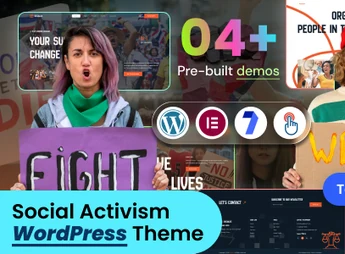
The Socialize theme is a WordPress theme created for NGOs, social movements, and human rights campaigns, which allows you to create donation, cause, and event pages via Elementor with one-click demo import. Built-in header and footer builders, built on Bootstrap 5 with SASS and integration with Contact Form 7 eliminate the need for code editing throughout the entire site construction process.
Key Features of Socialize
- Visual construction with Elementor
Edit pages by drag-and-drop, with declared compatibility with Elementor Pro. - Header and footer builders
Build the header and footer on the front-end, with 4+ style variations and a fixed header. - One-click demo import
Loads starter pages such as Crisis Response, Social Power, and Voices of Protest instantly. - Ready internal pages
Includes 27+ pages: donations, causes, campaigns, events, team, testimonials, and contact. - Bootstrap 5 base with SASS
Structures the responsive layout in W3C-valid code, with Font Awesome and Bootstrap icons.
Benefits of Socialize
- Site up and running fast
A demo import already includes a causes and donations structure ready to receive real content. - Visual identity under control
Colors and typography are fully adjustable, including Google Web Fonts. - Comfortable reading on any screen
The responsive layout keeps campaigns legible on mobile, tablet, and desktop. - Less technical dependency
Forms, blocks, and sections are configured without a programmer or code editing.
Who is Socialize for?
- NGOs and nonprofits that need to promote causes and receive online support.
- Those who organize fundraising campaigns and want donation pages with counters and timers.
- Activist collectives, human rights groups, and environmental organizations that publish events and mobilizations.
- Those already using Elementor who want a set of internal pages tailored for the third sector.
How to Download Socialize
Socialize is available for download here on Ultrapack. After saving the .zip file, navigate to Appearance > Themes > Add New > Upload Theme, select the package and activate. With the theme active, demo import options and header and footer builders appear in the dashboard.
By combining Elementor, socially mobilization-themed demos, and specific donation and volunteer pages, Socialize shortens the path from WordPress installation to a published cause site. For organizations that rely on visibility and ongoing support, the combination of responsive layout, validated code, and SEO-ready structure sustains campaigns that need to circulate effectively in search and networks.
Frequently asked questions
Is Socialize – Social Activism & NGO WordPress Theme GPL-licensed?
Yes. Socialize – Social Activism & NGO WordPress Theme is distributed under the GPL (GNU General Public License). You may legally use, modify and redistribute it on as many sites as you want.
Can I use Socialize – Social Activism & NGO WordPress Theme on multiple sites?
Yes. You can install Socialize – Social Activism & NGO WordPress Theme on as many sites as you want. Only automatic updates through Ultrapack Auto Updater have a limit: from 3 to 80 sites, depending on the plan.
How much does Socialize – Social Activism & NGO WordPress Theme cost at Ultrapack?
Socialize – Social Activism & NGO WordPress Theme costs US$2.99 as a single purchase, and it is also included in the subscription plans starting at US$12/mo (VIP I).
Does Socialize – Social Activism & NGO WordPress Theme include updates?
Yes. The current version of Socialize – Social Activism & NGO WordPress Theme is 1.0.0, published at Ultrapack on Aug 23, 2026. Subscribers update straight from the WordPress dashboard with UAU (Ultrapack Auto Updater).
Is Socialize – Social Activism & NGO WordPress Theme scanned before publication?
Yes. Every version of Socialize – Social Activism & NGO WordPress Theme goes through a malware scan (ClamAV and YARA rules, at UltraHub) before it is published.
What are the requirements for the theme Socialize – Social Activism & NGO WordPress Theme?
Requires PHP 7.1 or higher. Tested up to WordPress 6.0.
How to install
Automatic updates: this item is updated by the Ultrapack Auto Updater. With it installed, the new version shows up in your dashboard like any other WordPress update (how to set it up).
The file on this page is the developer’s full package, with documentation, demos and plugins. Do not upload that file to WordPress. The theme comes ready inside it, as a ZIP of its own, and that is the one you upload.
- Download the file
elements-socialize-social-activism-ngo-wordpress-theme.zipand extract it on your computer. - Look inside the extracted files for the file
socialize.zip. - In the WordPress dashboard, go to Appearance > Themes > Add New > Upload Theme.
- Select that file and click Install Now.
- Click Activate.
Requirements: Requires PHP 7.1 or higher. Tested up to WordPress 6.0.
- There is nothing to zip. The ZIP inside the package is already in the format WordPress accepts.
- Uploading the whole package is the most common mistake when installing a theme: WordPress answers that no valid theme was found, and nothing is installed.
- The rest of the package belongs to the author: documentation, demo files and, in some themes, the plugins it asks for during setup.
Stuck on a step? Open a ticket telling us which one you stopped at.