 UAU Ready
Description
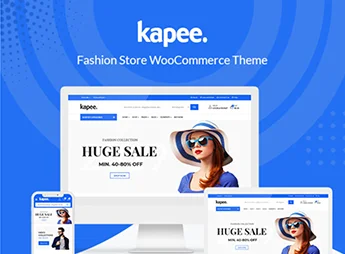
Kapee is a theme designed for fashion stores, electronics stores, and multivendor marketplaces, with native integration with WooCommerce, Dokan support, and a library of importable demos for different retail segments. Recommended for those who sell clothing, accessories, electronics, or build a marketplace with multiple vendors, it brings together quick view, wishlist, product comparison, and adjustable headers in its own panel without requiring code editing.
Main Features of Kapee
- Importable multipurpose demos
Ready-made layouts covering fashion, accessories, electronics, and marketplaces, importable with just a few clicks. - WooCommerce integration
Store, product, cart, and checkout pages styled and adjustable through the theme customizer. - Dokan compatibility
Structure prepared for multivendor marketplaces, with vendor store layouts and individual profiles. - Various headers and footers
Multiple header and footer styles that can be switched through the panel without modifying the theme code. - Quick view, wishlist, and comparison
Built-in store features for quick viewing, wishlists, and product comparison. - Library of ready-made internal pages
Templates for About, Contact, FAQ, blog, and product categories included in the library. - Mega menu and Ajax filters
Menu with images, icons, and columns, combined with product filters that update without reloading the page.
Benefits of Kapee
- Faster store launch
Importing ready-made demos reduces the time between installation and the first sale. - Adaptability to multiple niches
A single theme serves fashion, electronics, accessories, and marketplaces without switching products. - Smooth shopping experience
Quick view and Ajax filters shorten the path to the cart and reduce clicks. - Independence for visual adjustments
Colors, typography, header, and footer editable in the panel eliminate the need to rely on a developer.
Who Is Kapee Recommended For?
- Those who sell clothing, footwear, and accessories and want an organized catalog with filters and a wishlist.
- Those who build electronics, gadgets, and peripherals stores with broad categories and product variations.
- Those who need to structure a multivendor marketplace with Dokan, offering individual profiles and stores.
- You, if you want to replace a generic theme with a conversion-focused foundation for WooCommerce.
- Those looking for a single multipurpose theme to serve different e-commerce projects.
How to Download Kapee
Kapee is available for download here at Ultrapack. After downloading the .zip file, go to Appearance > Themes > Add New > Upload Theme in the WordPress dashboard, select the file, and activate the theme. Then, import one of the demos through the Kapee panel to speed up the store’s initial setup.
Designed for those who need a solid foundation for WooCommerce without giving up modern design, Kapee combines segment-specific demos, built-in store features, and marketplace support in a single package. The modular structure allows you to start with a fashion or electronics demo and adjust the header, typography, and colors as the project’s identity evolves, while maintaining storefront performance.
Frequently asked questions
Is Kapee – Modern Multipurpose WooCommerce Theme GPL-licensed?
Yes. Kapee – Modern Multipurpose WooCommerce Theme is distributed under the GPL (GNU General Public License). You may legally use, modify and redistribute it on as many sites as you want.
Can I use Kapee – Modern Multipurpose WooCommerce Theme on multiple sites?
Yes. You can install Kapee – Modern Multipurpose WooCommerce Theme on as many sites as you want. Only automatic updates through Ultrapack Auto Updater have a limit: from 3 to 80 sites, depending on the plan.
How much does Kapee – Modern Multipurpose WooCommerce Theme cost at Ultrapack?
Kapee – Modern Multipurpose WooCommerce Theme costs US$2.99 as a single purchase, and it is also included in the subscription plans starting at US$12/mo (VIP I).
Does Kapee – Modern Multipurpose WooCommerce Theme include updates?
Yes. The current version of Kapee – Modern Multipurpose WooCommerce Theme is 1.7.4, published at Ultrapack on Aug 12, 2026. Subscribers update straight from the WordPress dashboard with UAU (Ultrapack Auto Updater).
Is Kapee – Modern Multipurpose WooCommerce Theme scanned before publication?
Yes. Every version of Kapee – Modern Multipurpose WooCommerce Theme goes through a malware scan (ClamAV and YARA rules, at UltraHub) before it is published.
How to install
Automatic updates: this item is updated by the Ultrapack Auto Updater. With it installed, the new version shows up in your dashboard like any other WordPress update (how to set it up).
The file on this page is the full package the author publishes on the marketplace: the theme, the documentation and sometimes the plugins it uses. Do not upload that file through the dashboard, because WordPress cannot find the theme inside it. What gets installed is the theme folder, which is in there.
- Download the file
themeforest-24187521-kapee-fashion-store-woocommerce-theme.zipand extract it on your computer. - If the extracted package contains another ZIP file named after the theme, extract that ZIP as well before looking for the theme folder.
- Look for the folder that has the
style.cssfile and thescreenshot.pngimage. That is the theme folder. - Zip that folder only. Do not use RAR.
- In the WordPress dashboard, go to Appearance > Themes > Add New > Upload Theme and upload the ZIP file you just created.
- Click Activate.
- Uploading the whole package is the most common mistake when installing a theme. WordPress answers that no valid theme was found, and nothing is installed.
- If after extracting you already find
style.cssandscreenshot.pngin the main folder, that folder is the theme folder. - The rest of the package belongs to the author: documentation, demo files and, in some themes, the plugins it asks for during setup.
Stuck on a step? Open a ticket telling us which one you stopped at.