

 UAU Ready
Description
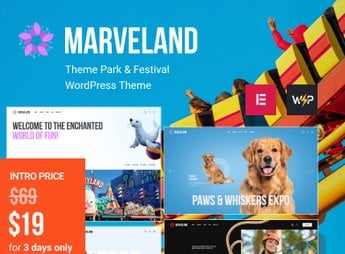
Marveland is a WordPress theme created especially for theme parks and festivals. With a vibrant and lively design, it is the perfect choice for those looking to highlight the fun and entertainment of their event or attraction. With an intuitive and easy-to-use interface, Marveland is ideal for theme park owners, festival organizers or anyone who wants to promote large-scale entertainment events.
Key Features
- Responsive Design
Compatible with all devices, the theme automatically adjusts to the screen size. - WooCommerce Integration
Sell tickets and products directly on your site with the powerful WooCommerce plugin. - Event Scheduling
Keep your visitors informed about event dates and times with the integrated calendar. - Contact Form
Allows visitors to easily get in touch via an integrated contact form on the site. - Optimized SEO
Improve your site’s visibility on search engines with SEO optimization.
Benefits
- An attractive and pleasing site increases visibility and brand recognition.
- WooCommerce integration streamlines the sales process, saving time and effort.
- Clear, easy-to-understand scheduling keeps visitors informed and helps avoid confusion.
- The contact form facilitates communication with customers, improving customer support.
- SEO optimization boosts site visibility, attracting more visitors and potential customers.
With Marveland, you have a complete and practical solution to showcase your theme park or festival. It offers all the necessary tools to create a professional and attractive site that will enchant your visitors and boost your sales.
Frequently asked questions
Is Marveland – Theme Park & Festival WordPress Theme GPL-licensed?
Yes. Marveland – Theme Park & Festival WordPress Theme is distributed under the GPL (GNU General Public License). You may legally use, modify and redistribute it on as many sites as you want.
Can I use Marveland – Theme Park & Festival WordPress Theme on multiple sites?
Yes. You can install Marveland – Theme Park & Festival WordPress Theme on as many sites as you want. Only automatic updates through Ultrapack Auto Updater have a limit: from 3 to 80 sites, depending on the plan.
How much does Marveland – Theme Park & Festival WordPress Theme cost at Ultrapack?
Marveland – Theme Park & Festival WordPress Theme costs US$2.99 as a single purchase, and it is also included in the subscription plans starting at US$12/mo (VIP I).
Does Marveland – Theme Park & Festival WordPress Theme include updates?
Yes. The current version of Marveland – Theme Park & Festival WordPress Theme is 1.11.0, published at Ultrapack on Sep 14, 2026. Subscribers update straight from the WordPress dashboard with UAU (Ultrapack Auto Updater).
Is Marveland – Theme Park & Festival WordPress Theme scanned before publication?
Yes. Every version of Marveland – Theme Park & Festival WordPress Theme goes through a malware scan (ClamAV and YARA rules, at UltraHub) before it is published.
How to install
Automatic updates: this item is updated by the Ultrapack Auto Updater. With it installed, the new version shows up in your dashboard like any other WordPress update (how to set it up).
The file on this page is the developer’s full package, with documentation, demos and plugins. Do not upload that file to WordPress. The theme comes ready inside it, as a ZIP of its own, and that is the one you upload.
- Download the file
elements-marveland.zipand extract it on your computer. - Look inside the extracted files for the file
Marveland_v1.11.0/marveland.zip. - In the WordPress dashboard, go to Appearance > Themes > Add New > Upload Theme.
- Select that file and click Install Now.
- Click Activate.
- There is nothing to zip. The ZIP inside the package is already in the format WordPress accepts.
- Uploading the whole package is the most common mistake when installing a theme: WordPress answers that no valid theme was found, and nothing is installed.
- The rest of the package belongs to the author: documentation, demo files and, in some themes, the plugins it asks for during setup.
Stuck on a step? Open a ticket telling us which one you stopped at.


