Description
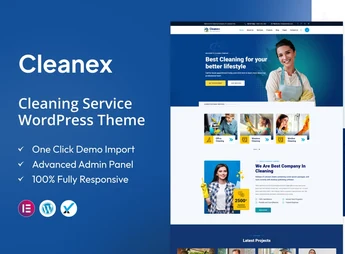
Cleanex is a WordPress theme created for residential and commercial cleaning companies, housekeepers, and building maintenance services, with ready-made pages for services, testimonials, and a blog. Built on Elementor, it lets you set up a cleaning company’s institutional website without writing code, adjusting sections, text, and images directly in the visual editor, with a responsive layout tested on mobile devices and Retina screen support.
Key Features of Cleanex
- Visual building with Elementor
Edit all sections by drag-and-drop, without changing theme files. - Services pages and facilities
Ready structure to describe cleaning types, covered environments, and differentiators. - Testimonials area
A dedicated section to publish reviews from clients served by the team. - Integrated blog
Publish articles, cleaning tips, and content for organic search. - Responsive and Retina layout
Automatic adaptation to phones and tablets, with sharp images on high-density displays.
Benefits of Cleanex
- Get your site live in a short time
The pages already come structured, just replace text, photos, and contacts. - Less dependence on a developer
Content and layout changes are made by the visual editor, day to day. - More mobile quote requests
Responsive navigation keeps forms and the phone number accessible on any screen. - Credibility with social proof
Testimonials and the blog strengthen trust for those hiring for the first time.
Who Is Cleanex For?
- Residential and commercial cleaning companies that need their own digital presence.
- Those who provide building maintenance, post-construction cleaning, or sanitization and want to showcase each service type on separate pages.
- For people who already use Elementor and prefer editing the site without relying on third parties.
- For those who want to receive quote requests via a form instead of only by phone.
How to Download Cleanex
The Cleanex is available for download here on Ultrapack. After saving the .zip file, go to Appearance > Themes > Add New > Upload Theme, select the package, and activate it. With the theme active, the page editing options become accessible through the Elementor editor.
By bringing together service presentation, social proof, and blog content in a single theme, Cleanex reduces the work of building a website from scratch for the cleaning industry. Those who serve condominiums, offices, and homes can organize each service on its own page, keep the layout consistent across all devices, and adjust the content as the operation grows.
Frequently asked questions
Is Cleanex – Cleaning Service WordPress Theme GPL-licensed?
Yes. Cleanex – Cleaning Service WordPress Theme is distributed under the GPL (GNU General Public License). You may legally use, modify and redistribute it on as many sites as you want.
Can I use Cleanex – Cleaning Service WordPress Theme on multiple sites?
Yes. You can install Cleanex – Cleaning Service WordPress Theme on as many sites as you want. Only automatic updates through Ultrapack Auto Updater have a limit: from 3 to 80 sites, depending on the plan.
How much does Cleanex – Cleaning Service WordPress Theme cost at Ultrapack?
Cleanex – Cleaning Service WordPress Theme costs US$2.99 as a single purchase, and it is also included in the subscription plans starting at US$12/mo (VIP I).
Does Cleanex – Cleaning Service WordPress Theme include updates?
Yes. The current version of Cleanex – Cleaning Service WordPress Theme is 1.3, published at Ultrapack on Aug 25, 2026. Subscribers update straight from the WordPress dashboard with UAU (Ultrapack Auto Updater).
Is Cleanex – Cleaning Service WordPress Theme scanned before publication?
Yes. Every version of Cleanex – Cleaning Service WordPress Theme goes through a malware scan (ClamAV and YARA rules, at UltraHub) before it is published.
What changed in this version
Version 1.3 2024-05-11
- 1) Debug mode on issues all are fixed.
- 2) All Plugins are up to date.
Version 1.2 2023-11-06
- 1) All Plugins are up to date.
Version 1.1 2023-03-13
- 1) One Click Demo import issue has been fixed.
- First release!
Release notes published by the developer.
How to install
Updates: manual. When a new version comes out, download it on this same page and upload it over the old one; WordPress asks whether you want to replace the current version.
The file on this page is the developer’s full package, with documentation, demos and plugins. Do not upload that file to WordPress. The theme comes ready inside it, as a ZIP of its own, and that is the one you upload.
- Download the file
elements-cleanex-cleaning-service-wordpress-theme.zipand extract it on your computer. - Look inside the extracted files for the file
cleanex-wp-full/cleanex.zip. - In the WordPress dashboard, go to Appearance > Themes > Add New > Upload Theme.
- Select that file and click Install Now.
- Click Activate.
- There is nothing to zip. The ZIP inside the package is already in the format WordPress accepts.
- Uploading the whole package is the most common mistake when installing a theme: WordPress answers that no valid theme was found, and nothing is installed.
- The rest of the package belongs to the author: documentation, demo files and, in some themes, the plugins it asks for during setup.
Stuck on a step? Open a ticket telling us which one you stopped at.