Description
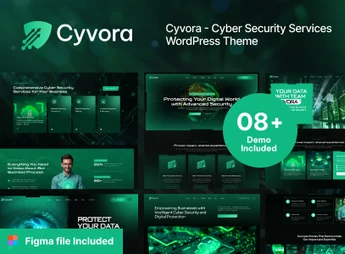
Cyvora is a WordPress theme that structures cybersecurity service websites with pages to present solutions, areas of expertise, technical content, and contact channels. Its visual organization serves digital security companies, data protection consultancies, and teams that need to explain services, demonstrate expertise, and guide visitors toward assessment requests or sales conversations with potential clients.
Key Features of Cyvora
- Service pages
Organizes security solutions into clear, targeted sections. - Areas of expertise
Separates specialties to present different areas of digital protection. - Technical content
Sets aside space for articles, guidance, and security-related materials. - Company sections
Structures information about the company, team, and industry positioning. - Contact channels
Includes areas for directing inquiries and sales conversations.
Benefits of Cyvora
- Clearer communication
Makes it easier to explain technical services to visitors at different stages. - Organized presentation
Helps separate specialties without concentrating information on one page. - Niche-aligned presence
Directs the website structure toward digital security and protection. - More direct contact
Guides interested visitors to the defined support channels.
Who Is Cyvora For?
- Companies that present digital security and data protection services.
- Consultancies that need to organize solutions, specialties, and company information.
- Teams that want to publish technical content and receive sales inquiries through the website.
How to Download Cyvora
Cyvora is available for download here on Ultrapack. After downloading the .zip file, install it in Appearance > Themes > Add New > Upload Theme, select the file, and activate it. The file is ready for immediate installation.
Cyvora organizes the digital presence of cybersecurity-related services into a structure focused on presenting solutions, specialties, and supporting content. The pages can bring together company information and contact paths without mixing every topic into a single area.
It is suitable for those who need to communicate digital protection, consulting, and technical services with navigation geared toward discovering solutions. The result is a website prepared to present areas of expertise, provide context for security needs, and direct interested contacts.
Frequently asked questions
Is Cyvora – Cyber Security Services WordPress Theme GPL-licensed?
Yes. Cyvora – Cyber Security Services WordPress Theme is distributed under the GPL (GNU General Public License). You may legally use, modify and redistribute it on as many sites as you want.
Can I use Cyvora – Cyber Security Services WordPress Theme on multiple sites?
Yes. You can install Cyvora – Cyber Security Services WordPress Theme on as many sites as you want. Only automatic updates through Ultrapack Auto Updater have a limit: from 3 to 80 sites, depending on the plan.
How much does Cyvora – Cyber Security Services WordPress Theme cost at Ultrapack?
Cyvora – Cyber Security Services WordPress Theme costs US$2.99 as a single purchase, and it is also included in the subscription plans starting at US$12/mo (VIP I).
Does Cyvora – Cyber Security Services WordPress Theme include updates?
Yes. The current version of Cyvora – Cyber Security Services WordPress Theme is 1.0.0, published at Ultrapack on Aug 21, 2026. Subscribers update straight from the WordPress dashboard with UAU (Ultrapack Auto Updater).
Is Cyvora – Cyber Security Services WordPress Theme scanned before publication?
Yes. Every version of Cyvora – Cyber Security Services WordPress Theme goes through a malware scan (ClamAV and YARA rules, at UltraHub) before it is published.
How to install
Updates: manual. When a new version comes out, download it on this same page and upload it over the old one; WordPress asks whether you want to replace the current version.
The file on this page is the developer’s full package, with documentation, demos and plugins. Do not upload that file to WordPress. The theme comes ready inside it, as a ZIP of its own, and that is the one you upload.
- Download the file
elements-cyvora-cyber-security-services-wordpress-theme.zipand extract it on your computer. - Look inside the extracted files for the file
Cyvora_FullPackage/Theme Install/cyvora.zip. - In the WordPress dashboard, go to Appearance > Themes > Add New > Upload Theme.
- Select that file and click Install Now.
- Click Activate.
- There is nothing to zip. The ZIP inside the package is already in the format WordPress accepts.
- Uploading the whole package is the most common mistake when installing a theme: WordPress answers that no valid theme was found, and nothing is installed.
- The rest of the package belongs to the author: documentation, demo files and, in some themes, the plugins it asks for during setup.
Stuck on a step? Open a ticket telling us which one you stopped at.