

 UAU Ready
Description
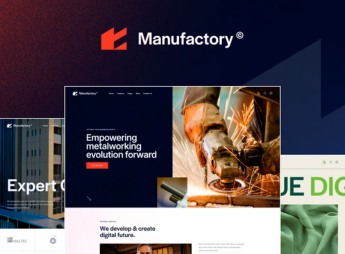
Manufactory is a WordPress theme built for industries, factories, and construction and engineering companies, with native support for the leading page builders and a slider with swipe gestures. An option inheritance and override system lets you set individual parameters for each section of the site and for compatible plugins, plus SEO readiness and Retina screen support.
Key Features of Manufactory
- Page builder support
Edit pages with the popular builders already integrated into the theme. - Option inheritance and override
Set your own parameters per site section, without changing the global setting. - Slider with swipe gestures
Drag navigation on touch, working on phones and tablets. - Retina screen readiness
Images and graphic elements displayed at high pixel density. - SEO-ready structure
Markup and content organization designed for search engine indexing.
Benefits of Manufactory
- Configuration by site area
Each page gets its own visual treatment without duplicating work. - Less reliance on code
Layout adjustments happen in the builder, no file editing required. - Comfortable mobile reading
Content and galleries respond well to touch on small screens. - Presentation aligned with the sector
Industrial visual language that supports the company’s credibility.
Who Is Manufactory For?
- Manufacturers of parts, machinery, or industrial supplies who need to showcase production lines and technical capacity.
- Civil construction and engineering companies that want to publish a portfolio of completed projects.
- Mechanical workshops and industrial service providers looking for a corporate site with a services catalog.
- You, if you already work with a page builder and want a theme that fits that editing routine.
How to Download Manufactory
Manufactory is available for download here on Ultrapack. The step-by-step for installing this file is in the How to install tab, next to the description. After activation, the theme’s options panel becomes the central place for section, color, and typography settings.
Among industrial-profile themes, Manufactory stands out for its per-section control: the same site can keep distinct headers, colors, and spacing in each area, with no extra plugins needed. This helps when you need to separate a corporate page, a project portfolio, and a product catalog within a single installation, while keeping visual consistency and good readability on any screen.
Frequently asked questions
Is Manufactory – Industrial WordPress Theme GPL-licensed?
Yes. Manufactory – Industrial WordPress Theme is distributed under the GPL (GNU General Public License). You may legally use, modify and redistribute it on as many sites as you want.
Can I use Manufactory – Industrial WordPress Theme on multiple sites?
Yes. You can install Manufactory – Industrial WordPress Theme on as many sites as you want. Only automatic updates through Ultrapack Auto Updater have a limit: from 3 to 80 sites, depending on the plan.
How much does Manufactory – Industrial WordPress Theme cost at Ultrapack?
Manufactory – Industrial WordPress Theme costs US$2.99 as a single purchase, and it is also included in the subscription plans starting at US$12/mo (VIP I).
Does Manufactory – Industrial WordPress Theme include updates?
Yes. The current version of Manufactory – Industrial WordPress Theme is 1.0.0, published at Ultrapack on Sep 1, 2024. Subscribers update straight from the WordPress dashboard with UAU (Ultrapack Auto Updater).
Is Manufactory – Industrial WordPress Theme scanned before publication?
Yes. Every version of Manufactory – Industrial WordPress Theme goes through a malware scan (ClamAV and YARA rules, at UltraHub) before it is published.
How to install
Automatic updates: this item is updated by the Ultrapack Auto Updater. With it installed, the new version shows up in your dashboard like any other WordPress update (how to set it up).
The file on this page is the developer’s full package, with documentation, demos and plugins. Do not upload that file to WordPress. The theme comes ready inside it, as a ZIP of its own, and that is the one you upload.
- Download the file
elements-manufactory.zipand extract it on your computer. - Look inside the extracted files for the file
Manufactory_v1.0/manufactory.zip. - In the WordPress dashboard, go to Appearance > Themes > Add New > Upload Theme.
- Select that file and click Install Now.
- Click Activate.
- There is nothing to zip. The ZIP inside the package is already in the format WordPress accepts.
- Uploading the whole package is the most common mistake when installing a theme: WordPress answers that no valid theme was found, and nothing is installed.
- The rest of the package belongs to the author: documentation, demo files and, in some themes, the plugins it asks for during setup.
- The file
plugins.zipis not an installable plugin: it's a package. Extract this file and upload each plugin inside it to Plugins > Add New > Upload Plugin.
Stuck on a step? Open a ticket telling us which one you stopped at.


