Description
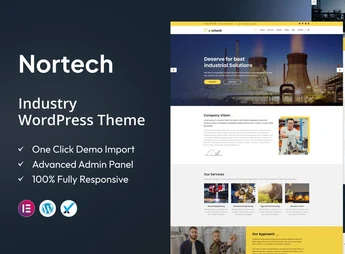
Nortech is a theme designed for manufacturing industries, factories, and engineering companies, built for Elementor and aimed at creating corporate websites for the industrial sector with project pages, testimonials, team, and a blog. The responsive layout was tested on major devices and includes support for Retina screens, serving those who need to present factory operations, production units, and technical services on an organized website, without relying on custom code to build each section.
Key Features of Nortech
- Compatibility with Elementor
All sections are edited visually by the Elementor page builder, with no code editing. - Projects Page
Ready structure to showcase works, layouts, and services carried out by the company. - Team and Testimonials Area
Dedicated blocks for professional profiles and accounts from served clients. - Tested Responsive Design
Layout adapted for phones, tablets, and desktops, verified on major devices. - Retina Screen Support
Images and graphic elements displayed in high resolution on high-density displays.
Benefits of Nortech
- Fast Site Setup
The internal pages are already structured, shortening the time to publication. - Editing Autonomy
Text, image, and section adjustments are handled by the internal team itself. - Technical Credibility
Projects and testimonials gathered in one place support the sales conversation. - Consistent Mobile Reading
Visitors access catalogs and contacts with the same clarity on any screen.
Who Is Nortech For?
- Manufacturing industries and factory plants that need to present production lines and installed capacity.
- Engineering companies and sectors such as energy, chemical, oils, and lubricants that promote executed projects.
- Anyone already working with Elementor and looking for a ready starting point for an industrial website.
How to Download Nortech
The Nortech is available for download here on Ultrapack. After saving the .zip file, go to Appearance > Themes > Add New > Upload theme, select the package, and activate it. The included documentation guides the initial setup, and the pages become editable with Elementor right after activation.
Industrial sector websites are often consulted by technical buyers who evaluate production capacity and delivery history before the first contact. Nortech addresses this scenario by bringing together projects, testimonials, and team presentation in an Elementor-compatible base, keeping content updates within the company itself and reducing reliance on third parties for each page adjustment.
Frequently asked questions
Is Nortech – Industry WordPress Theme GPL-licensed?
Yes. Nortech – Industry WordPress Theme is distributed under the GPL (GNU General Public License). You may legally use, modify and redistribute it on as many sites as you want.
Can I use Nortech – Industry WordPress Theme on multiple sites?
Yes. You can install Nortech – Industry WordPress Theme on as many sites as you want. Only automatic updates through Ultrapack Auto Updater have a limit: from 3 to 80 sites, depending on the plan.
How much does Nortech – Industry WordPress Theme cost at Ultrapack?
Nortech – Industry WordPress Theme costs US$2.99 as a single purchase, and it is also included in the subscription plans starting at US$12/mo (VIP I).
Does Nortech – Industry WordPress Theme include updates?
Yes. The current version of Nortech – Industry WordPress Theme is 2.8, published at Ultrapack on Aug 25, 2026. Subscribers update straight from the WordPress dashboard with UAU (Ultrapack Auto Updater).
Is Nortech – Industry WordPress Theme scanned before publication?
Yes. Every version of Nortech – Industry WordPress Theme goes through a malware scan (ClamAV and YARA rules, at UltraHub) before it is published.
What changed in this version
Version 2.8 2024-10-21
- 1) Plugin Update
Version 2.7 2023-01-08
- 1) New Theme Build With Elementor Page Builder
Version 2.6 2023-01-08
- 1) All Plugins are up to date.
Version 2.5 2022-10-28
- 1) Compatible with PHP 8.0 or Higher versions.
- 2) All Plugins are up to date.
Version 2.4 2022-03-11
- 1) kingcomposer not installing issue fixed.
Release notes published by the developer.
How to install
Updates: manual. When a new version comes out, download it on this same page and upload it over the old one; WordPress asks whether you want to replace the current version.
The file on this page is the full package the author publishes on the marketplace: the theme, the documentation and sometimes the plugins it uses. Do not upload that file through the dashboard, because WordPress cannot find the theme inside it. What gets installed is the theme folder, which is in there.
- Download the file
elements-nortech-industry-wordpress-theme.zipand extract it on your computer. - If the extracted package contains another ZIP file named after the theme, extract that ZIP as well before looking for the theme folder.
- Look for the folder that has the
style.cssfile and thescreenshot.pngimage (in this item, the foldernortech-wp-full/old theme/nortech). That is the theme folder. - Zip that folder only. Do not use RAR.
- In the WordPress dashboard, go to Appearance > Themes > Add New > Upload Theme and upload the ZIP file you just created.
- Click Activate.
- Uploading the whole package is the most common mistake when installing a theme. WordPress answers that no valid theme was found, and nothing is installed.
- If after extracting you already find
style.cssandscreenshot.pngin the main folder, that folder is the theme folder. - The rest of the package belongs to the author: documentation, demo files and, in some themes, the plugins it asks for during setup.
- The package also includes the plugin the theme uses, in
nortech-plugin.zip. Upload this file in Plugins > Add New > Upload Plugin after activating the theme. - Ignore the folder
old: they are the previous versions that the author left in the package.
Stuck on a step? Open a ticket telling us which one you stopped at.