

 UAU Ready
Description
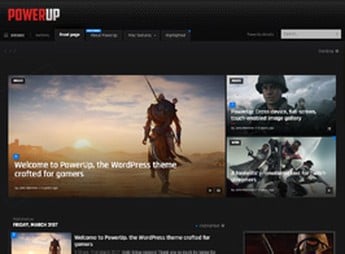
PowerUp organizes a games, esports or video channel site into a layout with sections ready for game reviews, news, championship tables and video posts. It works for those who cover game releases, stream live matches, organize esports championships or maintain a video channel with frequent posts and need a visual structure already adapted to that type of content from installation.
Main Features of PowerUp
- Layout for reviews
Dedicated page template for game reviews, with score, pros and cons. - News area
Post structure designed to publish gaming news at a steady pace. - Integrated video player
Displays videos and trailers directly in posts without leaving the theme layout. - Responsive design
Adapts to mobile, tablet and desktop while keeping comfortable reading on any screen. - Custom widgets
Brings ready-made blocks to highlight trending games, rankings and video content.
Benefits of PowerUp
- Faster publishing
Reduces the time to put together each article with blocks already structured in the editor. - Gamer visual identity
Gives the site a dark, modern look, aligned with the gaming universe. - More screen time
Retains the visitor with videos and related content displayed within the post itself. - Less technical dependency
Removes the need to hire a developer to build review or news pages.
Who Is PowerUp Suited For?
- Those who cover releases and news from the gaming universe.
- Those who stream live matches or organize esports championships.
- Those who publish game reviews and videos on their own channel.
- Those who manage a gamer community and need a content hub.
How to Download PowerUp
PowerUp is available for download here at Ultrapack. Installation follows the standard WordPress path, under Appearance > Themes > Add New > Upload Theme, just upload the compressed file, activate the theme and set up the main menu to apply the layout to the site.
A theme like this shortens the distance between ready-made design and published content, something especially useful for those who update the site several times a week with new news and videos. Instead of recreating the layout for every article, the structure already comes prepared for that publishing pace.
Frequently asked questions
Is PowerUp – Video Game Theme for WordPress GPL-licensed?
Yes. PowerUp – Video Game Theme for WordPress is distributed under the GPL (GNU General Public License). You may legally use, modify and redistribute it on as many sites as you want.
Can I use PowerUp – Video Game Theme for WordPress on multiple sites?
Yes. You can install PowerUp – Video Game Theme for WordPress on as many sites as you want. Only automatic updates through Ultrapack Auto Updater have a limit: from 3 to 80 sites, depending on the plan.
How much does PowerUp – Video Game Theme for WordPress cost at Ultrapack?
PowerUp – Video Game Theme for WordPress costs US$2.99 as a single purchase, and it is also included in the subscription plans starting at US$12/mo (VIP I).
Does PowerUp – Video Game Theme for WordPress include updates?
Yes. The current version of PowerUp – Video Game Theme for WordPress is 1.7, published at Ultrapack on Mar 15, 2021. Subscribers update straight from the WordPress dashboard with UAU (Ultrapack Auto Updater).
Is PowerUp – Video Game Theme for WordPress scanned before publication?
Yes. Every version of PowerUp – Video Game Theme for WordPress goes through a malware scan (ClamAV and YARA rules, at UltraHub) before it is published.
How to install
Automatic updates: this item is updated by the Ultrapack Auto Updater. With it installed, the new version shows up in your dashboard like any other WordPress update (how to set it up).
The file on this page is the developer’s full package, with documentation, demos and plugins. Do not upload that file to WordPress. The theme comes ready inside it, as a ZIP of its own, and that is the one you upload.
- Download the file
elements-powerup-video-game-theme-for-wordpress.zipand extract it on your computer. - Look inside the extracted files for the file
PowerUp by Bonfire/powerup.zip. - In the WordPress dashboard, go to Appearance > Themes > Add New > Upload Theme.
- Select that file and click Install Now.
- Click Activate.
- There is nothing to zip. The ZIP inside the package is already in the format WordPress accepts.
- Uploading the whole package is the most common mistake when installing a theme: WordPress answers that no valid theme was found, and nothing is installed.
- The rest of the package belongs to the author: documentation, demo files and, in some themes, the plugins it asks for during setup.
Stuck on a step? Open a ticket telling us which one you stopped at.


