

 UAU Ready
Description
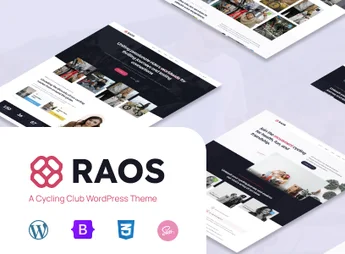
Raos is a modern and powerful WordPress theme, specifically designed for cycling clubs, cyclist communities, bike shops, and event organizers. Built with Full Site Editing (FSE) technology, it offers unprecedented control over every aspect of your site, allowing you to create a vibrant and functional online platform to connect, engage, and grow your cycling community.
Main Features
- Full Site Editing (FSE)
Fully customize your site layout, including headers, footers, and page templates, directly in the WordPress block editor without needing code. - Elementor Compatibility
If preferred, use the Elementor page builder to create complex layouts with its intuitive drag-and-drop interface. - Integrated Event Management
Create, promote, and manage cycling events, group rides, and races efficiently, keeping your community always informed and engaged. - WooCommerce Ready
Easily set up an online store to sell products, gear, cycling apparel, and event registrations, opening a new revenue stream. - Responsive and Attractive Design
Ensures a seamless and visually impactful browsing experience on all devices, from desktops to smartphones, with a cycling-focused design. - One-Click Demo Import
Launch your site quickly by importing the full demo content with a single click, saving time on initial setup.
Benefits of Raos
- Strengthen Your Community
Create a central space for members to interact, share experiences, and register for events, reinforcing club bonds. - Total Design Flexibility
With the power of FSE and the Elementor option, you have full freedom to tailor the site’s appearance to your brand identity. - Professionalize Your Events
Present your events in an organized and professional manner, facilitating promotion and registration management. - Save Time and Effort
Intuitive tools and pre-built block patterns allow you to launch a complete and functional site in much less time.
Who Is It For?
- Cycling clubs and associations
- Bike shops and rental services
- Race and cycling event organizers
- Online cycling communities and blogs
With a user experience-focused design and robust features for community and e-commerce, Raos is the ultimate solution to establish a professional and engaging online presence. It provides all the necessary tools to manage your club, promote events, and connect cyclists effectively and stylishly.
Frequently asked questions
Is Raos – Responsive Cycling Club & Community WordPress Theme GPL-licensed?
Yes. Raos – Responsive Cycling Club & Community WordPress Theme is distributed under the GPL (GNU General Public License). You may legally use, modify and redistribute it on as many sites as you want.
Can I use Raos – Responsive Cycling Club & Community WordPress Theme on multiple sites?
Yes. You can install Raos – Responsive Cycling Club & Community WordPress Theme on as many sites as you want. Only automatic updates through Ultrapack Auto Updater have a limit: from 3 to 80 sites, depending on the plan.
How much does Raos – Responsive Cycling Club & Community WordPress Theme cost at Ultrapack?
Raos – Responsive Cycling Club & Community WordPress Theme costs US$2.99 as a single purchase, and it is also included in the subscription plans starting at US$12/mo (VIP I).
Does Raos – Responsive Cycling Club & Community WordPress Theme include updates?
Yes. The current version of Raos – Responsive Cycling Club & Community WordPress Theme is 1.1, published at Ultrapack on May 21, 2026. Subscribers update straight from the WordPress dashboard with UAU (Ultrapack Auto Updater).
Is Raos – Responsive Cycling Club & Community WordPress Theme scanned before publication?
Yes. Every version of Raos – Responsive Cycling Club & Community WordPress Theme goes through a malware scan (ClamAV and YARA rules, at UltraHub) before it is published.
How to install
Automatic updates: this item is updated by the Ultrapack Auto Updater. With it installed, the new version shows up in your dashboard like any other WordPress update (how to set it up).
The file on this page is the developer’s full package, with documentation, demos and plugins. Do not upload that file to WordPress. The theme comes ready inside it, as a ZIP of its own, and that is the one you upload.
- Download the file
elements-raos.zipand extract it on your computer. - Look inside the extracted files for the file
raos.zip. - In the WordPress dashboard, go to Appearance > Themes > Add New > Upload Theme.
- Select that file and click Install Now.
- Click Activate.
- There is nothing to zip. The ZIP inside the package is already in the format WordPress accepts.
- Uploading the whole package is the most common mistake when installing a theme: WordPress answers that no valid theme was found, and nothing is installed.
- The rest of the package belongs to the author: documentation, demo files and, in some themes, the plugins it asks for during setup.
- The package also includes the plugin the theme uses, in
raos_plugin.zip. Upload this file in Plugins > Add New > Upload Plugin after activating the theme.
Stuck on a step? Open a ticket telling us which one you stopped at.


