

Description
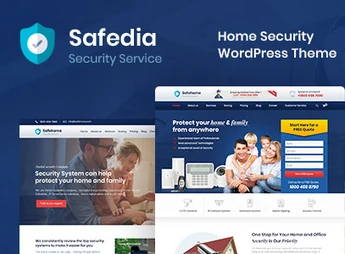
Safedia is a WordPress theme designed for security companies, CCTV installers, and residential condominiums, and structures service, team, and scheduling pages with an integrated Elementor builder. The theme includes Revolution Slider for animated banners, Contact Form 7 compatibility for contact forms, and WPML support for multilingual websites, covering businesses that serve homes, condominiums, and commercial complexes.
Key Features of Safedia
- Integrated Elementor Builder
Builds pages via drag-and-drop, without requiring coding knowledge. - Revolution Slider Included
Creates animated banners and slides to highlight services on the homepage. - Ready-made Institutional Pages
Provides pre-structured service, team, gallery, and scheduling templates. - WPML Support
Enables full website translation into multiple languages. - Typography with Google Fonts
Gathers over 600 font families to customize website text.
Benefits of Safedia
- Immediate Professional Presence
Publishes a complete website with a trustworthy appearance for the security sector. - Less Developer Dependency
Allows adjusting layout and content directly via Elementor without hiring third parties. - Multilingual Reach
Expands service to international clients with WPML support. - Facilitated Client Contact
Receives quote and support requests through integrated forms.
Who is Safedia For?
- Those who provide residential or commercial monitoring and security services.
- CCTV installers who need to present a project portfolio and technical team.
- Condominiums and management companies that promote concierge and surveillance services.
How to Download Safedia
Safedia is available for download here on Ultrapack. After downloading the .zip file, install it under Appearance > Themes > Add New > Upload Theme, select the file and activate it to unlock the service, team, and scheduling templates in the WordPress dashboard.
Aimed at businesses that rely on visual trust, Safedia organizes service portfolios, teams, and contact channels on a single website, without requiring specialized technical knowledge. The combination of Elementor, Revolution Slider, and WPML support caters to everything from small CCTV installers to condominium management companies seeking a consistent professional presence across different languages and devices.
Frequently asked questions
Is Safedia – Home Security WordPress Theme GPL-licensed?
Yes. Safedia – Home Security WordPress Theme is distributed under the GPL (GNU General Public License). You may legally use, modify and redistribute it on as many sites as you want.
Can I use Safedia – Home Security WordPress Theme on multiple sites?
Yes. You can install Safedia – Home Security WordPress Theme on as many sites as you want. Only automatic updates through Ultrapack Auto Updater have a limit: from 3 to 80 sites, depending on the plan.
How much does Safedia – Home Security WordPress Theme cost at Ultrapack?
Safedia – Home Security WordPress Theme costs US$2.99 as a single purchase, and it is also included in the subscription plans starting at US$12/mo (VIP I).
Does Safedia – Home Security WordPress Theme include updates?
Yes. The current version of Safedia – Home Security WordPress Theme is 1.1, published at Ultrapack on Aug 26, 2026. Subscribers update straight from the WordPress dashboard with UAU (Ultrapack Auto Updater).
Is Safedia – Home Security WordPress Theme scanned before publication?
Yes. Every version of Safedia – Home Security WordPress Theme goes through a malware scan (ClamAV and YARA rules, at UltraHub) before it is published.
What changed in this version
Version 1.1 2024-09-10
- 1) Some Functionality issues are fixed.
- 2) Plugin Updated.
- First release!
Release notes published by the developer.
How to install
Updates: manual. When a new version comes out, download it on this same page and upload it over the old one; WordPress asks whether you want to replace the current version.
The file on this page is the developer’s full package, with documentation, demos and plugins. Do not upload that file to WordPress. The theme comes ready inside it, as a ZIP of its own, and that is the one you upload.
- Download the file
elements-safedia-home-security-wordpress-theme.zipand extract it on your computer. - Look inside the extracted files for the file
safedia-wp-full/safedia.zip. - In the WordPress dashboard, go to Appearance > Themes > Add New > Upload Theme.
- Select that file and click Install Now.
- Click Activate.
- There is nothing to zip. The ZIP inside the package is already in the format WordPress accepts.
- Uploading the whole package is the most common mistake when installing a theme: WordPress answers that no valid theme was found, and nothing is installed.
- The rest of the package belongs to the author: documentation, demo files and, in some themes, the plugins it asks for during setup.
Stuck on a step? Open a ticket telling us which one you stopped at.


